---
title: "概览"
description: "了解 G2 图形标记的类型、数据编码和样式配置,以及多个标记的组合和自定义复合标记的使用。"
language: "zh"
canonical: "https://g2.antv.antgroup.com/zh/manual/core/mark/overview/"
version: "5.4.8"
---
[资料索引](/llms.txt)
在 G2 中**没有图表的概念**,而是把 **标记(Mark)** 作为基本的视觉组成单元,任何一个图表都可以由一个或多个标记组合而成。
标记是 G2 绘图框架中最基础的图形单元,也是构成复杂图表的核心组成部分之一。它具有多样化的特性和强大的表现力,能够作为构建图表的“原子”组件被灵活运用。通过合理地组合、排列和定制标记,用户不仅可以满足常规图表绘制需求,还能创建高度个性化、复杂性较高的可视化作品。这种自由度使得标记在实现数据可视化的过程中具备广泛的应用空间,包括但不限于散点图、柱状图、饼图等基础图形,以及更加结构化或创新性的混合式图表。这种特性使得 G2 在绘图的灵活性和定制能力上展现出极大的优势。
正如上面所说,我们在一个图表中添加散点图的 Point 标记以及连接图的 Link 标记,便可以得到一个带有标注的点线连接图。
```ts
import { Chart } from '@antv/g2';
const chart = new Chart({
container: 'container',
height: 180,
});
chart.options({
type: 'view',
data: {
type: 'fetch',
value: 'https://assets.antv.antgroup.com/g2/penguins.json',
transform: [
{
type: 'map',
callback: (d) => ({
...d,
body_mass_g: +d.body_mass_g,
}),
},
],
},
children: [
// point 标记
{
type: 'point',
encode: { x: 'body_mass_g', y: 'species' },
style: { stroke: '#000' },
tooltip: { items: [{ channel: 'x' }] },
},
// link 标记
{
type: 'link',
encode: { x: 'body_mass_g', y: 'species' },
transform: [{ type: 'groupY', x: 'min', x1: 'max' }],
style: { stroke: '#000' },
tooltip: false,
},
// point 标记绘制中位线
{
type: 'point',
encode: { y: 'species', x: 'body_mass_g', shape: 'line', size: 12 },
transform: [{ type: 'groupY', x: 'median' }],
style: { stroke: 'red' },
tooltip: { items: [{ channel: 'x' }] },
},
],
});
chart.render();
```
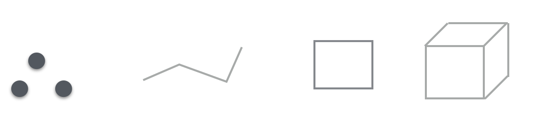
根据标记可以代表的数据维度来划分,可以分为:
- 零维,点是常见的零维几何标记,点仅有位置信息
- 一维,常见的一维几何标记有线
- 二维,二维平面
- 三维,常见的立方体、圆柱体都是三维的几何标记
标记的自由度与数据能够映射到图形的视觉通道 **size(大小)** 相关,这个角度上来讲:
- 点可以映射两个数据字段字段到点的大小上(当然现实中我们仅仅映射一个)。
- 线可以映射一个数据字段字段到线的宽度。
- 柱状图的矩形可以映射一个数据字段到宽度上。
- 封闭的多边形无法使用数据映射到大小。
标记的表现形式与数据能够映射到图形的视觉通道 **color(颜色)** 相关,这个角度上来讲:
- 表现形式为封闭的有填充色的图形。例如 point 标记的 `point` 形状、interval 标记的 `rect` 形状等,颜色通道一般表现在标记的填充颜色 `fill` 上。
- 表现形式为线和空心的图形。例如 line 标记的所有形状、interval 标记的 `hollow` 形状等,颜色通道一般表现在标记的线的颜色 `stroke` 上。
- 表现形式为文字。例如 text 标记、wordCloud 标记等,颜色通道一般表现在标记的文字颜色 `fill` 上。
目前 G2 支持的内置标记如下:
| type | 描述 | 属性 | 示例 |
| --------- | ------------------------------------------------ | ---------------------------------------- | --------------------------------------------------------------------------------------------------------------------------------------------------------------------------------------------------------------------------------------------------------------------------------------------------------------------------------------------------------------------------------------------------------------------------------------------------------------------- |
| area | 用面积填充展示数据趋势,适合展示堆积关系 | [area](/zh/manual/core/mark/area/) | 
 |
| box | 基础箱线图,展示数据分布和异常值 | [box](/zh/manual/core/mark/box/) |
|
| box | 基础箱线图,展示数据分布和异常值 | [box](/zh/manual/core/mark/box/) |  |
| boxplot | 带聚合计算的箱线图,自动计算分位数 | [boxplot](/zh/manual/core/mark/boxplot/) |
|
| boxplot | 带聚合计算的箱线图,自动计算分位数 | [boxplot](/zh/manual/core/mark/boxplot/) |  |
| cell | 将空间划分为方块进行可视化,常用于日历图、热力图 | [cell](/zh/manual/core/mark/cell/) |
|
| cell | 将空间划分为方块进行可视化,常用于日历图、热力图 | [cell](/zh/manual/core/mark/cell/) |  |
| chord | 展示实体间关系强度的弦图 | [chord](/zh/manual/core/mark/chord/) |
|
| chord | 展示实体间关系强度的弦图 | [chord](/zh/manual/core/mark/chord/) |  |
| density | 核密度估计图,常用于小提琴图 | [density](/zh/manual/core/mark/density/) |
|
| density | 核密度估计图,常用于小提琴图 | [density](/zh/manual/core/mark/density/) |  |
| gauge | 仪表盘图表,展示进度指标 | [gauge](/zh/manual/core/mark/gauge/) |
|
| gauge | 仪表盘图表,展示进度指标 | [gauge](/zh/manual/core/mark/gauge/) |  |
| heatmap | 二维密度分布图,用颜色编码数据密度 | [heatmap](/zh/manual/core/mark/heatmap/) |
|
| heatmap | 二维密度分布图,用颜色编码数据密度 | [heatmap](/zh/manual/core/mark/heatmap/) |  |
| image | 在指定位置渲染图像 | [image](/zh/manual/core/mark/image/) |
|
| image | 在指定位置渲染图像 | [image](/zh/manual/core/mark/image/) |  |
| interval | 基础柱状图/条形图,通过坐标系变换可生成饼图 | [interval](/zh/manual/core/mark/interval/) |
|
| interval | 基础柱状图/条形图,通过坐标系变换可生成饼图 | [interval](/zh/manual/core/mark/interval/) | 


 |
| line | 折线图,支持平滑曲线和阶梯线 | [line](/zh/manual/core/mark/line/) |
|
| line | 折线图,支持平滑曲线和阶梯线 | [line](/zh/manual/core/mark/line/) | 

 |
| lineX | 垂直辅助线,常用于标注特定值 | [lineX](/zh/manual/core/mark/line-x/) |
|
| lineX | 垂直辅助线,常用于标注特定值 | [lineX](/zh/manual/core/mark/line-x/) |  |
| lineY | 水平辅助线,常用于标注阈值 | [lineY](/zh/manual/core/mark/line-y/) |
|
| lineY | 水平辅助线,常用于标注阈值 | [lineY](/zh/manual/core/mark/line-y/) |  |
| link | 带方向箭头标记,展示节点间关系 | [link](/zh/manual/core/mark/link/) |
|
| link | 带方向箭头标记,展示节点间关系 | [link](/zh/manual/core/mark/link/) |  |
| liquid | 水波图,展示百分比进度 | [liquid](/zh/manual/core/mark/liquid/) |
|
| liquid | 水波图,展示百分比进度 | [liquid](/zh/manual/core/mark/liquid/) |  |
| point | 散点图,通过大小/颜色编码多维度数据 | [point](/zh/manual/core/mark/point/) |
|
| point | 散点图,通过大小/颜色编码多维度数据 | [point](/zh/manual/core/mark/point/) |  |
| polygon | 多边形标记,常配合布局算法使用 | [polygon](/zh/manual/core/mark/polygon/) |
|
| polygon | 多边形标记,常配合布局算法使用 | [polygon](/zh/manual/core/mark/polygon/) |  |
| range | 矩形区域标记,用于高亮特定区间 | [range](/zh/manual/core/mark/range/) |
|
| range | 矩形区域标记,用于高亮特定区间 | [range](/zh/manual/core/mark/range/) |  |
| rangeX | 垂直方向区域标记 | [rangeX](/zh/manual/core/mark/range-x/) |
|
| rangeX | 垂直方向区域标记 | [rangeX](/zh/manual/core/mark/range-x/) |  |
| rangeY | 水平方向区域标记 | [rangeY](/zh/manual/core/mark/range-y/) |
|
| rangeY | 水平方向区域标记 | [rangeY](/zh/manual/core/mark/range-y/) |  |
| rect | 基础矩形标记,用于直方图/矩形树图 | [rect](/zh/manual/core/mark/rect/) |
|
| rect | 基础矩形标记,用于直方图/矩形树图 | [rect](/zh/manual/core/mark/rect/) |  |
| shape | 完全自定义图形标记 | [shape](/zh/manual/core/mark/shape/) |
|
| shape | 完全自定义图形标记 | [shape](/zh/manual/core/mark/shape/) |  |
| text | 数据标签标记,支持富文本格式 | [text](/zh/manual/core/mark/text/) |
|
| text | 数据标签标记,支持富文本格式 | [text](/zh/manual/core/mark/text/) |  |
| vector | 向量场标记,展示方向/强度双维度数据 | [vector](/zh/manual/core/mark/vector/) |
|
| vector | 向量场标记,展示方向/强度双维度数据 | [vector](/zh/manual/core/mark/vector/) |  |
| wordCloud | 词云图,通过文字大小编码词频 | [wordCloud](/zh/manual/core/mark/wordcloud/) |
|
| wordCloud | 词云图,通过文字大小编码词频 | [wordCloud](/zh/manual/core/mark/wordcloud/) |  |
## 使用方式
每一个图形标记都是独立的存在,通过 `type` 属性指定标记类型。标记是 G2 可视化体系的核心原子单位,也是视图树的叶子节点,作为 G2 的"一等公民",其核心构成包含以下概念:
- **数据相关**
- [**data**](/zh/manual/core/data/overview/) 可视化原始数据源,支持多种数据格式和动态更新机制。数据通过编码映射到图形属性空间
- [**encode**](/zh/manual/core/encode/) 数据到图形属性的编码通道。例如将身高映射到 x 轴,体重映射到 y 轴,性别映射到颜色通道
- [**scale**](/zh/manual/core/scale/overview/) 控制数据到视觉通道的映射规则。包括连续型、分类型、时间型等多种度量类型
- **图形生成**
- [**transform**](/zh/manual/core/transform/overview/) 数据转换。支持数据堆叠(stack)、分组(dodge)、扰动(jitter)、对称(symmetric)等调整方法,解决图形重叠问题
- [**coordinate**](/zh/manual/core/coordinate/overview/) 坐标系变换。支持笛卡尔坐标、极坐标、螺旋坐标等,同一几何标记在不同坐标系下呈现不同形态
- **视觉表现**
- [**style**](/zh/manual/core/style/) 图形元素的视觉样式。支持配置填充色、描边、透明度等属性
- [**viewStyle**](/zh/manual/core/chart/chart-component/#viewstyle) 视图容器的背景、边距等样式配置
- **交互动态**
- [**animate**](/zh/manual/core/animate/overview/) 控制三类动画:
enter:新增元素动画
update:数据更新动画
exit:元素销毁动画
- [**state**](/zh/manual/core/state/) 定义元素在不同交互状态(active/inactive/selected/unselected)下的样式变化
- **图表组件**
- [**title**](/zh/manual/component/title/) 图表标题。支持配置标题和副标题
- [**label**](/zh/manual/component/label/) 数据标签系统。支持防重叠布局、自定义内容、连接线等特性,适配不同标记类型
- [**axis**](/zh/manual/component/axis/) 坐标轴。支持刻度、网格线、标签的自定义配置
- [**legend**](/zh/manual/component/legend/) 图例。支持连续型/分类型图例交互
- [**tooltip**](/zh/manual/component/tooltip/) 提示信息。支持字段映射、格式化、自定义内容
- [**scrollbar**](/zh/manual/component/scrollbar/) 滚动条组件。滚动条默认都是关闭的。解决图表信息过于密集而无法完全展示的问题。
- [**slider**](/zh/manual/component/slider/) 缩略轴组件。可以用于过滤数据,让用户在数据量较大的情况下一次只用关注局部的数据,是一种辅助看数据的组件
- **扩展控制**
- [**theme**](/zh/manual/core/theme/overview/) 主题配置系统。可修改默认颜色板、字体、组件样式等视觉规范,支持主题切换
- [**interaction**](/zh/manual/core/interaction/overview/) 交互行为库。内置元素选取、视图缩放、提示联动等交互模式
```js
({
type: 'mark',
data: [],
encode: {},
scale: {},
transform: [],
coordinate: {},
style: {},
viewStyle: {},
animate: {},
state: {},
label: {},
title: {},
axis: {},
legend: {},
tooltip: {},
scrollbar: {},
slider: {},
interaction: {},
theme: {},
});
```
## 配置层级
标记可以作为顶层的类型如下声明:
```js
({
type: 'interval',
encode: {
x: 'name',
y: 'value',
},
});
```
也可以放在 View 里面添加多个标记到视图中:
```js
({
type: 'view',
children: [{ type: 'line' }, { type: 'point' }],
});
```
## 特性
G2 中的标记具有许多特性,包括模板化、可叠加、可复合等。合理地运用这些特性,可以快速定义和使用多种图形样式,将多个标记组合展现更丰富的图形效果。这些灵活且高度定制的特性,使标记能够满足从基础图表到复杂可视化的多层次需求。
### 图形模版
每个内置标记都是一个图形模版,会生成一系列**数据驱动**的图形,其中每个图形对应一个或者多个**数据项(Data Item)**。比如下面的散点图里只有一个 Point 标记,而这个标记生成了多个圆,每个圆对应一个数据项。
```ts
import { Chart } from '@antv/g2';
const chart = new Chart({
container: 'container',
});
chart.options({
type: 'point',
data: {
type: 'fetch',
value:
'https://gw.alipayobjects.com/os/basement_prod/6b4aa721-b039-49b9-99d8-540b3f87d339.json',
},
encode: { x: 'height', y: 'weight', color: 'gender' },
});
chart.render();
```
而在下面的折线图中,一条线对应多个数据项。
```ts
import { Chart } from '@antv/g2';
const chart = new Chart({
container: 'container',
});
chart.options({
type: 'line',
width: 900,
autoFit: true,
data: {
type: 'fetch',
value:
'https://gw.alipayobjects.com/os/bmw-prod/551d80c6-a6be-4f3c-a82a-abd739e12977.csv',
},
encode: { x: 'date', y: 'close' },
});
chart.render();
```
### 可叠加
G2 的标记是可以叠加的,换句话说:可以在一个视图里面添加多个标记,丰富图表展示效果。
下面的例子中给图表添加了 line 和 point 两个标记:
```ts
import { Chart } from '@antv/g2';
const chart = new Chart({
container: 'container',
});
chart.options({
type: 'view',
data: [
{ year: '1991', value: 3 },
{ year: '1992', value: 4 },
{ year: '1993', value: 3.5 },
{ year: '1994', value: 5 },
{ year: '1995', value: 4.9 },
{ year: '1996', value: 6 },
{ year: '1997', value: 7 },
{ year: '1998', value: 9 },
{ year: '1999', value: 13 },
],
children: [
{
type: 'line',
encode: { x: 'year', y: 'value' },
},
{
type: 'point',
encode: { x: 'year', y: 'value' },
tooltip: false, // 如果不希望展示某个标记的tooltip,可以单独关闭
},
],
});
chart.render();
```
当然,我们也可以结合更多的标记绘制一个具有复杂图形意义的区间曲线面积图。
```ts
import { Chart } from '@antv/g2';
const chart = new Chart({
container: 'container',
});
chart.options({
type: 'view',
data: {
type: 'fetch',
value: 'https://assets.antv.antgroup.com/g2/range-spline-area.json',
transform: [
{
type: 'map',
callback: ([x, low, high, v2, v3]) => ({
x,
low,
high,
v2,
v3,
}),
},
],
},
scale: { x: { type: 'linear', tickCount: 10 } },
axis: { y: { title: false } },
children: [
{
type: 'area',
encode: { x: 'x', y: ['low', 'high'], shape: 'smooth' },
style: { fillOpacity: 0.65, fill: '#64b5f6', lineWidth: 1 },
},
{
type: 'point',
encode: { x: 'x', y: 'v2', size: 2, shape: 'point' },
tooltip: { items: ['v2'] },
},
{
type: 'line',
encode: { x: 'x', y: 'v3', color: '#FF6B3B', shape: 'smooth' },
},
],
});
chart.render();
```
### 可复合
G2 里面的标记可以通过一种机制复合成一个标记,然后使用,比如上面的点线图:
```ts
import { Chart } from '@antv/g2';
// 定义复合 Mark
function PointLine({ encode, data } = {}) {
return [
{ type: 'line', data, encode },
{ type: 'point', data, encode },
];
}
const data = [
{ year: '1991', value: 3 },
{ year: '1992', value: 4 },
{ year: '1993', value: 3.5 },
{ year: '1994', value: 5 },
{ year: '1995', value: 4.9 },
{ year: '1996', value: 6 },
{ year: '1997', value: 7 },
{ year: '1998', value: 9 },
{ year: '1999', value: 13 },
];
const chart = new Chart({
container: 'container',
});
const spec = {
type: PointLine,
data,
encode: { x: 'year', y: 'value' },
};
// 使用 Spec 配置复合标记
chart.options(spec);
chart.render();
```
标记可复合的特性提供了一种简单却强大的扩展 G2 能力的方式,G2 内部也是使用这个机制实现了一些比较复杂的标记,比如桑基图:用两个 Polygon 标记进行复合。
```ts
import { Chart } from '@antv/g2';
const chart = new Chart({
container: 'container',
width: 900,
height: 600,
});
// Sankey 标记
chart.options({
type: 'sankey',
layout: { nodeAlign: 'center', nodePadding: 0.03 },
data: {
type: 'fetch',
value: 'https://assets.antv.antgroup.com/g2/energy.json',
transform: [
{
type: 'custom',
callback: (data) => ({
links: data,
}),
},
],
},
style: {
labelSpacing: 3,
labelFontWeight: 'bold',
nodeStrokeWidth: 1.2,
linkFillOpacity: 0.4,
},
});
chart.render();
```
### 支持多种转换
G2 的标记支持多种 [转换(Transform)](/zh/manual/core/transform/overview/) ,通过对标记的几何形状、样式或空间布局进行灵活调整,实现丰富的视觉表现效果。这些转换不仅可以用于基础图形的变换,如分组、堆叠、分箱等,还能与数据驱动的动态调整结合,以适应复杂的可视化场景需求。通过简单的配置,用户可以在图表中实现数据与视觉元素之间的直观映射,提升图表的表现力和可读性。
以下是一个经过 [binX](/zh/manual/core/transform/bin-x/) 和 [stackY](/zh/manual/core/transform/stack-y/) 转换后的颜色分类直方图。
```ts
import { Chart } from '@antv/g2';
const chart = new Chart({
container: 'container',
});
chart.options({
type: 'rect',
autoFit: true,
data: {
type: 'fetch',
value: 'https://assets.antv.antgroup.com/g2/athletes.json',
},
encode: { x: 'weight', color: 'sex' },
transform: [
{ type: 'binX', y: 'count' },
{ type: 'stackY', orderBy: 'series' },
],
style: { inset: 0.5 },
});
chart.render();
```
通过配置多种转换,我们可以得到特定表现形式的复杂图表,以下是一个经过 [normalizeY](/zh/manual/core/transform/normalize-y/) 和 [stackY](/zh/manual/core/transform/stack-y/) 等多个转换后得到的聚合归一化堆叠条形图。
```ts
import { Chart } from '@antv/g2';
const chart = new Chart({
container: 'container',
});
chart.options({
type: 'interval',
autoFit: true,
data: {
type: 'fetch',
value:
'https://gw.alipayobjects.com/os/bmw-prod/87b2ff47-2a33-4509-869c-dae4cdd81163.csv',
transform: [{ type: 'filter', callback: (d) => d.year === 2000 }],
},
encode: { x: 'age', y: 'people', color: 'sex' },
transform: [
{ type: 'groupX', y: 'sum' },
{ type: 'stackY' },
{ type: 'normalizeY' },
],
scale: { color: { type: 'ordinal', range: ['#ca8861', '#675193'] } },
coordinate: { transform: [{ type: 'transpose' }] },
axis: { y: { labelFormatter: '.0%' } },
labels: [{ text: 'people', position: 'inside', fill: 'white' }],
tooltip: { items: [{ channel: 'y', valueFormatter: '.0%' }] },
});
chart.render();
```
### 可作为标注
**标注(Annotation)** 是用于在可视化图表中对需要重点关注区域或信息进行说明与强调的图形元素。在 G2 5.0 中,并未单独提供专门的标注组件,而是通过灵活配置标记来实现标注功能。换言之,标注实际上是一种标记表达形式,部分标记(如 Text、Image 等)可被用于标注的场景。这种设计方式统一了标记与标注的使用逻辑,赋予用户更高的自由度与灵活性,从而能够轻松满足多种标注需求。
#### 转换
既然标注也是一种标记,那么它也可以执行转换。比如下面的 [Select](/zh/manual/core/transform/select/) 转换。
Select 标记转换提供了从一组图形中根据指定通道和 selector 选择数据的能力。比如在下面的例子中,标注出了每个大陆 Continent 中,GDP 最大的国家。
```ts
import { Chart } from '@antv/g2';
const chart = new Chart({
container: 'container',
});
chart.options({
type: 'view',
data: {
type: 'fetch',
value:
'https://gw.alipayobjects.com/os/bmw-prod/1ecf85d2-8279-46a1-898d-d2e1814617f9.json',
},
children: [
{
type: 'point',
encode: { x: 'GDP', y: 'LifeExpectancy', color: 'Continent' },
},
{
type: 'text',
encode: {
text: 'Country',
x: 'GDP',
y: 'LifeExpectancy',
series: 'Continent',
},
// 将图形按照 series 分组,也就是 Continent
// 通过 x 通道选择,选择其中最大的,也就是 GDP 最大的
transform: [{ type: 'select', channel: 'x', selector: 'max' }],
style: { textAlign: 'end' },
},
],
});
chart.render();
```
对于不需要分组的简单的文本标记,使用 [数据标签(Label)](/zh/manual/component/label/) 就可以,否则可以考虑上面的方式。
#### 定位
在图形语法中,标注的核心在于准确定位至适当的位置,以便有效传达关键信息。在 G2 中,标注的定位支持以下三种方式:
- **数据驱动的定位** :基于数据值,将标注绑定到具体的图表数据点或数据范围之上。此方式能够动态适应数据变动,例如在数据更新或动画交互时,标注位置会随之调整。
- **绝对定位** :通过固定的像素坐标将标注放置在画布上的特定位置,与数据无直接关联。此方式适用于添加标题、说明或其他与数据逻辑无关的标注内容。
- **相对定位** :以坐标系或图形区域为参考,通过百分比或相对位置参数定义标注的位置。此方式适合在对图表整体进行强调或标注区域时提供灵活的布局。
##### 数据驱动
在 G2 中可以通过 `data` 去指定数据驱动的定位,比如下面的例子中希望标注每天糖和脂肪的安全摄入量,就可以如下实现。
```ts
import { Chart } from '@antv/g2';
const chart = new Chart({
container: 'container',
});
const lineStyle = { stroke: '#000', strokeOpacity: 0.45, lineDash: [3, 3] };
chart.options({
type: 'view',
autoFit: true,
children: [
{
type: 'point',
data: [
{ x: 95, y: 95, z: 13.8, name: 'BE', country: 'Belgium' },
{ x: 86.5, y: 102.9, z: 14.7, name: 'DE', country: 'Germany' },
{ x: 80.8, y: 91.5, z: 15.8, name: 'FI', country: 'Finland' },
{ x: 80.4, y: 102.5, z: 12, name: 'NL', country: 'Netherlands' },
{ x: 80.3, y: 86.1, z: 11.8, name: 'SE', country: 'Sweden' },
{ x: 78.4, y: 70.1, z: 16.6, name: 'ES', country: 'Spain' },
{ x: 74.2, y: 68.5, z: 14.5, name: 'FR', country: 'France' },
{ x: 73.5, y: 83.1, z: 10, name: 'NO', country: 'Norway' },
{ x: 71, y: 93.2, z: 24.7, name: 'UK', country: 'United Kingdom' },
{ x: 69.2, y: 57.6, z: 10.4, name: 'IT', country: 'Italy' },
{ x: 68.6, y: 20, z: 16, name: 'RU', country: 'Russia' },
{ x: 65.5, y: 126.4, z: 35.3, name: 'US', country: 'United States' },
{ x: 65.4, y: 50.8, z: 28.5, name: 'HU', country: 'Hungary' },
{ x: 63.4, y: 51.8, z: 15.4, name: 'PT', country: 'Portugal' },
{ x: 64, y: 82.9, z: 31.3, name: 'NZ', country: 'New Zealand' },
],
encode: { x: 'x', y: 'y', size: 'z', shape: 'point' },
scale: {
x: { nice: true },
y: { nice: true, domainMax: 165, zero: true },
size: { range: [10, 40] },
},
style: { stroke: '#1890ff', fillOpacity: 0.3, fill: '#1890ff' },
legend: false,
labels: [
{ text: 'name', position: 'inside', fill: '#1890ff', stroke: '#fff' },
],
},
{
type: 'lineY',
data: [50],
style: lineStyle,
labels: [
{
text: 'Safe sugar intake 50g/day',
position: 'right',
textBaseline: 'bottom',
fill: '#000',
fillOpacity: 0.45,
background: true,
backgroundFill: '#000',
backgroundOpacity: 0.15,
},
],
},
{
type: 'lineX',
data: [65],
style: lineStyle,
labels: [
{
text: 'Safe fat intake 65g/day',
position: 'top-left',
textBaseline: 'bottom',
fill: '#000',
fillOpacity: 0.45,
background: true,
backgroundFill: '#000',
backgroundOpacity: 0.15,
},
],
},
],
});
chart.render();
```
除了数据驱动的定位,G2 也提供了非数据驱动的定位方式。通过 `style` 去指定 x 和 y 属性,x 和 y 拥有下面两种类型。分别对应标注的 **绝对定位** 和 **相对定位** 。
##### 绝对定位
- **x 和 y 为数字**:像素为单位的坐标。
```ts
import { Chart } from '@antv/g2';
const chart = new Chart({
container: 'container',
});
chart.options({
type: 'view',
children: [
{
type: 'interval',
data: [
{ genre: 'Sports', sold: 275 },
{ genre: 'Strategy', sold: 115 },
{ genre: 'Action', sold: 120 },
{ genre: 'Shooter', sold: 350 },
{ genre: 'Other', sold: 150 },
],
encode: { y: 'sold', color: 'genre' },
transform: [{ type: 'stackY' }],
coordinate: { type: 'theta', innerRadius: 0.5 },
},
{
type: 'text',
style: {
x: 290, // 配置具体像素坐标
y: 200,
text: 'hello',
textAlign: 'center',
fontSize: 60,
textBaseline: 'middle',
},
},
],
});
chart.render();
```
##### 相对定位
- **x 和 y 为百分比**:内容区域的百分比。
```ts
import { Chart } from '@antv/g2';
const chart = new Chart({
container: 'container',
});
chart.options({
type: 'view',
children: [
{
type: 'interval',
data: [
{ genre: 'Sports', sold: 275 },
{ genre: 'Strategy', sold: 115 },
{ genre: 'Action', sold: 120 },
{ genre: 'Shooter', sold: 350 },
{ genre: 'Other', sold: 150 },
],
encode: { y: 'sold', color: 'genre' },
transform: [{ type: 'stackY' }],
coordinate: { type: 'theta', innerRadius: 0.5 },
},
{
type: 'text',
style: {
x: '50%', // 配置百分比坐标
y: '50%',
text: 'hello',
textAlign: 'center',
fontSize: 60,
textBaseline: 'middle',
},
},
],
});
chart.render();
```
## 示例
- 如何自定义标记的形状?
每一个标记都可以自定义形状,形状决定了标记最后的展现形式。自定义形状主要分为三步:
- 定义形状组件。
- 注册形状。
- 使用形状。
首先我们来看看如何定义形状组件。一个形状组件是一个函数,该函数接受图形的样式 _style_ 和上下文 _context_,返回一个绘制函数 _render_ 。其中 _style_ 是通过 `mark.style` 指定的经过处理的选项,_context_ 包含了 [@antv/g](https://g.antv.antgroup.com/) 创建图形的 _document_ 。
返回的 _render_ 函数接受图形的控制点 _P_,映射值 _value_ 和默认值 _defaults_,返回 @antv/g 的图形。其中 _P_ 是一系列画布坐标构成的数组,_value_ 是通过 `mark.encode` 处理后的值,_defaults_ 是主题中 `theme.mark.shape` 指定的值。一个形状组件的定义大概如下:
```js
function ShapeTriangle(style, context) {
const { document } = context;
return (P, value, defaults) => {
return document.createElement('rect', {
//...
});
};
}
```
接下来就是注册形状,通过调用 `G2.register('shape.${mark}.${shape}', Shape)` 来完成注册该形状。其中 _mark_ 是标记的名字,_shape_ 是形状的名字,_Shape_ 是定义好的形状组件。比如给 Interval 标记注册一个三角形的形状:
```js
import { register } from '@antv/g2';
register('shape.interval.triangle', ShapeTriangle);
```
最后就是使用该形状了,可以通过 `mark.encode` 指定,也可以通过 `mark.style` 指定.
```js
({
type: 'interval',
encode: { shape: 'triangle' },
// 或者
style: { shape: 'triangle' },
});
```
下面是一个完整的例子,展示了如何自定义形状。
```ts
import { register, Chart } from '@antv/g2';
// 定义图形组件
function ShapeTriangle(style, context) {
const { document } = context;
return (P, value, defaults) => {
const { color: defaultColor } = defaults;
const [p0, p1, p2, p3] = P;
const pm = [(p0[0] + p1[0]) / 2, p0[1]];
const { color = defaultColor } = value;
return document.createElement('polygon', {
style: {
...style,
fill: color,
points: [pm, p2, p3],
},
});
};
}
// 注册该三角形
register('shape.interval.triangle', ShapeTriangle);
// 初始化图表
const chart = new Chart({
container: 'container',
});
chart.options({
type: 'interval',
data: [
{ genre: 'Sports', sold: 275 },
{ genre: 'Strategy', sold: 115 },
{ genre: 'Action', sold: 120 },
{ genre: 'Shooter', sold: 350 },
{ genre: 'Other', sold: 150 },
],
encode: {
x: 'genre',
y: 'sold',
color: 'genre',
shape: 'triangle', // 使用这个形状
},
});
chart.render();
```
|
## 使用方式
每一个图形标记都是独立的存在,通过 `type` 属性指定标记类型。标记是 G2 可视化体系的核心原子单位,也是视图树的叶子节点,作为 G2 的"一等公民",其核心构成包含以下概念:
- **数据相关**
- [**data**](/zh/manual/core/data/overview/) 可视化原始数据源,支持多种数据格式和动态更新机制。数据通过编码映射到图形属性空间
- [**encode**](/zh/manual/core/encode/) 数据到图形属性的编码通道。例如将身高映射到 x 轴,体重映射到 y 轴,性别映射到颜色通道
- [**scale**](/zh/manual/core/scale/overview/) 控制数据到视觉通道的映射规则。包括连续型、分类型、时间型等多种度量类型
- **图形生成**
- [**transform**](/zh/manual/core/transform/overview/) 数据转换。支持数据堆叠(stack)、分组(dodge)、扰动(jitter)、对称(symmetric)等调整方法,解决图形重叠问题
- [**coordinate**](/zh/manual/core/coordinate/overview/) 坐标系变换。支持笛卡尔坐标、极坐标、螺旋坐标等,同一几何标记在不同坐标系下呈现不同形态
- **视觉表现**
- [**style**](/zh/manual/core/style/) 图形元素的视觉样式。支持配置填充色、描边、透明度等属性
- [**viewStyle**](/zh/manual/core/chart/chart-component/#viewstyle) 视图容器的背景、边距等样式配置
- **交互动态**
- [**animate**](/zh/manual/core/animate/overview/) 控制三类动画:
enter:新增元素动画
update:数据更新动画
exit:元素销毁动画
- [**state**](/zh/manual/core/state/) 定义元素在不同交互状态(active/inactive/selected/unselected)下的样式变化
- **图表组件**
- [**title**](/zh/manual/component/title/) 图表标题。支持配置标题和副标题
- [**label**](/zh/manual/component/label/) 数据标签系统。支持防重叠布局、自定义内容、连接线等特性,适配不同标记类型
- [**axis**](/zh/manual/component/axis/) 坐标轴。支持刻度、网格线、标签的自定义配置
- [**legend**](/zh/manual/component/legend/) 图例。支持连续型/分类型图例交互
- [**tooltip**](/zh/manual/component/tooltip/) 提示信息。支持字段映射、格式化、自定义内容
- [**scrollbar**](/zh/manual/component/scrollbar/) 滚动条组件。滚动条默认都是关闭的。解决图表信息过于密集而无法完全展示的问题。
- [**slider**](/zh/manual/component/slider/) 缩略轴组件。可以用于过滤数据,让用户在数据量较大的情况下一次只用关注局部的数据,是一种辅助看数据的组件
- **扩展控制**
- [**theme**](/zh/manual/core/theme/overview/) 主题配置系统。可修改默认颜色板、字体、组件样式等视觉规范,支持主题切换
- [**interaction**](/zh/manual/core/interaction/overview/) 交互行为库。内置元素选取、视图缩放、提示联动等交互模式
```js
({
type: 'mark',
data: [],
encode: {},
scale: {},
transform: [],
coordinate: {},
style: {},
viewStyle: {},
animate: {},
state: {},
label: {},
title: {},
axis: {},
legend: {},
tooltip: {},
scrollbar: {},
slider: {},
interaction: {},
theme: {},
});
```
## 配置层级
标记可以作为顶层的类型如下声明:
```js
({
type: 'interval',
encode: {
x: 'name',
y: 'value',
},
});
```
也可以放在 View 里面添加多个标记到视图中:
```js
({
type: 'view',
children: [{ type: 'line' }, { type: 'point' }],
});
```
## 特性
G2 中的标记具有许多特性,包括模板化、可叠加、可复合等。合理地运用这些特性,可以快速定义和使用多种图形样式,将多个标记组合展现更丰富的图形效果。这些灵活且高度定制的特性,使标记能够满足从基础图表到复杂可视化的多层次需求。
### 图形模版
每个内置标记都是一个图形模版,会生成一系列**数据驱动**的图形,其中每个图形对应一个或者多个**数据项(Data Item)**。比如下面的散点图里只有一个 Point 标记,而这个标记生成了多个圆,每个圆对应一个数据项。
```ts
import { Chart } from '@antv/g2';
const chart = new Chart({
container: 'container',
});
chart.options({
type: 'point',
data: {
type: 'fetch',
value:
'https://gw.alipayobjects.com/os/basement_prod/6b4aa721-b039-49b9-99d8-540b3f87d339.json',
},
encode: { x: 'height', y: 'weight', color: 'gender' },
});
chart.render();
```
而在下面的折线图中,一条线对应多个数据项。
```ts
import { Chart } from '@antv/g2';
const chart = new Chart({
container: 'container',
});
chart.options({
type: 'line',
width: 900,
autoFit: true,
data: {
type: 'fetch',
value:
'https://gw.alipayobjects.com/os/bmw-prod/551d80c6-a6be-4f3c-a82a-abd739e12977.csv',
},
encode: { x: 'date', y: 'close' },
});
chart.render();
```
### 可叠加
G2 的标记是可以叠加的,换句话说:可以在一个视图里面添加多个标记,丰富图表展示效果。
下面的例子中给图表添加了 line 和 point 两个标记:
```ts
import { Chart } from '@antv/g2';
const chart = new Chart({
container: 'container',
});
chart.options({
type: 'view',
data: [
{ year: '1991', value: 3 },
{ year: '1992', value: 4 },
{ year: '1993', value: 3.5 },
{ year: '1994', value: 5 },
{ year: '1995', value: 4.9 },
{ year: '1996', value: 6 },
{ year: '1997', value: 7 },
{ year: '1998', value: 9 },
{ year: '1999', value: 13 },
],
children: [
{
type: 'line',
encode: { x: 'year', y: 'value' },
},
{
type: 'point',
encode: { x: 'year', y: 'value' },
tooltip: false, // 如果不希望展示某个标记的tooltip,可以单独关闭
},
],
});
chart.render();
```
当然,我们也可以结合更多的标记绘制一个具有复杂图形意义的区间曲线面积图。
```ts
import { Chart } from '@antv/g2';
const chart = new Chart({
container: 'container',
});
chart.options({
type: 'view',
data: {
type: 'fetch',
value: 'https://assets.antv.antgroup.com/g2/range-spline-area.json',
transform: [
{
type: 'map',
callback: ([x, low, high, v2, v3]) => ({
x,
low,
high,
v2,
v3,
}),
},
],
},
scale: { x: { type: 'linear', tickCount: 10 } },
axis: { y: { title: false } },
children: [
{
type: 'area',
encode: { x: 'x', y: ['low', 'high'], shape: 'smooth' },
style: { fillOpacity: 0.65, fill: '#64b5f6', lineWidth: 1 },
},
{
type: 'point',
encode: { x: 'x', y: 'v2', size: 2, shape: 'point' },
tooltip: { items: ['v2'] },
},
{
type: 'line',
encode: { x: 'x', y: 'v3', color: '#FF6B3B', shape: 'smooth' },
},
],
});
chart.render();
```
### 可复合
G2 里面的标记可以通过一种机制复合成一个标记,然后使用,比如上面的点线图:
```ts
import { Chart } from '@antv/g2';
// 定义复合 Mark
function PointLine({ encode, data } = {}) {
return [
{ type: 'line', data, encode },
{ type: 'point', data, encode },
];
}
const data = [
{ year: '1991', value: 3 },
{ year: '1992', value: 4 },
{ year: '1993', value: 3.5 },
{ year: '1994', value: 5 },
{ year: '1995', value: 4.9 },
{ year: '1996', value: 6 },
{ year: '1997', value: 7 },
{ year: '1998', value: 9 },
{ year: '1999', value: 13 },
];
const chart = new Chart({
container: 'container',
});
const spec = {
type: PointLine,
data,
encode: { x: 'year', y: 'value' },
};
// 使用 Spec 配置复合标记
chart.options(spec);
chart.render();
```
标记可复合的特性提供了一种简单却强大的扩展 G2 能力的方式,G2 内部也是使用这个机制实现了一些比较复杂的标记,比如桑基图:用两个 Polygon 标记进行复合。
```ts
import { Chart } from '@antv/g2';
const chart = new Chart({
container: 'container',
width: 900,
height: 600,
});
// Sankey 标记
chart.options({
type: 'sankey',
layout: { nodeAlign: 'center', nodePadding: 0.03 },
data: {
type: 'fetch',
value: 'https://assets.antv.antgroup.com/g2/energy.json',
transform: [
{
type: 'custom',
callback: (data) => ({
links: data,
}),
},
],
},
style: {
labelSpacing: 3,
labelFontWeight: 'bold',
nodeStrokeWidth: 1.2,
linkFillOpacity: 0.4,
},
});
chart.render();
```
### 支持多种转换
G2 的标记支持多种 [转换(Transform)](/zh/manual/core/transform/overview/) ,通过对标记的几何形状、样式或空间布局进行灵活调整,实现丰富的视觉表现效果。这些转换不仅可以用于基础图形的变换,如分组、堆叠、分箱等,还能与数据驱动的动态调整结合,以适应复杂的可视化场景需求。通过简单的配置,用户可以在图表中实现数据与视觉元素之间的直观映射,提升图表的表现力和可读性。
以下是一个经过 [binX](/zh/manual/core/transform/bin-x/) 和 [stackY](/zh/manual/core/transform/stack-y/) 转换后的颜色分类直方图。
```ts
import { Chart } from '@antv/g2';
const chart = new Chart({
container: 'container',
});
chart.options({
type: 'rect',
autoFit: true,
data: {
type: 'fetch',
value: 'https://assets.antv.antgroup.com/g2/athletes.json',
},
encode: { x: 'weight', color: 'sex' },
transform: [
{ type: 'binX', y: 'count' },
{ type: 'stackY', orderBy: 'series' },
],
style: { inset: 0.5 },
});
chart.render();
```
通过配置多种转换,我们可以得到特定表现形式的复杂图表,以下是一个经过 [normalizeY](/zh/manual/core/transform/normalize-y/) 和 [stackY](/zh/manual/core/transform/stack-y/) 等多个转换后得到的聚合归一化堆叠条形图。
```ts
import { Chart } from '@antv/g2';
const chart = new Chart({
container: 'container',
});
chart.options({
type: 'interval',
autoFit: true,
data: {
type: 'fetch',
value:
'https://gw.alipayobjects.com/os/bmw-prod/87b2ff47-2a33-4509-869c-dae4cdd81163.csv',
transform: [{ type: 'filter', callback: (d) => d.year === 2000 }],
},
encode: { x: 'age', y: 'people', color: 'sex' },
transform: [
{ type: 'groupX', y: 'sum' },
{ type: 'stackY' },
{ type: 'normalizeY' },
],
scale: { color: { type: 'ordinal', range: ['#ca8861', '#675193'] } },
coordinate: { transform: [{ type: 'transpose' }] },
axis: { y: { labelFormatter: '.0%' } },
labels: [{ text: 'people', position: 'inside', fill: 'white' }],
tooltip: { items: [{ channel: 'y', valueFormatter: '.0%' }] },
});
chart.render();
```
### 可作为标注
**标注(Annotation)** 是用于在可视化图表中对需要重点关注区域或信息进行说明与强调的图形元素。在 G2 5.0 中,并未单独提供专门的标注组件,而是通过灵活配置标记来实现标注功能。换言之,标注实际上是一种标记表达形式,部分标记(如 Text、Image 等)可被用于标注的场景。这种设计方式统一了标记与标注的使用逻辑,赋予用户更高的自由度与灵活性,从而能够轻松满足多种标注需求。
#### 转换
既然标注也是一种标记,那么它也可以执行转换。比如下面的 [Select](/zh/manual/core/transform/select/) 转换。
Select 标记转换提供了从一组图形中根据指定通道和 selector 选择数据的能力。比如在下面的例子中,标注出了每个大陆 Continent 中,GDP 最大的国家。
```ts
import { Chart } from '@antv/g2';
const chart = new Chart({
container: 'container',
});
chart.options({
type: 'view',
data: {
type: 'fetch',
value:
'https://gw.alipayobjects.com/os/bmw-prod/1ecf85d2-8279-46a1-898d-d2e1814617f9.json',
},
children: [
{
type: 'point',
encode: { x: 'GDP', y: 'LifeExpectancy', color: 'Continent' },
},
{
type: 'text',
encode: {
text: 'Country',
x: 'GDP',
y: 'LifeExpectancy',
series: 'Continent',
},
// 将图形按照 series 分组,也就是 Continent
// 通过 x 通道选择,选择其中最大的,也就是 GDP 最大的
transform: [{ type: 'select', channel: 'x', selector: 'max' }],
style: { textAlign: 'end' },
},
],
});
chart.render();
```
对于不需要分组的简单的文本标记,使用 [数据标签(Label)](/zh/manual/component/label/) 就可以,否则可以考虑上面的方式。
#### 定位
在图形语法中,标注的核心在于准确定位至适当的位置,以便有效传达关键信息。在 G2 中,标注的定位支持以下三种方式:
- **数据驱动的定位** :基于数据值,将标注绑定到具体的图表数据点或数据范围之上。此方式能够动态适应数据变动,例如在数据更新或动画交互时,标注位置会随之调整。
- **绝对定位** :通过固定的像素坐标将标注放置在画布上的特定位置,与数据无直接关联。此方式适用于添加标题、说明或其他与数据逻辑无关的标注内容。
- **相对定位** :以坐标系或图形区域为参考,通过百分比或相对位置参数定义标注的位置。此方式适合在对图表整体进行强调或标注区域时提供灵活的布局。
##### 数据驱动
在 G2 中可以通过 `data` 去指定数据驱动的定位,比如下面的例子中希望标注每天糖和脂肪的安全摄入量,就可以如下实现。
```ts
import { Chart } from '@antv/g2';
const chart = new Chart({
container: 'container',
});
const lineStyle = { stroke: '#000', strokeOpacity: 0.45, lineDash: [3, 3] };
chart.options({
type: 'view',
autoFit: true,
children: [
{
type: 'point',
data: [
{ x: 95, y: 95, z: 13.8, name: 'BE', country: 'Belgium' },
{ x: 86.5, y: 102.9, z: 14.7, name: 'DE', country: 'Germany' },
{ x: 80.8, y: 91.5, z: 15.8, name: 'FI', country: 'Finland' },
{ x: 80.4, y: 102.5, z: 12, name: 'NL', country: 'Netherlands' },
{ x: 80.3, y: 86.1, z: 11.8, name: 'SE', country: 'Sweden' },
{ x: 78.4, y: 70.1, z: 16.6, name: 'ES', country: 'Spain' },
{ x: 74.2, y: 68.5, z: 14.5, name: 'FR', country: 'France' },
{ x: 73.5, y: 83.1, z: 10, name: 'NO', country: 'Norway' },
{ x: 71, y: 93.2, z: 24.7, name: 'UK', country: 'United Kingdom' },
{ x: 69.2, y: 57.6, z: 10.4, name: 'IT', country: 'Italy' },
{ x: 68.6, y: 20, z: 16, name: 'RU', country: 'Russia' },
{ x: 65.5, y: 126.4, z: 35.3, name: 'US', country: 'United States' },
{ x: 65.4, y: 50.8, z: 28.5, name: 'HU', country: 'Hungary' },
{ x: 63.4, y: 51.8, z: 15.4, name: 'PT', country: 'Portugal' },
{ x: 64, y: 82.9, z: 31.3, name: 'NZ', country: 'New Zealand' },
],
encode: { x: 'x', y: 'y', size: 'z', shape: 'point' },
scale: {
x: { nice: true },
y: { nice: true, domainMax: 165, zero: true },
size: { range: [10, 40] },
},
style: { stroke: '#1890ff', fillOpacity: 0.3, fill: '#1890ff' },
legend: false,
labels: [
{ text: 'name', position: 'inside', fill: '#1890ff', stroke: '#fff' },
],
},
{
type: 'lineY',
data: [50],
style: lineStyle,
labels: [
{
text: 'Safe sugar intake 50g/day',
position: 'right',
textBaseline: 'bottom',
fill: '#000',
fillOpacity: 0.45,
background: true,
backgroundFill: '#000',
backgroundOpacity: 0.15,
},
],
},
{
type: 'lineX',
data: [65],
style: lineStyle,
labels: [
{
text: 'Safe fat intake 65g/day',
position: 'top-left',
textBaseline: 'bottom',
fill: '#000',
fillOpacity: 0.45,
background: true,
backgroundFill: '#000',
backgroundOpacity: 0.15,
},
],
},
],
});
chart.render();
```
除了数据驱动的定位,G2 也提供了非数据驱动的定位方式。通过 `style` 去指定 x 和 y 属性,x 和 y 拥有下面两种类型。分别对应标注的 **绝对定位** 和 **相对定位** 。
##### 绝对定位
- **x 和 y 为数字**:像素为单位的坐标。
```ts
import { Chart } from '@antv/g2';
const chart = new Chart({
container: 'container',
});
chart.options({
type: 'view',
children: [
{
type: 'interval',
data: [
{ genre: 'Sports', sold: 275 },
{ genre: 'Strategy', sold: 115 },
{ genre: 'Action', sold: 120 },
{ genre: 'Shooter', sold: 350 },
{ genre: 'Other', sold: 150 },
],
encode: { y: 'sold', color: 'genre' },
transform: [{ type: 'stackY' }],
coordinate: { type: 'theta', innerRadius: 0.5 },
},
{
type: 'text',
style: {
x: 290, // 配置具体像素坐标
y: 200,
text: 'hello',
textAlign: 'center',
fontSize: 60,
textBaseline: 'middle',
},
},
],
});
chart.render();
```
##### 相对定位
- **x 和 y 为百分比**:内容区域的百分比。
```ts
import { Chart } from '@antv/g2';
const chart = new Chart({
container: 'container',
});
chart.options({
type: 'view',
children: [
{
type: 'interval',
data: [
{ genre: 'Sports', sold: 275 },
{ genre: 'Strategy', sold: 115 },
{ genre: 'Action', sold: 120 },
{ genre: 'Shooter', sold: 350 },
{ genre: 'Other', sold: 150 },
],
encode: { y: 'sold', color: 'genre' },
transform: [{ type: 'stackY' }],
coordinate: { type: 'theta', innerRadius: 0.5 },
},
{
type: 'text',
style: {
x: '50%', // 配置百分比坐标
y: '50%',
text: 'hello',
textAlign: 'center',
fontSize: 60,
textBaseline: 'middle',
},
},
],
});
chart.render();
```
## 示例
- 如何自定义标记的形状?
每一个标记都可以自定义形状,形状决定了标记最后的展现形式。自定义形状主要分为三步:
- 定义形状组件。
- 注册形状。
- 使用形状。
首先我们来看看如何定义形状组件。一个形状组件是一个函数,该函数接受图形的样式 _style_ 和上下文 _context_,返回一个绘制函数 _render_ 。其中 _style_ 是通过 `mark.style` 指定的经过处理的选项,_context_ 包含了 [@antv/g](https://g.antv.antgroup.com/) 创建图形的 _document_ 。
返回的 _render_ 函数接受图形的控制点 _P_,映射值 _value_ 和默认值 _defaults_,返回 @antv/g 的图形。其中 _P_ 是一系列画布坐标构成的数组,_value_ 是通过 `mark.encode` 处理后的值,_defaults_ 是主题中 `theme.mark.shape` 指定的值。一个形状组件的定义大概如下:
```js
function ShapeTriangle(style, context) {
const { document } = context;
return (P, value, defaults) => {
return document.createElement('rect', {
//...
});
};
}
```
接下来就是注册形状,通过调用 `G2.register('shape.${mark}.${shape}', Shape)` 来完成注册该形状。其中 _mark_ 是标记的名字,_shape_ 是形状的名字,_Shape_ 是定义好的形状组件。比如给 Interval 标记注册一个三角形的形状:
```js
import { register } from '@antv/g2';
register('shape.interval.triangle', ShapeTriangle);
```
最后就是使用该形状了,可以通过 `mark.encode` 指定,也可以通过 `mark.style` 指定.
```js
({
type: 'interval',
encode: { shape: 'triangle' },
// 或者
style: { shape: 'triangle' },
});
```
下面是一个完整的例子,展示了如何自定义形状。
```ts
import { register, Chart } from '@antv/g2';
// 定义图形组件
function ShapeTriangle(style, context) {
const { document } = context;
return (P, value, defaults) => {
const { color: defaultColor } = defaults;
const [p0, p1, p2, p3] = P;
const pm = [(p0[0] + p1[0]) / 2, p0[1]];
const { color = defaultColor } = value;
return document.createElement('polygon', {
style: {
...style,
fill: color,
points: [pm, p2, p3],
},
});
};
}
// 注册该三角形
register('shape.interval.triangle', ShapeTriangle);
// 初始化图表
const chart = new Chart({
container: 'container',
});
chart.options({
type: 'interval',
data: [
{ genre: 'Sports', sold: 275 },
{ genre: 'Strategy', sold: 115 },
{ genre: 'Action', sold: 120 },
{ genre: 'Shooter', sold: 350 },
{ genre: 'Other', sold: 150 },
],
encode: {
x: 'genre',
y: 'sold',
color: 'genre',
shape: 'triangle', // 使用这个形状
},
});
chart.render();
```