---
title: "马赛克图"
description: "用矩形面积和分割比例表达分类数据的频数关系,了解马赛克图的使用场景及 G2 示例。"
language: "zh"
canonical: "https://g2.antv.antgroup.com/zh/charts/mosaic/"
version: "5.4.8"
---
[资料索引](/llms.txt)
 ## 马赛克图的简介
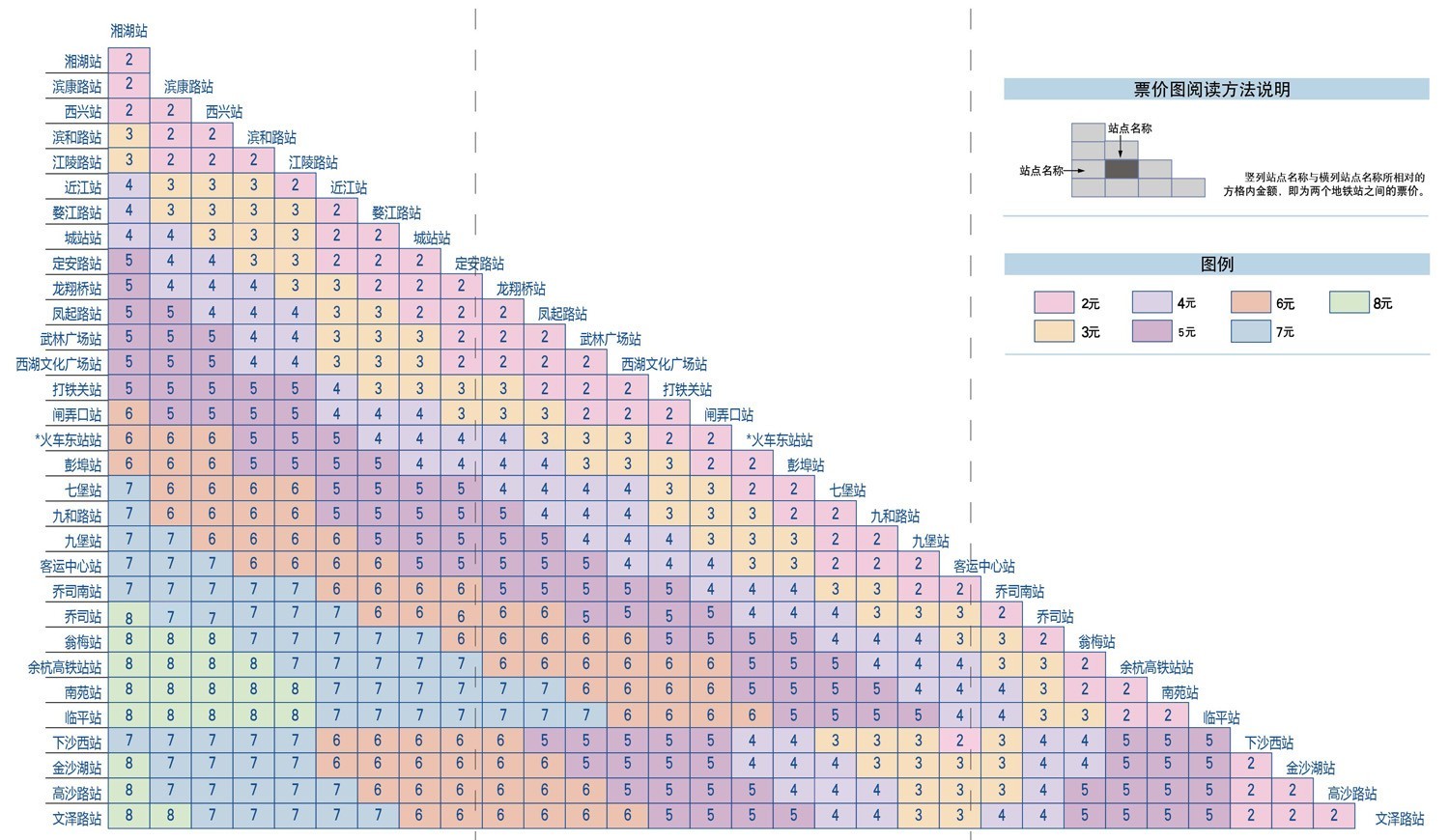
马赛克图(Mosaic Plot,又名 Marimekko Chart)是一种用于显示分类数据之间关系的图表。它通过矩形的面积和颜色来表示数据的比例和分类。
马赛克图分为均匀和非均匀两种类型,均匀马赛克图在生活中更为常见,例如地铁票价图;而非均匀马赛克图多用于统计学领域。
**英文名**:Mosaic Plot, Marimekko Chart
## 马赛克图的构成
### 非均匀坐标轴马赛克图
## 马赛克图的简介
马赛克图(Mosaic Plot,又名 Marimekko Chart)是一种用于显示分类数据之间关系的图表。它通过矩形的面积和颜色来表示数据的比例和分类。
马赛克图分为均匀和非均匀两种类型,均匀马赛克图在生活中更为常见,例如地铁票价图;而非均匀马赛克图多用于统计学领域。
**英文名**:Mosaic Plot, Marimekko Chart
## 马赛克图的构成
### 非均匀坐标轴马赛克图
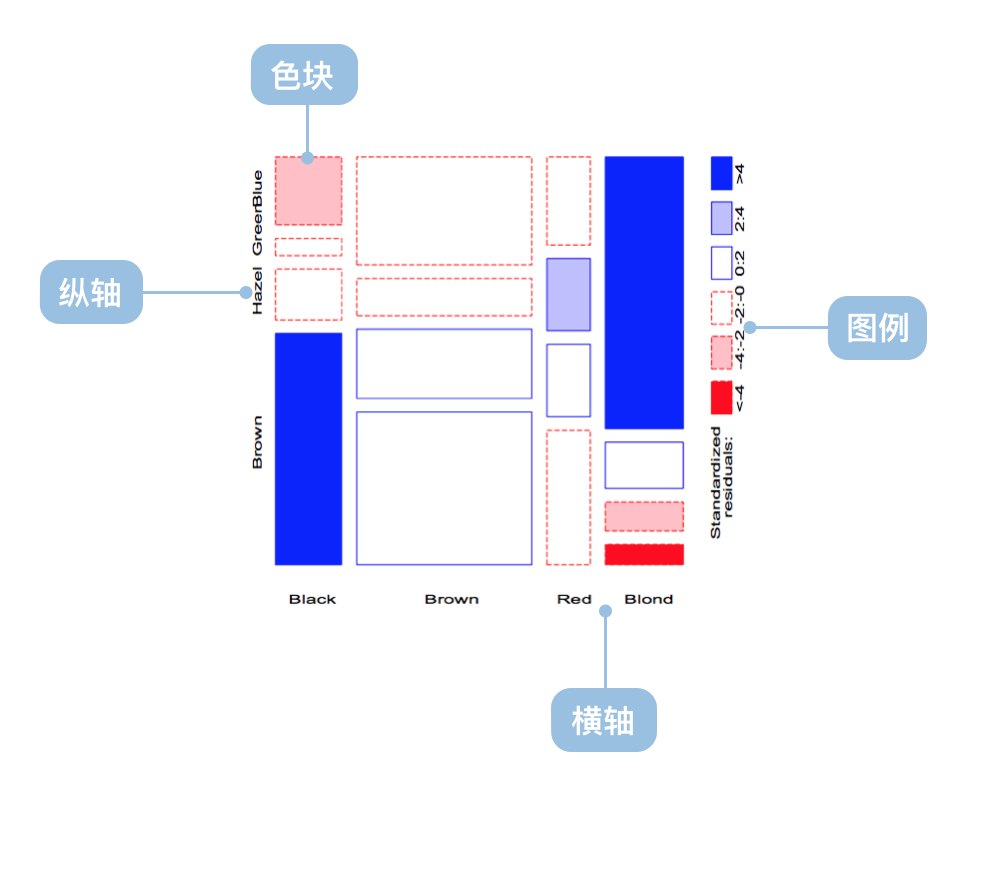 | 图表类型 | 非均匀坐标轴马赛克图 |
| ---------------- | ------------------------------------------------------------------ |
| 适合的数据 | 多维分类数据 |
| 功能 | 显示多维分类数据的分布 |
| 数据与图形的映射 | 分类数据字段映射到非均匀的坐标轴
| 图表类型 | 非均匀坐标轴马赛克图 |
| ---------------- | ------------------------------------------------------------------ |
| 适合的数据 | 多维分类数据 |
| 功能 | 显示多维分类数据的分布 |
| 数据与图形的映射 | 分类数据字段映射到非均匀的坐标轴
面积和颜色表示数据的比例和分类 |
| 适合的数据条数 | 数据维度较多时效果更佳 |
---
### 均匀坐标轴马赛克图
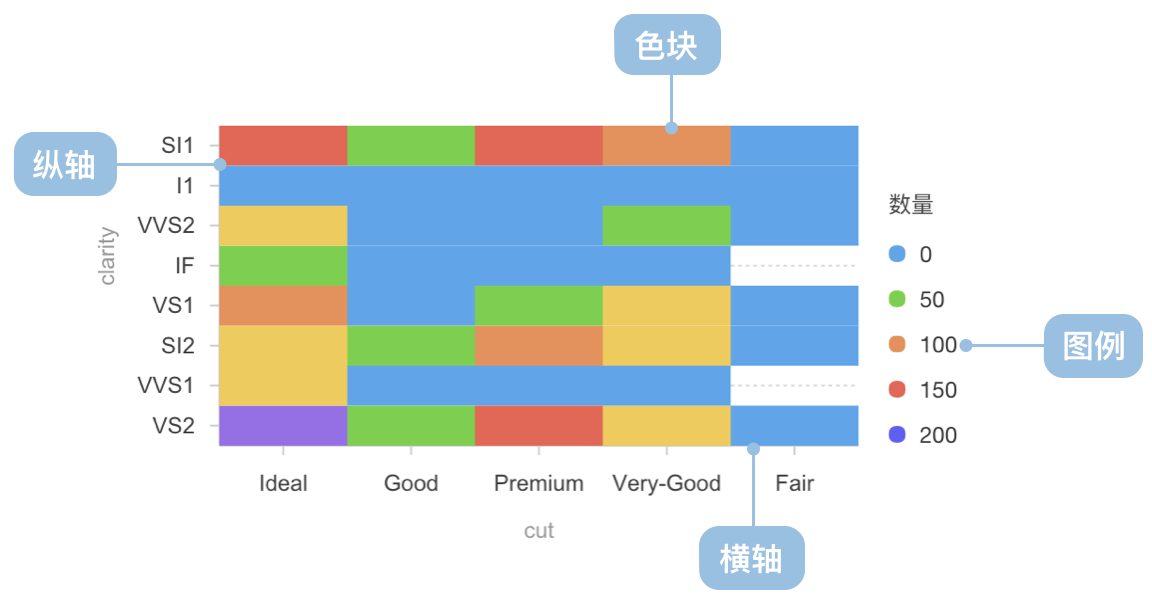 | 图表类型 | 均匀坐标轴马赛克图 |
| ---------------- | ---------------------------------------------------- |
| 适合的数据 | 二维分类数据 |
| 功能 | 显示二维分类数据的分布 |
| 数据与图形的映射 | 分类数据字段映射到均匀的坐标轴
| 图表类型 | 均匀坐标轴马赛克图 |
| ---------------- | ---------------------------------------------------- |
| 适合的数据 | 二维分类数据 |
| 功能 | 显示二维分类数据的分布 |
| 数据与图形的映射 | 分类数据字段映射到均匀的坐标轴
颜色表示数据的分类 |
| 适合的数据条数 | 数据维度较少时效果更佳 |
## 马赛克图的应用场景
### 适合的场景
例子 1: **适合应用到多维分类数据分析**
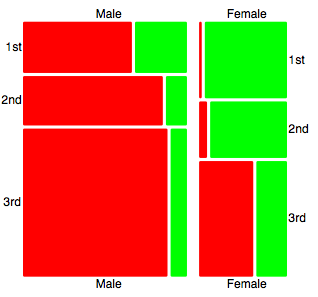
例子 2: **适合应用到二维分类数据分析**
```ts
import * as G2 from '@antv/g2';
const chart = new G2.Chart({
container: 'container',
autoFit: true,
height: 400,
});
chart.options({
type: 'cell',
data: [
{ product: '手机', region: '华北', sales: 120, category: '高端' },
{ product: '手机', region: '华东', sales: 180, category: '高端' },
{ product: '手机', region: '华南', sales: 150, category: '高端' },
{ product: '电脑', region: '华北', sales: 80, category: '中端' },
{ product: '电脑', region: '华东', sales: 110, category: '中端' },
{ product: '电脑', region: '华南', sales: 95, category: '中端' },
{ product: '平板', region: '华北', sales: 60, category: '中端' },
{ product: '平板', region: '华东', sales: 85, category: '中端' },
{ product: '平板', region: '华南', sales: 70, category: '低端' },
{ product: '耳机', region: '华北', sales: 40, category: '低端' },
{ product: '耳机', region: '华东', sales: 55, category: '低端' },
{ product: '耳机', region: '华南', sales: 45, category: '低端' },
],
encode: {
x: 'product',
y: 'region',
color: 'category',
size: 'sales',
},
scale: {
color: {
palette: 'category10',
type: 'ordinal',
},
size: {
type: 'linear',
range: [0.3, 1],
},
},
style: {
stroke: '#fff',
strokeWidth: 2,
inset: 2,
},
legend: {
color: {
title: '产品类别',
position: 'top',
},
size: {
title: '销售额',
position: 'right',
},
},
axis: {
x: {
title: '产品类型',
labelAutoRotate: false,
},
y: {
title: '销售区域',
},
},
tooltip: {
title: (d) => `${d.product} - ${d.region}`,
items: [
{ field: 'sales', name: '销售额', valueFormatter: (v) => `${v}万` },
{ field: 'category', name: '类别' },
],
},
});
chart.render();
```
例子 3: **市场细分分析(非均匀马赛克图)**
这个例子展示了如何使用非均匀马赛克图来展示不同市场细分的分布情况,其中矩形的宽度表示市场规模,高度表示各细分市场的占比。
```ts
import { Chart } from '@antv/g2';
const chart = new Chart({
container: 'container',
width: 900,
height: 800,
paddingLeft: 0,
paddingRight: 0,
});
chart.options({
type: 'interval',
data: {
type: 'fetch',
value:
'https://gw.alipayobjects.com/os/bmw-prod/3041da62-1bf4-4849-aac3-01a387544bf4.csv',
},
transform: [
{ type: 'flexX', reducer: 'sum' }, // 灵活X轴宽度
{ type: 'stackY' }, // Y轴堆叠
{ type: 'normalizeY' }, // Y轴归一化
],
encode: {
x: 'market',
y: 'value',
color: 'segment',
},
axis: {
y: false,
},
scale: {
x: { paddingOuter: 0, paddingInner: 0.01 },
},
tooltip: 'value',
labels: [
{
text: 'segment',
x: 5,
y: 5,
textAlign: 'start',
textBaseline: 'top',
fontSize: 10,
fill: '#fff',
},
{
text: 'value',
x: 5,
y: 5,
textAlign: 'start',
dy: 15,
fontSize: 10,
fill: '#fff',
},
],
});
chart.render();
```
例子 4: **电影评分分布分析(密度马赛克图)**
这个例子展示了如何使用密度马赛克图来分析 IMDB 和烂番茄评分的关系分布,颜色深浅表示电影数量的多少。
```ts
import { Chart } from '@antv/g2';
const chart = new Chart({
container: 'container',
autoFit: true,
});
chart.options({
type: 'rect',
data: {
type: 'fetch',
value: 'https://assets.antv.antgroup.com/g2/movies.json',
},
encode: {
x: 'IMDB Rating',
y: 'Rotten Tomatoes Rating',
},
transform: [
{ type: 'bin', color: 'count', thresholdsX: 30, thresholdsY: 20 },
],
scale: {
color: { palette: 'ylGnBu' },
},
tooltip: {
title: { channel: 'color' },
items: [
(d, i, data, column) => ({
name: 'IMDB评分',
value: `${column.x.value[i]}, ${column.x1.value[i]}`,
}),
(d, i, data, column) => ({
name: '烂番茄评分',
value: `${column.y.value[i]}, ${column.y1.value[i]}`,
}),
],
render: () => '1',
},
});
chart.render();
```
例子 5: **运动员生理数据分析(分组密度马赛克图)**
这个例子展示了如何使用马赛克图按性别分组展示运动员身高和体重的分布情况,不透明度表示数据点的密度。
```ts
import { Chart } from '@antv/g2';
const chart = new Chart({
container: 'container',
autoFit: true,
});
chart.options({
type: 'rect',
data: {
type: 'fetch',
value: 'https://assets.antv.antgroup.com/g2/athletes.json',
},
encode: {
x: 'weight',
y: 'height',
color: 'sex',
},
transform: [{ type: 'bin', opacity: 'count' }],
legend: {
opacity: false,
},
style: {
inset: 0.5,
},
tooltip: {
title: { channel: 'opacity' },
items: [
(d, i, data, column) => ({
name: '体重',
value: `${column.x.value[i]}, ${column.x1.value[i]}`,
}),
(d, i, data, column) => ({
name: '身高',
value: `${column.y.value[i]}, ${column.y1.value[i]}`,
}),
],
},
});
chart.render();
```
## 马赛克图与其他图表的对比
### 马赛克图和热力图
- 从图形属性上:
- 热力图表示第三维度的颜色是**线性**变化的。
- 马赛克图表示第三维度的颜色是**分类**的。
- 标准热力图要经过平滑算法,没有明显的边界。
- 马赛克图拥有清晰的边界。
- 从数据上看:
- 均匀的马赛克图和热力图在连续数据上的含义非常相似。
- 从分析需求上看:
- 热力图侧重于分布,可预测未知区域数据。
- 马赛克图拥有更清晰的边界,更侧重于对比。
## 马赛克图的扩展阅读
- [A Brief History of the Mosaic Display](http://www.datavis.ca/papers/moshist.pdf)
- [Are Mosaic Plots Worthwhile](https://www.perceptualedge.com/articles/visual_business_intelligence/are_mosaic_plots_worthwhile.pdf)
- [Marimekko Charts](http://peltiertech.com/marimekko-charts/)
- [Marimekko Charts FusionChart](http://www.fusioncharts.com/charts/marimekko-charts/)
- [Marimekko Charts The Data Visualisation Catalogue](http://www.datavizcatalogue.com/methods/marimekko_chart.html#.VlJ9E98rJTY)
- [Marimekko Charts in Microsoft Excel](http://www.clearlyandsimply.com/clearly_and_simply/2014/05/marimekko-charts-in-microsoft-excel.html)
## 相似图表
[Interactive content]()
---
## 分类
[Interactive content]()