---
title: "折线图"
description: "连接连续观测值以展示变化趋势,了解折线图的数据要求、多系列比较及 G2 绘制示例。"
language: "zh"
canonical: "https://g2.antv.antgroup.com/zh/charts/line/"
version: "5.4.8"
---
[资料索引](/llms.txt)
 ## 折线图的简介
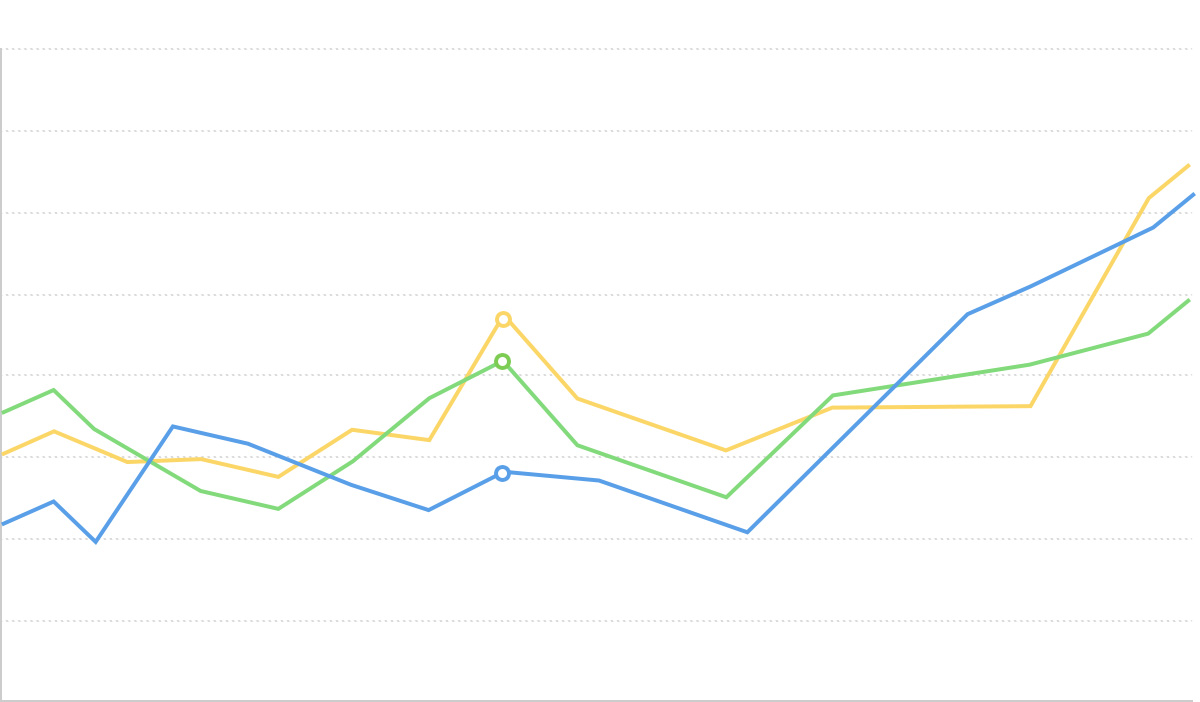
折线图是一种将数据点按时间或类别顺序连接成一条折线,用于显示数据随时间或有序类别变化趋势的统计图表。通过折线的上升或下降,可以直观地表现数据变化的速度、幅度、范围及其周期性。
折线图特别适合展示连续时间序列的数据变化,能够有效地反映数据的趋势、波动、周期性和异常点。在多系列数据比较时,折线图通过不同颜色或样式的线条,清晰地展示各数据系列间的对比和关系。
相比于面积图,折线图更侧重于展示数据变化的趋势和轨迹,而非总量;相比于柱状图,折线图更适合展示连续变化的趋势,而非离散的数值比较。
**英文名**:Line Chart
## 折线图的构成
### 基础折线图
## 折线图的简介
折线图是一种将数据点按时间或类别顺序连接成一条折线,用于显示数据随时间或有序类别变化趋势的统计图表。通过折线的上升或下降,可以直观地表现数据变化的速度、幅度、范围及其周期性。
折线图特别适合展示连续时间序列的数据变化,能够有效地反映数据的趋势、波动、周期性和异常点。在多系列数据比较时,折线图通过不同颜色或样式的线条,清晰地展示各数据系列间的对比和关系。
相比于面积图,折线图更侧重于展示数据变化的趋势和轨迹,而非总量;相比于柱状图,折线图更适合展示连续变化的趋势,而非离散的数值比较。
**英文名**:Line Chart
## 折线图的构成
### 基础折线图
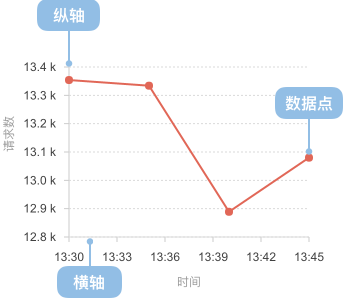 | 图表类型 | 基础折线图 |
| ---------------- | ------------------------------------------------------------------------------------------ |
| 适合的数据 | 时间序列数据:一个有序/连续数据字段(通常是时间)、一个连续数据字段 |
| 功能 | 展示数据随时间或有序维度的变化趋势 |
| 数据与图形的映射 | 时间字段映射到横轴的位置
| 图表类型 | 基础折线图 |
| ---------------- | ------------------------------------------------------------------------------------------ |
| 适合的数据 | 时间序列数据:一个有序/连续数据字段(通常是时间)、一个连续数据字段 |
| 功能 | 展示数据随时间或有序维度的变化趋势 |
| 数据与图形的映射 | 时间字段映射到横轴的位置
数值字段映射到纵轴的高度
各数据点通过线条连接,展示变化轨迹 |
| 适合的场景 | 单一数据系列随时间的变化趋势 |
---
### 多系列折线图
| 图表类型 | 多系列折线图 |
| ---------------- | --------------------------------------------------------------------------------------- |
| 适合的数据 | 多序列时间数据:一个有序/连续数据字段(通常是时间)、一个连续数据字段、一个分类数据字段 |
| 功能 | 展示多个数据系列随时间变化的趋势,便于比较不同系列间的关系 |
| 数据与图形的映射 | 时间字段映射到横轴的位置
数值字段映射到纵轴的高度
分类字段映射到不同颜色的线条 |
| 适合的场景 | 多数据系列随时间的变化趋势对比 |
## 折线图的应用场景
### 适合的场景
例子 1: **适合展示连续时间序列的趋势**
下图是一个股票价格走势的折线图,展示了某公司股票价格随时间的变化趋势。
| date(日期) | close(收盘价) |
| ------------ | --------------- |
| 2015/1/5 | 121.73 |
| 2015/1/6 | 115.07 |
| 2015/1/7 | 116.75 |
| ... | ... |
```ts
import { Chart } from '@antv/g2';
const chart = new Chart({
container: 'container',
theme: 'classic',
});
chart.options({
type: 'line',
autoFit: true,
data: {
type: 'fetch',
value: 'https://assets.antv.antgroup.com/g2/aapl.json',
transform: [
{
type: 'map',
callback: (d) => ({
...d,
date: new Date(d.date),
}),
},
],
},
encode: { x: 'date', y: 'close' },
axis: {
x: {
title: null,
},
y: {
title: null,
},
},
style: {
lineWidth: 2,
stroke: '#1890ff',
},
});
chart.render();
```
**说明** :
- `date` 字段,映射到横轴的位置,表示时间的先后顺序
- `close` 字段,映射到纵轴的高度,展示了价格随时间的变化趋势
- 通过线条连接各个数据点,清晰地展示数据的变化轨迹
例子 2: **适合展示多个数据系列的对比趋势**
多系列折线图可以同时展示多个数据系列随时间的变化,便于进行比较分析。下图展示了不同地区失业率的变化趋势。
```ts
import { Chart } from '@antv/g2';
const chart = new Chart({
container: 'container',
theme: 'classic',
});
chart.options({
type: 'line',
autoFit: true,
data: {
type: 'fetch',
value:
'https://gw.alipayobjects.com/os/bmw-prod/728a4bdc-9d0b-49e0-a92f-6320a6cddeed.csv',
},
encode: {
x: 'date',
y: 'unemployment',
color: 'division',
},
axis: {
x: {
title: null,
},
y: {
title: null,
},
},
});
chart.render();
```
**说明**:
- `date` 字段映射到横轴,表示时间维度
- `unemployment` 字段映射到纵轴,表示失业率
- `division` 字段映射到颜色,区分不同地区
- 多条折线便于直观比较不同地区失业率的变化趋势和差异
例子 3: **展示数据的细微变化和波动**
折线图可以清晰地展示数据的细微变化和波动,特别是当数据点较多且变化频繁时。
```ts
import { Chart } from '@antv/g2';
const chart = new Chart({
container: 'container',
theme: 'classic',
});
chart.options({
type: 'line',
autoFit: true,
data: [
{ month: 'Jan', city: 'Tokyo', temperature: 7 },
{ month: 'Jan', city: 'London', temperature: 3.9 },
{ month: 'Feb', city: 'Tokyo', temperature: 6.9 },
{ month: 'Feb', city: 'London', temperature: 4.2 },
{ month: 'Mar', city: 'Tokyo', temperature: 9.5 },
{ month: 'Mar', city: 'London', temperature: 5.7 },
{ month: 'Apr', city: 'Tokyo', temperature: 14.5 },
{ month: 'Apr', city: 'London', temperature: 8.5 },
{ month: 'May', city: 'Tokyo', temperature: 18.4 },
{ month: 'May', city: 'London', temperature: 11.9 },
{ month: 'Jun', city: 'Tokyo', temperature: 21.5 },
{ month: 'Jun', city: 'London', temperature: 15.2 },
{ month: 'Jul', city: 'Tokyo', temperature: 25.2 },
{ month: 'Jul', city: 'London', temperature: 17 },
{ month: 'Aug', city: 'Tokyo', temperature: 26.5 },
{ month: 'Aug', city: 'London', temperature: 16.6 },
{ month: 'Sep', city: 'Tokyo', temperature: 23.3 },
{ month: 'Sep', city: 'London', temperature: 14.2 },
{ month: 'Oct', city: 'Tokyo', temperature: 18.3 },
{ month: 'Oct', city: 'London', temperature: 10.3 },
{ month: 'Nov', city: 'Tokyo', temperature: 13.9 },
{ month: 'Nov', city: 'London', temperature: 6.6 },
{ month: 'Dec', city: 'Tokyo', temperature: 9.6 },
{ month: 'Dec', city: 'London', temperature: 4.8 },
],
encode: { x: 'month', y: 'temperature', color: 'city' },
axis: {
y: {
title: null,
labelFormatter: (d) => d + '°C',
},
x: {
title: null,
},
},
style: {
lineWidth: 2,
},
});
chart.render();
```
**说明**:
- 折线图清晰地展示了东京和伦敦全年温度的变化曲线
- 通过不同颜色的折线,可以直观地比较两个城市温度的差异和变化模式
### 不适合的场景
例子 1: **不适合展示离散类别的比较**
当水平轴的数据类型为无序的分类或者垂直轴的数据类型为连续时间时,不适合使用折线图。
我们以一个不同游戏类型的销量对比的场景为例,对于表示分类对比的数据时,我们更应该使用[柱状图](/zh/charts/bar/),而不是折线图。
**错误的做法**
```ts
import { Chart } from '@antv/g2';
const chart = new Chart({
container: 'container',
theme: 'classic',
height: 250,
});
chart.options({
type: 'line',
autoFit: true,
data: [
{ genre: 'Sports', sold: 27500 },
{ genre: 'Strategy', sold: 11500 },
{ genre: 'Action', sold: 6000 },
{ genre: 'Shooter', sold: 3500 },
{ genre: 'Other', sold: 1500 },
],
encode: { x: 'genre', y: 'sold' },
axis: {
x: {
title: '游戏类型',
},
y: {
title: '销售量',
labelFormatter: (val) => val / 1000 + 'k',
},
},
style: {
lineWidth: 3,
stroke: '#1890ff',
},
});
chart.render();
```
**正确的做法**
```ts
import { Chart } from '@antv/g2';
const chart = new Chart({
container: 'container',
theme: 'classic',
height: 250,
});
chart.options({
type: 'interval',
autoFit: true,
data: [
{ genre: 'Sports', sold: 27500 },
{ genre: 'Strategy', sold: 11500 },
{ genre: 'Action', sold: 6000 },
{ genre: 'Shooter', sold: 3500 },
{ genre: 'Other', sold: 1500 },
],
encode: { x: 'genre', y: 'sold', color: 'genre' },
axis: {
x: {
title: '游戏类型',
},
y: {
title: '销售量',
labelFormatter: (val) => val / 1000 + 'k',
},
},
});
chart.render();
```
**问题说明**:
- 游戏类型之间没有自然的顺序或连续性关系
- 连线暗示了类别间的趋势关系,但实际上不存在这种关系
- 折线可能误导读者认为从"Sports"到"Strategy"存在某种变化趋势
- 柱状图能更准确地表达各游戏类型的独立销量比较
例子 2: **数据点较少或变化不明显时效果不佳**
当数据点较少或变化不明显时,折线图可能无法充分发挥其展示趋势变化的优势。这种情况下,可以考虑使用柱状图或点图来强调个别数据点的比较。
```ts
import { Chart } from '@antv/g2';
const chart = new Chart({
container: 'container',
theme: 'classic',
});
chart.options({
type: 'line',
autoFit: true,
data: [
{ quarter: 'Q1', value: 100 },
{ quarter: 'Q2', value: 101 },
{ quarter: 'Q3', value: 99 },
{ quarter: 'Q4', value: 102 },
],
encode: { x: 'quarter', y: 'value' },
axis: {
x: { title: null },
y: { title: null },
},
style: {
lineWidth: 2,
stroke: '#1890ff',
},
});
chart.render();
```
**问题说明**:
- 数据点太少(仅 4 个),无法形成明显的趋势线
- 数值变化很小(99-102),折线看起来几乎是平的
- 难以从中获得有意义的趋势信息
- 柱状图或点图能更好地强调各个独立数值的比较
## 折线图的扩展
### 阶梯折线图
阶梯折线图使用水平和垂直线段连接数据点,形成阶梯状的效果,适合展示在特定时间点发生突变的数据。
```ts
import { Chart } from '@antv/g2';
const chart = new Chart({
container: 'container',
theme: 'classic',
});
chart.options({
type: 'line',
autoFit: true,
data: [
{ month: 'Jan', value: 51 },
{ month: 'Feb', value: 91 },
{ month: 'Mar', value: 34 },
{ month: 'Apr', value: 47 },
{ month: 'May', value: 63 },
{ month: 'June', value: 58 },
{ month: 'July', value: 56 },
{ month: 'Aug', value: 77 },
{ month: 'Sep', value: 99 },
{ month: 'Oct', value: 106 },
{ month: 'Nov', value: 88 },
{ month: 'Dec', value: 56 },
],
encode: { x: 'month', y: 'value', shape: 'hv' },
axis: {
x: {
title: null,
},
y: {
title: null,
},
},
style: {
lineWidth: 2,
stroke: '#1890ff',
},
});
chart.render();
```
**说明**:
- 使用 `encode: { shape: 'hv' }` 指定阶梯状的线条形状
- 适合展示在特定时间点发生变化且保持稳定直到下一变化点的数据,如电费阶梯价格、库存水平变化等
### 虚线折线图
虚线折线图通过不同的线型来区分不同的数据系列或表示特定含义,如预测值、参考线等。
```ts
import { Chart } from '@antv/g2';
const chart = new Chart({
container: 'container',
theme: 'classic',
});
chart.options({
type: 'view',
autoFit: true,
data: [
{ year: '1991', value: 3, type: '实际值' },
{ year: '1992', value: 4, type: '实际值' },
{ year: '1993', value: 3.5, type: '实际值' },
{ year: '1994', value: 5, type: '实际值' },
{ year: '1995', value: 4.9, type: '实际值' },
{ year: '1996', value: 6, type: '实际值' },
{ year: '1997', value: 7, type: '实际值' },
{ year: '1998', value: 9, type: '实际值' },
{ year: '1999', value: 13, type: '实际值' },
{ year: '1999', value: 13, type: '预测值' },
{ year: '2000', value: 16, type: '预测值' },
{ year: '2001', value: 21, type: '预测值' },
{ year: '2002', value: 25, type: '预测值' },
{ year: '2003', value: 30, type: '预测值' },
],
children: [
{
type: 'line',
encode: { x: 'year', y: 'value', color: 'type' },
style: {
lineWidth: 2,
lineDash: (d) => (d[0].type === '预测值' ? [4, 4] : null),
},
},
{
type: 'point',
encode: { x: 'year', y: 'value', color: 'type', shape: 'circle' },
},
],
scale: {
color: {
range: ['#1890FF', '#FF6B3B'],
},
},
axis: {
x: { title: null },
y: { title: null },
},
});
chart.render();
```
**说明**:
- 使用 `lineDash: (d) => (d[0].type === '预测值' ? [4, 4] : null)` 为预测值设置虚线样式
- 实线表示已有的历史数据,虚线表示预测或估计的数据,增强了数据的可读性
## 折线图与其他图表的对比
### 折线图和[面积图](/zh/charts/area/)
- 折线图侧重于展示数据变化的趋势和轨迹,关注变化的方向和速度
- 面积图通过填充区域强调数量的视觉效果,更适合展示总量变化
- 当需要突出变化趋势时选择折线图,当需要强调数量级变化时选择面积图
### 折线图和[堆叠面积图](/zh/charts/stacked-area/)
- 折线图适合展示多个独立数据系列的变化趋势,各系列间可以直接比较
- 堆叠面积图显示各部分对总体的贡献,强调累积效果和部分与整体的关系
- 当需要比较多个独立趋势时选择折线图,当需要展示部分构成总体的变化时选择堆叠面积图
### 折线图和[柱状图](/zh/charts/bar/)
- 折线图更适合展示连续时间序列的变化趋势,强调数据的流动性和连续性
- 柱状图更适合展示离散分类之间的数值比较,强调各个独立数值的大小对比
- 当数据点较多且关注变化趋势时选择折线图,当数据点较少且关注具体数值比较时选择柱状图
### 折线图和[散点图](/zh/charts/scatter-plot/)
- 折线图通过连线展示数据的变化趋势和连续性,强调数据点间的关系
- 散点图展示各个独立数据点的分布,不强调数据点间的连续关系
- 当需要展示数据趋势时选择折线图,当需要展示数据分布或相关性时选择散点图
## 相似图表
[Interactive content]()
## 分类
[Interactive content]()