---
title: "双向柱状图"
description: "将两组数据沿相反方向排列,比较不同群体或正负数值,了解双向柱状图的使用场景和 G2 示例。"
language: "zh"
canonical: "https://g2.antv.antgroup.com/zh/charts/bi-directional-bar/"
version: "5.4.8"
---
[资料索引](/llms.txt)
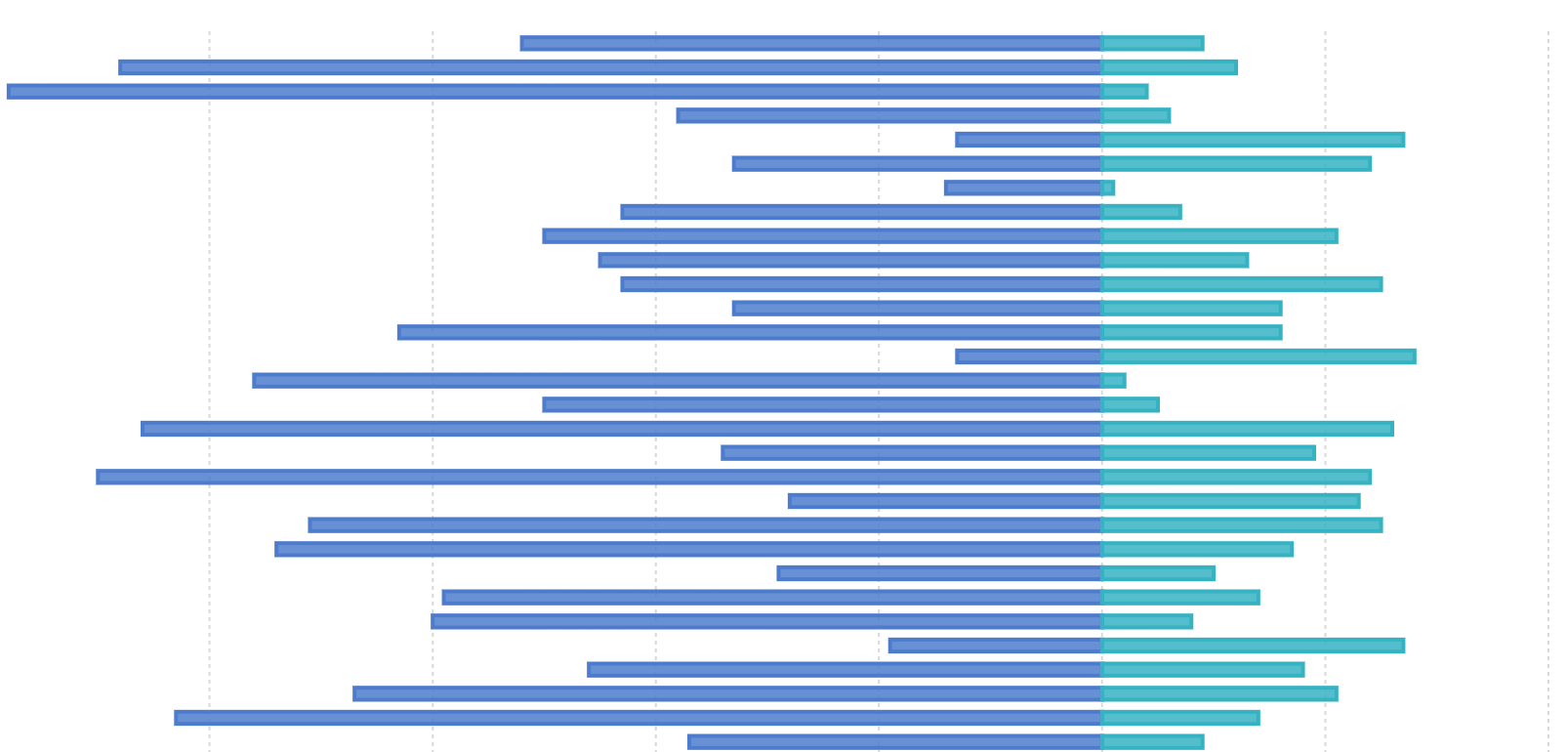 ## 双向柱状图的简介
双向柱状图(又名正负条形图),使用正向和反向的柱子显示类别之间的数值比较。其中分类轴表示需要对比的分类维度,连续轴代表相应的数值,分为两种情况,一种是正向刻度值与反向刻度值完全对称,另一种是正向刻度值与反向刻度值反向对称,即互为相反数。
**英文名**:Bi-Directional Bar,Bi-Directional Column
## 双向柱状图的构成
## 双向柱状图的简介
双向柱状图(又名正负条形图),使用正向和反向的柱子显示类别之间的数值比较。其中分类轴表示需要对比的分类维度,连续轴代表相应的数值,分为两种情况,一种是正向刻度值与反向刻度值完全对称,另一种是正向刻度值与反向刻度值反向对称,即互为相反数。
**英文名**:Bi-Directional Bar,Bi-Directional Column
## 双向柱状图的构成
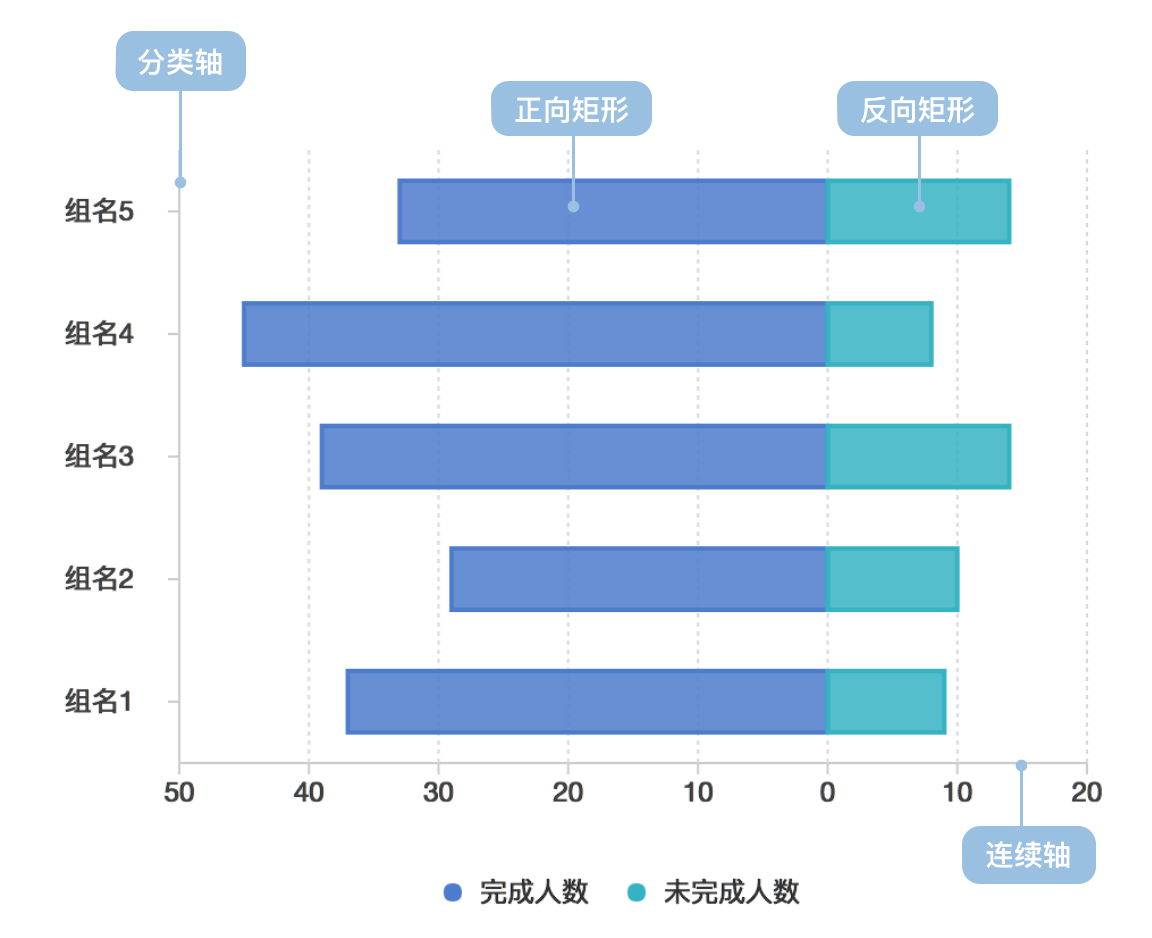 | 图表类型 | 双向柱状图 |
| ---------------- | ------------------------------------------------------------------------------------------------------------------------------------------------------------------------------------------------- |
| 适合的数据 | 列表:一个分类数据字段、两个连续数据字段 |
| 功能 | 对比分类数据的数值大小 |
| 数据与图形的映射 | 分类数据字段映射到分类轴的位置;一个连续数据字段映射到正向矩形的长度;另一个连续数据字段映射到反向矩形的长度;正反向数据可以设置颜色或形状(shape)增强区分度;分类数据可以设置颜色增强分类的区分度 |
| 适合的数据条数 | 横向不超过 30 条数据、纵向不超过 12 条数据 |
---
## 双向柱状图的应用场景
### 适合的场景
例子 1: **正反分类数据对比**
下图是模拟某个公司各个部门对某项任务的完成情况数据的对比图,完成人数使用正向柱状图表示、未完成人数使用反向柱状图表示。
| 部门 | 小组 | 完成人数 | 未完成人数 |
| ------ | ------ | -------- | ---------- |
| 部门 0 | 组名 0 | 37 | 9 |
| ... | ... | ... | ... |
```ts
import { Chart } from '@antv/g2';
const chart = new Chart({
container: 'container',
});
const data = [
{ department: '部门 0', group: '组名0', people: 37, type: 'completed' },
{ department: '部门 0', group: '组名0', people: 9, type: 'uncompleted' },
{ department: '部门 0', group: '组名1', people: 27, type: 'completed' },
{ department: '部门 0', group: '组名1', people: 10, type: 'uncompleted' },
{ department: '部门 1', group: '组名2', people: 37, type: 'completed' },
{ department: '部门 1', group: '组名2', people: 19, type: 'uncompleted' },
{ department: '部门 1', group: '组名3', people: 37, type: 'completed' },
{ department: '部门 1', group: '组名3', people: 29, type: 'uncompleted' },
{ department: '部门 2', group: '组名4', people: 20, type: 'completed' },
{ department: '部门 2', group: '组名4', people: 2, type: 'uncompleted' },
{ department: '部门 2', group: '组名5', people: 40, type: 'completed' },
{ department: '部门 2', group: '组名5', people: 10, type: 'uncompleted' },
{ department: '部门 3', group: '组名6', people: 25, type: 'completed' },
{ department: '部门 3', group: '组名6', people: 3, type: 'uncompleted' },
{ department: '部门 3', group: '组名7', people: 55, type: 'completed' },
{ department: '部门 3', group: '组名7', people: 8, type: 'uncompleted' },
];
const range = ['#7593ed', '#95e3b0', '#6c7893', '#e7c450', '#7460eb'];
chart.options({
type: 'interval',
coordinate: { transform: [{ type: 'transpose' }] },
autoFit: true,
data: data,
encode: {
x: 'group',
y: (d) => (d.type === 'completed' ? d.people : -d.people),
color: 'department',
},
scale: {
x: { padding: 0.5 },
color: {
type: 'ordinal',
range,
},
},
axis: {
x: { title: '' },
y: {
labelFormatter: (d) => {
return Math.abs(d);
},
},
},
style: {
fill: ({ type }, i, data) => {
if (type === 'uncompleted') {
return 'transparent';
}
},
stroke: (d, i, data, ...re) => {
const { type } = d;
if (type === 'uncompleted') {
return range[i / 2];
}
},
lineWidth: 2,
},
tooltip: {
title: (d) => {
return `${d.department}-${d.group}`;
},
items: [
(d, i, data, column) => ({
name: d.type === 'completed' ? '完成' : '未完成',
value: d.people,
}),
],
},
});
chart.render();
```
**说明** :
- 使用了`颜色`用于区分不同的部门
- 使用了`形状`(空心和实心)用于区分完成人数和未完成人数
- 使用了`位置`用于区分不同小组
### 不适合的场景
双向柱状图不适合不含相反含义的数据
## 双向柱状图的扩展
例子 1: **层叠双向柱状图**
下图展示了不同类型的人群对某个问题的同意程度的统计数据,分为非常不同意、不同意、没意见、同意和非常同意五种程度,其中非常不同意、不同意和没意见作为反向柱状图,不同程度用不同颜色来表示。`虚构数据`
| type | Strongly agree | Agree | Neither agree nor disagree | Disagree | Strongly disagree |
| ---------- | -------------- | ----- | -------------------------- | -------- | ----------------- |
| Question 1 | 11.7 | 59.9 | 18.5 | 9.1 | 0.7 |
| ... | ... | ... | ... | ... | ... |
```ts
import { Chart } from '@antv/g2';
const chart = new Chart({
container: 'container',
});
const types = [
'Strongly disagree',
'Disagree',
'Neither agree nor disagree',
'Agree',
'Strongly agree',
];
const colors = ['#c30d24', '#f3a583', '#cccccc', '#94c6da', '#1770ab'];
chart.options({
type: 'interval',
coordinate: { transform: [{ type: 'transpose' }] },
autoFit: true,
data: {
type: 'fetch',
value:
'https://gw.alipayobjects.com/os/bmw-prod/82c97016-0f99-433b-ab21-9ecf14244610.csv',
},
transform: [{ type: 'stackY' }],
encode: {
x: 'question',
y: (d) =>
d.type === 'Disagree' || d.type === 'Strongly disagree'
? -d.percentage
: d.type === 'Neither agree nor disagree'
? -d.percentage / 2
: +d.percentage,
color: 'type',
},
scale: {
x: { padding: 0.5 },
color: { domain: types, range: colors },
},
axis: {
x: { title: '' },
y: {
labelFormatter: (d) => {
return Math.abs(d);
},
},
},
tooltip: {
items: [
(d, i, data, column) => ({
name: d.type,
value: d.percentage,
}),
],
},
});
chart.render();
```
**说明** :
- 使用了`颜色`用于区分不同程度
- 使用了`位置`用于区分不同问题
## 双向柱状图与其他图表的对比
### 双向柱状图和[柱状图](/zh/charts/bar/)
- 柱状图只能绘制在同一个坐标轴内,每个柱子只能表示一个数据
- 双向柱状图包含正向和反向两个坐标轴,每个柱子可以表示一个正向数据和一个反向数据
## 相似图表
[Interactive content]()
## 分类
[Interactive content]()
| 图表类型 | 双向柱状图 |
| ---------------- | ------------------------------------------------------------------------------------------------------------------------------------------------------------------------------------------------- |
| 适合的数据 | 列表:一个分类数据字段、两个连续数据字段 |
| 功能 | 对比分类数据的数值大小 |
| 数据与图形的映射 | 分类数据字段映射到分类轴的位置;一个连续数据字段映射到正向矩形的长度;另一个连续数据字段映射到反向矩形的长度;正反向数据可以设置颜色或形状(shape)增强区分度;分类数据可以设置颜色增强分类的区分度 |
| 适合的数据条数 | 横向不超过 30 条数据、纵向不超过 12 条数据 |
---
## 双向柱状图的应用场景
### 适合的场景
例子 1: **正反分类数据对比**
下图是模拟某个公司各个部门对某项任务的完成情况数据的对比图,完成人数使用正向柱状图表示、未完成人数使用反向柱状图表示。
| 部门 | 小组 | 完成人数 | 未完成人数 |
| ------ | ------ | -------- | ---------- |
| 部门 0 | 组名 0 | 37 | 9 |
| ... | ... | ... | ... |
```ts
import { Chart } from '@antv/g2';
const chart = new Chart({
container: 'container',
});
const data = [
{ department: '部门 0', group: '组名0', people: 37, type: 'completed' },
{ department: '部门 0', group: '组名0', people: 9, type: 'uncompleted' },
{ department: '部门 0', group: '组名1', people: 27, type: 'completed' },
{ department: '部门 0', group: '组名1', people: 10, type: 'uncompleted' },
{ department: '部门 1', group: '组名2', people: 37, type: 'completed' },
{ department: '部门 1', group: '组名2', people: 19, type: 'uncompleted' },
{ department: '部门 1', group: '组名3', people: 37, type: 'completed' },
{ department: '部门 1', group: '组名3', people: 29, type: 'uncompleted' },
{ department: '部门 2', group: '组名4', people: 20, type: 'completed' },
{ department: '部门 2', group: '组名4', people: 2, type: 'uncompleted' },
{ department: '部门 2', group: '组名5', people: 40, type: 'completed' },
{ department: '部门 2', group: '组名5', people: 10, type: 'uncompleted' },
{ department: '部门 3', group: '组名6', people: 25, type: 'completed' },
{ department: '部门 3', group: '组名6', people: 3, type: 'uncompleted' },
{ department: '部门 3', group: '组名7', people: 55, type: 'completed' },
{ department: '部门 3', group: '组名7', people: 8, type: 'uncompleted' },
];
const range = ['#7593ed', '#95e3b0', '#6c7893', '#e7c450', '#7460eb'];
chart.options({
type: 'interval',
coordinate: { transform: [{ type: 'transpose' }] },
autoFit: true,
data: data,
encode: {
x: 'group',
y: (d) => (d.type === 'completed' ? d.people : -d.people),
color: 'department',
},
scale: {
x: { padding: 0.5 },
color: {
type: 'ordinal',
range,
},
},
axis: {
x: { title: '' },
y: {
labelFormatter: (d) => {
return Math.abs(d);
},
},
},
style: {
fill: ({ type }, i, data) => {
if (type === 'uncompleted') {
return 'transparent';
}
},
stroke: (d, i, data, ...re) => {
const { type } = d;
if (type === 'uncompleted') {
return range[i / 2];
}
},
lineWidth: 2,
},
tooltip: {
title: (d) => {
return `${d.department}-${d.group}`;
},
items: [
(d, i, data, column) => ({
name: d.type === 'completed' ? '完成' : '未完成',
value: d.people,
}),
],
},
});
chart.render();
```
**说明** :
- 使用了`颜色`用于区分不同的部门
- 使用了`形状`(空心和实心)用于区分完成人数和未完成人数
- 使用了`位置`用于区分不同小组
### 不适合的场景
双向柱状图不适合不含相反含义的数据
## 双向柱状图的扩展
例子 1: **层叠双向柱状图**
下图展示了不同类型的人群对某个问题的同意程度的统计数据,分为非常不同意、不同意、没意见、同意和非常同意五种程度,其中非常不同意、不同意和没意见作为反向柱状图,不同程度用不同颜色来表示。`虚构数据`
| type | Strongly agree | Agree | Neither agree nor disagree | Disagree | Strongly disagree |
| ---------- | -------------- | ----- | -------------------------- | -------- | ----------------- |
| Question 1 | 11.7 | 59.9 | 18.5 | 9.1 | 0.7 |
| ... | ... | ... | ... | ... | ... |
```ts
import { Chart } from '@antv/g2';
const chart = new Chart({
container: 'container',
});
const types = [
'Strongly disagree',
'Disagree',
'Neither agree nor disagree',
'Agree',
'Strongly agree',
];
const colors = ['#c30d24', '#f3a583', '#cccccc', '#94c6da', '#1770ab'];
chart.options({
type: 'interval',
coordinate: { transform: [{ type: 'transpose' }] },
autoFit: true,
data: {
type: 'fetch',
value:
'https://gw.alipayobjects.com/os/bmw-prod/82c97016-0f99-433b-ab21-9ecf14244610.csv',
},
transform: [{ type: 'stackY' }],
encode: {
x: 'question',
y: (d) =>
d.type === 'Disagree' || d.type === 'Strongly disagree'
? -d.percentage
: d.type === 'Neither agree nor disagree'
? -d.percentage / 2
: +d.percentage,
color: 'type',
},
scale: {
x: { padding: 0.5 },
color: { domain: types, range: colors },
},
axis: {
x: { title: '' },
y: {
labelFormatter: (d) => {
return Math.abs(d);
},
},
},
tooltip: {
items: [
(d, i, data, column) => ({
name: d.type,
value: d.percentage,
}),
],
},
});
chart.render();
```
**说明** :
- 使用了`颜色`用于区分不同程度
- 使用了`位置`用于区分不同问题
## 双向柱状图与其他图表的对比
### 双向柱状图和[柱状图](/zh/charts/bar/)
- 柱状图只能绘制在同一个坐标轴内,每个柱子只能表示一个数据
- 双向柱状图包含正向和反向两个坐标轴,每个柱子可以表示一个正向数据和一个反向数据
## 相似图表
[Interactive content]()
## 分类
[Interactive content]()