---
title: "弧长连接图"
description: "用沿直线或圆周排列的节点与弧线展示关系,了解节点排序、连接模式及 G2 弧长连接图示例。"
language: "zh"
canonical: "https://g2.antv.antgroup.com/zh/charts/arcdiagram/"
version: "5.4.8"
---
[资料索引](/llms.txt)
 ## 弧长连接图的简介
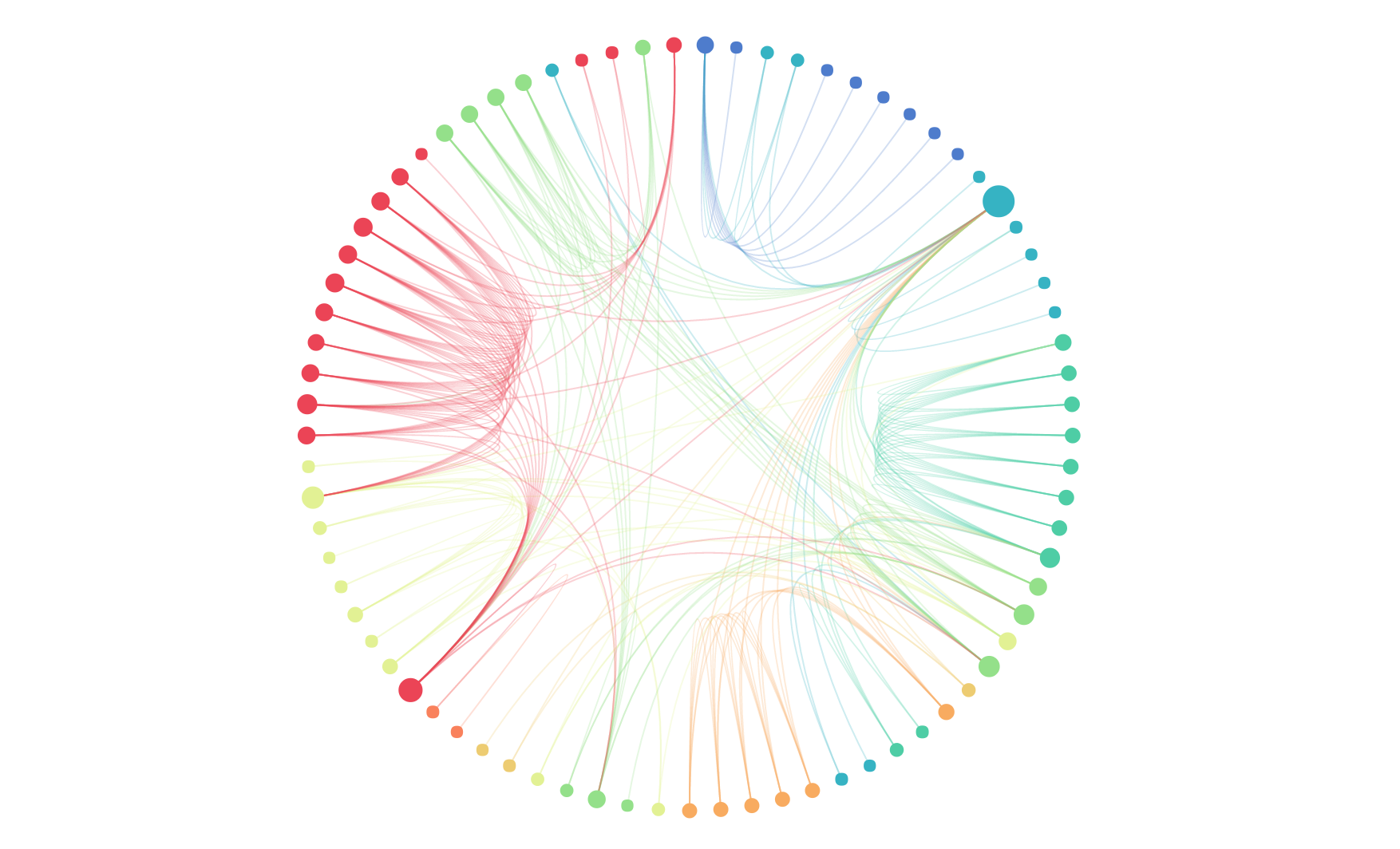
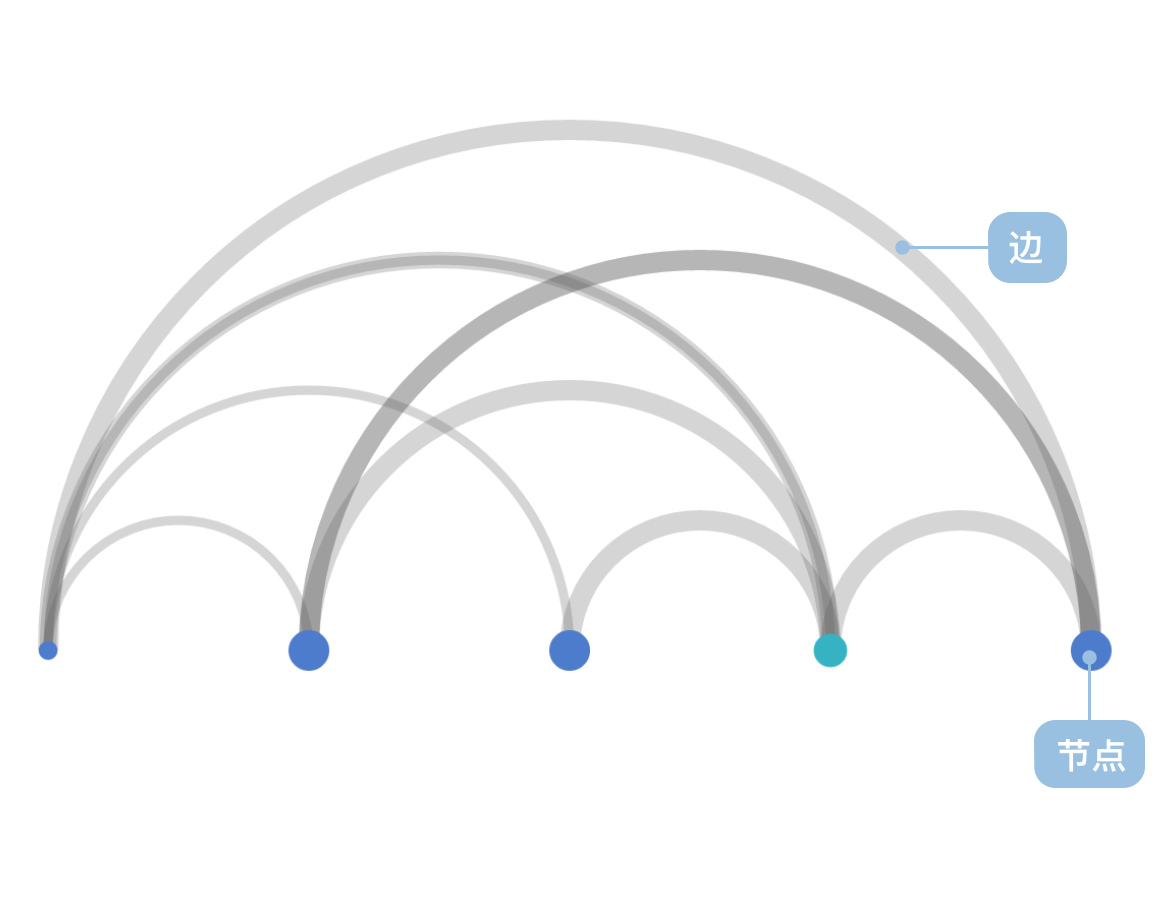
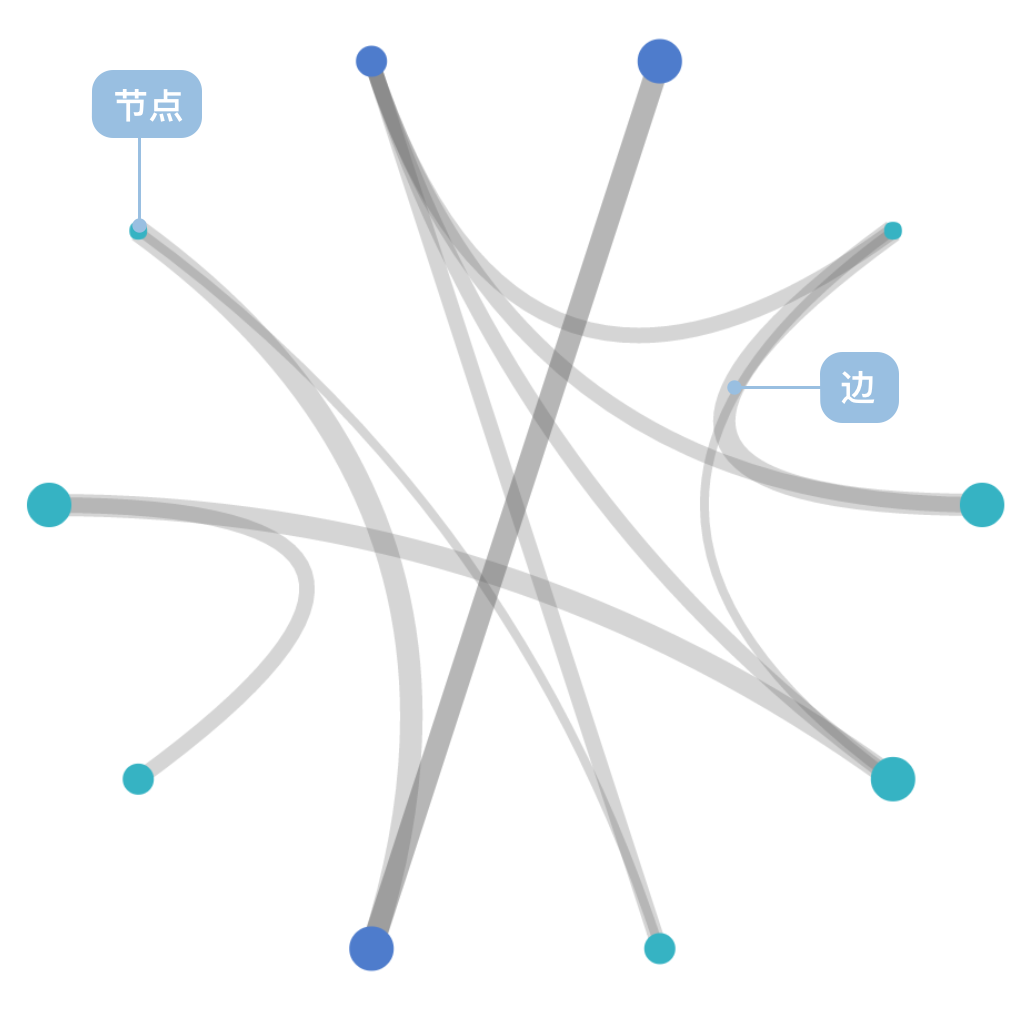
弧长连接图是节点-链接法的一个变种,节点-链接法是指用节点表示对象,用线(或边)表示关系的节点-链接布局(node-link)的一种可视化布局表示。弧长连接图在此概念的基础上,采用一维布局方式,即节点沿某个线性轴或环状排列,用圆弧表达节点之间的链接关系。这种方法不能像二维布局那样表达图的全局结构,但在节点良好排序后可清晰的呈现环和桥的结构。
**英文名**:Arc diagram
## 弧长连接图的构成
### 线性弧长连接图
## 弧长连接图的简介
弧长连接图是节点-链接法的一个变种,节点-链接法是指用节点表示对象,用线(或边)表示关系的节点-链接布局(node-link)的一种可视化布局表示。弧长连接图在此概念的基础上,采用一维布局方式,即节点沿某个线性轴或环状排列,用圆弧表达节点之间的链接关系。这种方法不能像二维布局那样表达图的全局结构,但在节点良好排序后可清晰的呈现环和桥的结构。
**英文名**:Arc diagram
## 弧长连接图的构成
### 线性弧长连接图
 | 图表类型 | 线性弧长连接图 |
| ---------------- | ---------------------------------------------------------------------------------------------------------------------------------------------------- |
| 适合的数据 | 列表:一组节点数据(包含节点 id 字段)、一组链接数据(包含源节点字段和目标节点字段) |
| 功能 | 表示数据之间的链接关系 |
| 数据与图形的映射 | 节点的坐标(自动计算)字段映射到节点的坐标轴的位置
| 图表类型 | 线性弧长连接图 |
| ---------------- | ---------------------------------------------------------------------------------------------------------------------------------------------------- |
| 适合的数据 | 列表:一组节点数据(包含节点 id 字段)、一组链接数据(包含源节点字段和目标节点字段) |
| 功能 | 表示数据之间的链接关系 |
| 数据与图形的映射 | 节点的坐标(自动计算)字段映射到节点的坐标轴的位置
链接的坐标(自动计算)映射到半圆弧的顶点坐标轴位置
节点中的分类数据也可以设置颜色增强区分度 |
| 适合的数据条数 | 不少于 2 条数据 |
---
### 环形弧长连接图
 | 图表类型 | 环形弧长连接图 |
| ---------------- | ------------------------------------------------------------------------------------------------------------------------------------------------------------------------ |
| 适合的数据 | 列表:一组节点数据(包含节点 id 字段)、一组链接数据(包含源节点字段和目标节点字段) |
| 功能 | 表示数据之间的链接关系 |
| 数据与图形的映射 | 节点的坐标(自动计算)字段映射到节点的坐标轴的位置
| 图表类型 | 环形弧长连接图 |
| ---------------- | ------------------------------------------------------------------------------------------------------------------------------------------------------------------------ |
| 适合的数据 | 列表:一组节点数据(包含节点 id 字段)、一组链接数据(包含源节点字段和目标节点字段) |
| 功能 | 表示数据之间的链接关系 |
| 数据与图形的映射 | 节点的坐标(自动计算)字段映射到节点的坐标轴的位置
链接的坐标(自动计算)映射到以圆心为控制点的贝塞尔曲线的顶点坐标轴位置
节点中的分类数据也可以设置颜色增强区分度 |
| 适合的数据条数 | 不少于 5 条节点数据 |
## 弧长连接图的应用场景
### 适合的场景
例子 1: **表达数据之间的关系,以及关系的重要性**
下图这个网络代表了维克多·雨果的经典小说"Les Misérables"中的人物关系。
**节点数据**:
| name | group | id |
| ------ | ----- | --- |
| Myriel | 1 | 0 |
| ... | ... | ... |
**链接数据**:
| source | target | value |
| ------ | ------ | ----- |
| 1 | 0 | 1 |
| ... | ... | ... |
```ts
import { Chart } from '@antv/g2';
const colors = [
'#ff7875',
'#ffa940',
'#fadb14',
'#73d13d',
'#40a9ff',
'#b37feb',
'#ff85c0',
'#ffc069',
'#95de64',
];
const chart = new Chart({
container: 'container',
theme: 'classic',
});
chart.options({
type: 'view',
autoFit: true,
data: {
type: 'fetch',
value:
'https://gw.alipayobjects.com/os/antvdemo/assets/data/relationship.json',
transform: [
{
type: 'custom',
callback: (data) => {
const { nodes, links } = data;
const arcData = [];
links.forEach((link) => {
const sourceId = parseInt(link.source);
const targetId = parseInt(link.target);
const sourceIndex = nodes.findIndex((n) => n.id === sourceId);
const targetIndex = nodes.findIndex((n) => n.id === targetId);
if (sourceIndex !== -1 && targetIndex !== -1) {
const sourceX = sourceIndex * 15 + 50;
const targetX = targetIndex * 15 + 50;
const distance = Math.abs(targetX - sourceX);
const arcHeight = Math.min(150, distance * 0.1);
for (let i = 0; i <= 15; i++) {
const t = i / 15;
const x = sourceX + (targetX - sourceX) * t;
const y = 600 - arcHeight * Math.sin(Math.PI * t);
arcData.push({
x: x,
y: y,
linkId: `${sourceId}-${targetId}`,
sourceName: nodes[sourceIndex].label,
targetName: nodes[targetIndex].label,
type: 'link',
});
}
}
});
const nodeData = nodes.map((node, i) => ({
name: node.label,
group: node.modularity_class,
size: node.size,
displaySize: Math.sqrt(node.size) * 4,
x: i * 15 + 50,
y: 600,
type: 'node',
}));
return [...arcData, ...nodeData];
},
},
],
},
children: [
{
type: 'line',
data: {
transform: [{ type: 'filter', callback: (d) => d.type === 'link' }],
},
encode: { x: 'x', y: 'y', series: 'linkId' },
style: { stroke: '#1890ff', strokeWidth: 0.8, strokeOpacity: 0.4 },
},
{
type: 'point',
data: {
transform: [{ type: 'filter', callback: (d) => d.type === 'node' }],
},
encode: { x: 'x', y: 'y', color: 'group' },
scale: {
color: {
type: 'ordinal',
range: colors,
},
},
style: {
r: 4,
fill: (d) => colors[parseInt(d.group)] || '#40a9ff',
stroke: 'none',
fillOpacity: 0.8,
},
},
],
});
chart.render();
```
**说明**:
- `group` 字段,使用了`颜色`用于区分不同的节点类型
- `value` 字段,使用`弧线粗细`表示关系的强度
例子 2: **环形布局展示复杂关系网络**
使用极坐标系可以将例 1 的数据绘制成环形弧长连接图,更适合展示具有大量节点和复杂关系的网络数据。
```ts
import { Chart } from '@antv/g2';
const colors = [
'#ff7875',
'#ffa940',
'#fadb14',
'#73d13d',
'#40a9ff',
'#b37feb',
'#ff85c0',
'#ffc069',
'#95de64',
];
const chart = new Chart({
container: 'container',
theme: 'classic',
width: 600,
height: 600,
});
const nodeFilter = {
transform: [{ type: 'filter', callback: (d) => d.type === 'node' }],
};
chart.options({
type: 'view',
autoFit: true,
data: {
type: 'fetch',
value:
'https://gw.alipayobjects.com/os/antvdemo/assets/data/relationship.json',
transform: [
{
type: 'custom',
callback: (data) => {
const { nodes, links } = data;
const centerX = 300;
const centerY = 300;
const radius = 200;
const nodeCount = nodes.length;
const nodePositions = nodes.map((node, i) => {
const angle = (i / nodeCount) * 2 * Math.PI - Math.PI / 2;
const x = centerX + radius * Math.cos(angle);
const y = centerY + radius * Math.sin(angle);
return {
...node,
x,
y,
angle,
index: i,
};
});
const arcData = [];
links.forEach((link) => {
const sourceId = parseInt(link.source);
const targetId = parseInt(link.target);
const sourceNode = nodePositions.find((n) => n.id === sourceId);
const targetNode = nodePositions.find((n) => n.id === targetId);
if (sourceNode && targetNode) {
const steps = 20;
for (let i = 0; i <= steps; i++) {
const t = i / steps;
const x =
Math.pow(1 - t, 2) * sourceNode.x +
2 * (1 - t) * t * centerX +
Math.pow(t, 2) * targetNode.x;
const y =
Math.pow(1 - t, 2) * sourceNode.y +
2 * (1 - t) * t * centerY +
Math.pow(t, 2) * targetNode.y;
arcData.push({
x,
y,
linkId: `${sourceId}-${targetId}`,
sourceName: sourceNode.label,
targetName: targetNode.label,
type: 'link',
});
}
}
});
const nodeData = nodePositions.map((node) => ({
name: node.label,
group: node.modularity_class,
size: node.size,
displaySize: Math.sqrt(node.size) * 4,
x: node.x,
y: node.y,
type: 'node',
}));
return [...arcData, ...nodeData];
},
},
],
},
children: [
{
type: 'line',
data: {
transform: [{ type: 'filter', callback: (d) => d.type === 'link' }],
},
encode: { x: 'x', y: 'y', series: 'linkId' },
style: {
stroke: '#1890ff',
strokeWidth: 1.2,
strokeOpacity: 0.3,
lineCap: 'round',
},
},
{
type: 'point',
data: nodeFilter,
encode: { x: 'x', y: 'y', color: 'group' },
scale: {
color: {
type: 'ordinal',
range: colors,
},
},
style: {
r: 6,
fill: (d) => colors[parseInt(d.group)] || '#40a9ff',
stroke: '#fff',
strokeWidth: 2,
fillOpacity: 0.9,
},
},
{
type: 'text',
data: nodeFilter,
encode: { x: 'x', y: 'y', text: 'name' },
style: {
textAlign: 'center',
textBaseline: 'middle',
fontSize: 10,
fill: '#333',
fontWeight: 'bold',
dy: -15,
},
},
],
});
chart.render();
```
### 不适合的场景
例子 1: **不适合表示层次结构**
弧长连接图采用线性或环形的一维布局,无法有效表达数据的层次关系,对于具有明显层级结构的数据,树形图或组织架构图更为合适。
例子 2: **不适合处理过多节点**
当节点数量过多时,弧长连接图会变得拥挤难读,连线重叠严重,影响可读性。此时应考虑使用力导向图或其他网络图布局。
## 弧长连接图与其他图表的对比
### 弧长连接图和[和弦图](/zh/charts/chord/)
- 弧长连接图的节点使用标准线性布局,节点权重决定节点大小但不影响位置
- 弧长连接图的连线可以使用权重控制线宽,粗细均匀
- 弧长连接图的连线重叠绘制在节点上
- 和弦图的节点使用权重线性布局,节点权重即决定节点大小,又决定节点位置
- 和弦图的连线使用源权重和目标权重控制线宽,粗细非均匀
- 和弦图的节点宽度为连线宽度之和,节点处的连线平铺不重叠
### 弧长连接图和[桑基图](/zh/charts/sankey/)
- 弧长连接图主要用于表示节点之间的关系连接,不体现流量或数据流向
- 桑基图专门用于表示数据流,连线宽度表示流量大小,具有明确的流向
- 弧长连接图采用弧形连线,视觉上更加优雅
- 桑基图采用直线或曲线连接,更直观地表达流向关系
## 相似图表
- [和弦图](/zh/charts/chord/) - 用于表示多个实体之间的关系和流向
- [桑基图](/zh/charts/sankey/) - 用于表示数据流和能量流转
- [网络图](/zh/manual/extra-topics/graph/force-graph/) - 用于表示复杂的网络关系结构
## 相似图表
[Interactive content]()
## 分类
[Interactive content]()