---
title: "Overview"
description: "Learn about G2 mark types, data encodings, and styles, including combining marks and using custom composite marks."
language: "en"
canonical: "https://g2.antv.antgroup.com/en/manual/core/mark/overview/"
version: "5.4.8"
---
[Resource index](/llms.txt)
In G2, **there is no concept of charts**, instead **marks** are used as the basic visual component units. Any chart can be composed of one or more marks.
Marks are the most fundamental graphic units in the G2 drawing framework and are one of the core components that constitute complex charts. They have diverse characteristics and powerful expressiveness, serving as "atomic" components for building charts that can be flexibly used. Through proper combination, arrangement, and customization of marks, users can not only meet conventional chart drawing needs but also create highly personalized and complex visualization works. This freedom gives marks a wide range of application space in data visualization, including but not limited to basic graphics such as scatter plots, bar charts, pie charts, and more structured or innovative hybrid charts. This characteristic enables G2 to demonstrate great advantages in drawing flexibility and customization capabilities.
As mentioned above, by adding Point marks for scatter plots and Link marks for connection graphs to a chart, we can obtain a point-line connection graph with annotations.
```ts
import { Chart } from '@antv/g2';
const chart = new Chart({
container: 'container',
height: 180,
});
chart.options({
type: 'view',
data: {
type: 'fetch',
value: 'https://assets.antv.antgroup.com/g2/penguins.json',
transform: [
{
type: 'map',
callback: (d) => ({
...d,
body_mass_g: +d.body_mass_g,
}),
},
],
},
children: [
// point mark
{
type: 'point',
encode: { x: 'body_mass_g', y: 'species' },
style: { stroke: '#000' },
tooltip: { items: [{ channel: 'x' }] },
},
// link mark
{
type: 'link',
encode: { x: 'body_mass_g', y: 'species' },
transform: [{ type: 'groupY', x: 'min', x1: 'max' }],
style: { stroke: '#000' },
tooltip: false,
},
// point mark for drawing median line
{
type: 'point',
encode: { y: 'species', x: 'body_mass_g', shape: 'line', size: 12 },
transform: [{ type: 'groupY', x: 'median' }],
style: { stroke: 'red' },
tooltip: { items: [{ channel: 'x' }] },
},
],
});
chart.render();
```
Based on the data dimensions that marks can represent, they can be categorized as:
- Zero-dimensional: Points are common zero-dimensional geometric marks, with only position information
- One-dimensional: Common one-dimensional geometric marks include lines
- Two-dimensional: Two-dimensional planes
- Three-dimensional: Common three-dimensional geometric marks include cubes and cylinders
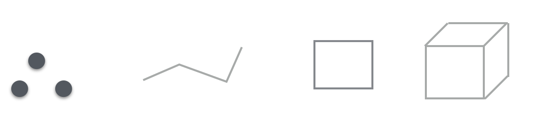
The freedom of marks is related to the visual channel **size** that data can be mapped to the graphics. From this perspective:
- Points can map two data fields to the point size (although in reality we only map one).
- Lines can map one data field to the line width.
- Rectangles in bar charts can map one data field to the width.
- Closed polygons cannot use data mapping to size.
The representation form of marks is related to the visual channel **color** that data can be mapped to the graphics. From this perspective:
- Representation form as closed graphics with fill color. For example, the `point` shape of point marks, the `rect` shape of interval marks, etc. The color channel is generally represented in the mark's fill color `fill`.
- Representation form as lines and hollow graphics. For example, all shapes of line marks, the `hollow` shape of interval marks, etc. The color channel is generally represented in the mark's line color `stroke`.
- Representation form as text. For example, text marks, wordCloud marks, etc. The color channel is generally represented in the mark's text color `fill`.
Currently, G2 supports the following built-in marks:
| type | Description | Properties | Examples |
| --------- | --------------------------------------------------------------------------------- | ------------------------------------------- | --------------------------------------------------------------------------------------------------------------------------------------------------------------------------------------------------------------------------------------------------------------------------------------------------------------------------------------------------------------------------------------------------------------------------------------------------------------------- |
| area | Use area fill to show data trends, suitable for stacking | [area](/en/manual/core/mark/area/) | 
 |
| box | Basic box plot, showing data distribution and outliers | [box](/en/manual/core/mark/box/) |
|
| box | Basic box plot, showing data distribution and outliers | [box](/en/manual/core/mark/box/) |  |
| boxplot | Box plot with aggregation calculation, auto-calculates quartiles | [boxplot](/en/manual/core/mark/boxplot/) |
|
| boxplot | Box plot with aggregation calculation, auto-calculates quartiles | [boxplot](/en/manual/core/mark/boxplot/) |  |
| cell | Divides space into blocks for visualization, used for calendar and heatmaps | [cell](/en/manual/core/mark/cell/) |
|
| cell | Divides space into blocks for visualization, used for calendar and heatmaps | [cell](/en/manual/core/mark/cell/) |  |
| chord | Chord diagram showing relationship strength between entities | [chord](/en/manual/core/mark/chord/) |
|
| chord | Chord diagram showing relationship strength between entities | [chord](/en/manual/core/mark/chord/) |  |
| density | Kernel density estimation, commonly used for violin plots | [density](/en/manual/core/mark/density/) |
|
| density | Kernel density estimation, commonly used for violin plots | [density](/en/manual/core/mark/density/) |  |
| gauge | Gauge chart showing progress indicators | [gauge](/en/manual/core/mark/gauge/) |
|
| gauge | Gauge chart showing progress indicators | [gauge](/en/manual/core/mark/gauge/) |  |
| heatmap | 2D density distribution using color encoding for data density | [heatmap](/en/manual/core/mark/heatmap/) |
|
| heatmap | 2D density distribution using color encoding for data density | [heatmap](/en/manual/core/mark/heatmap/) |  |
| image | Renders images at specified positions | [image](/en/manual/core/mark/image/) |
|
| image | Renders images at specified positions | [image](/en/manual/core/mark/image/) |  |
| interval | Basic bar/column chart, can generate pie charts through coordinate transformation | [interval](/en/manual/core/mark/interval/) |
|
| interval | Basic bar/column chart, can generate pie charts through coordinate transformation | [interval](/en/manual/core/mark/interval/) | 


 |
| line | Line chart supporting smooth curves and step lines | [line](/en/manual/core/mark/line/) |
|
| line | Line chart supporting smooth curves and step lines | [line](/en/manual/core/mark/line/) | 

 |
| lineX | Vertical auxiliary line, commonly used for marking specific values | [lineX](/en/manual/core/mark/line-x/) |
|
| lineX | Vertical auxiliary line, commonly used for marking specific values | [lineX](/en/manual/core/mark/line-x/) |  |
| lineY | Horizontal auxiliary line, commonly used for marking thresholds | [lineY](/en/manual/core/mark/line-y/) |
|
| lineY | Horizontal auxiliary line, commonly used for marking thresholds | [lineY](/en/manual/core/mark/line-y/) |  |
| link | Arrow mark showing relationships between nodes | [link](/en/manual/core/mark/link/) |
|
| link | Arrow mark showing relationships between nodes | [link](/en/manual/core/mark/link/) |  |
| liquid | Liquid chart showing percentage progress | [liquid](/en/manual/core/mark/liquid/) |
|
| liquid | Liquid chart showing percentage progress | [liquid](/en/manual/core/mark/liquid/) |  |
| point | Scatter plot encoding multi-dimensional data through size/color | [point](/en/manual/core/mark/point/) |
|
| point | Scatter plot encoding multi-dimensional data through size/color | [point](/en/manual/core/mark/point/) |  |
| polygon | Polygon mark, often used with layout algorithms | [polygon](/en/manual/core/mark/polygon/) |
|
| polygon | Polygon mark, often used with layout algorithms | [polygon](/en/manual/core/mark/polygon/) |  |
| range | Rectangle area mark for highlighting specific intervals | [range](/en/manual/core/mark/range/) |
|
| range | Rectangle area mark for highlighting specific intervals | [range](/en/manual/core/mark/range/) |  |
| rangeX | Vertical direction area mark | [rangeX](/en/manual/core/mark/range-x/) |
|
| rangeX | Vertical direction area mark | [rangeX](/en/manual/core/mark/range-x/) |  |
| rangeY | Horizontal direction area mark | [rangeY](/en/manual/core/mark/range-y/) |
|
| rangeY | Horizontal direction area mark | [rangeY](/en/manual/core/mark/range-y/) |  |
| rect | Basic rectangle mark for histograms/treemaps | [rect](/en/manual/core/mark/rect/) |
|
| rect | Basic rectangle mark for histograms/treemaps | [rect](/en/manual/core/mark/rect/) |  |
| shape | Fully customizable graphic mark | [shape](/en/manual/core/mark/shape/) |
|
| shape | Fully customizable graphic mark | [shape](/en/manual/core/mark/shape/) |  |
| text | Data label mark supporting rich text formatting | [text](/en/manual/core/mark/text/) |
|
| text | Data label mark supporting rich text formatting | [text](/en/manual/core/mark/text/) |  |
| vector | Vector field mark showing direction/strength dual-dimensional data | [vector](/en/manual/core/mark/vector/) |
|
| vector | Vector field mark showing direction/strength dual-dimensional data | [vector](/en/manual/core/mark/vector/) |  |
| wordCloud | Word cloud encoding word frequency through text size | [wordCloud](/en/manual/core/mark/wordcloud/) |
|
| wordCloud | Word cloud encoding word frequency through text size | [wordCloud](/en/manual/core/mark/wordcloud/) |  |
## Usage
Each graphic mark is an independent entity, with the mark type specified through the `type` property. Marks are the core atomic units of the G2 visualization system and are leaf nodes in the view tree. As "first-class citizens" of G2, their core components include the following concepts:
- **Data Related**
- [**data**](/en/manual/core/data/overview/) Visualization raw data source, supporting multiple data formats and dynamic update mechanisms. Data is mapped to graphic property space through encoding
- [**encode**](/en/manual/core/encode/) Encoding channels from data to graphic properties. For example, mapping height to the x-axis, weight to the y-axis, and gender to the color channel
- [**scale**](/en/manual/core/scale/overview/) Controls mapping rules from data to visual channels. Includes various scale types such as continuous, categorical, and temporal
- **Graphic Generation**
- [**transform**](/en/manual/core/transform/overview/) Data transformation. Supports data stacking (stack), grouping (dodge), jittering (jitter), symmetry (symmetric) and other adjustment methods to solve graphic overlap problems
- [**coordinate**](/en/manual/core/coordinate/overview/) Coordinate system transformation. Supports Cartesian coordinates, polar coordinates, spiral coordinates, etc. The same geometric mark presents different forms under different coordinate systems
- **Visual Appearance**
- [**style**](/en/manual/core/style/) Visual styles of graphic elements. Supports configuring fill color, stroke, opacity and other properties
- [**viewStyle**](/en/manual/core/chart/chart-component/#viewstyle) Style configuration for view container background, margins, etc.
- **Interactive Dynamics**
- [**animate**](/en/manual/core/animate/overview/) Controls three types of animations:
enter: New element animation
update: Data update animation
exit: Element destruction animation
- [**state**](/en/manual/core/state/) Defines style changes for elements in different interactive states (active/inactive/selected/unselected)
- **Chart Components**
- [**title**](/en/manual/component/title/) Chart title. Supports configuring title and subtitle
- [**label**](/en/manual/component/label/) Data label system. Supports anti-overlap layout, custom content, connector lines and other features, adapting to different mark types
- [**axis**](/en/manual/component/axis/) Coordinate axis. Supports custom configuration of ticks, grid lines, and labels
- [**legend**](/en/manual/component/legend/) Legend. Supports continuous/categorical legend interactions
- [**tooltip**](/en/manual/component/tooltip/) Tooltip information. Supports field mapping, formatting, and custom content
- [**scrollbar**](/en/manual/component/scrollbar/) Scrollbar component. Scrollbars are disabled by default. Solves the problem of too dense chart information that cannot be fully displayed
- [**slider**](/en/manual/component/slider/) Thumbnail axis component. Can be used to filter data, allowing users to focus on local data when data volume is large, serving as an auxiliary data viewing component
- **Extension Control**
- [**theme**](/en/manual/core/theme/overview/) Theme configuration system. Can modify default color palettes, fonts, component styles and other visual specifications, supporting theme switching
- [**interaction**](/en/manual/core/interaction/overview/) Interaction behavior library. Built-in element selection, view zooming, tooltip linking and other interaction modes
```js
({
type: 'mark',
data: [],
encode: {},
scale: {},
transform: [],
coordinate: {},
style: {},
viewStyle: {},
animate: {},
state: {},
label: {},
title: {},
axis: {},
legend: {},
tooltip: {},
scrollbar: {},
slider: {},
interaction: {},
theme: {},
});
```
## Configuration Hierarchy
Marks can be declared as top-level types as follows:
```js
({
type: 'interval',
encode: {
x: 'name',
y: 'value',
},
});
```
They can also be placed inside a View to add multiple marks to the view:
```js
({
type: 'view',
children: [{ type: 'line' }, { type: 'point' }],
});
```
## Features
Marks in G2 have many features, including templating, stackability, composability, etc. Proper use of these features allows for quick definition and use of various graphic styles, combining multiple marks to display richer graphic effects. These flexible and highly customizable features enable marks to meet multi-level needs from basic charts to complex visualizations.
### Graphic Templates
Each built-in mark is a graphic template that generates a series of **data-driven** graphics, where each graphic corresponds to one or more **data items**. For example, in the scatter plot below, there is only one Point mark, and this mark generates multiple circles, each circle corresponding to one data item.
```ts
import { Chart } from '@antv/g2';
const chart = new Chart({
container: 'container',
});
chart.options({
type: 'point',
data: {
type: 'fetch',
value:
'https://gw.alipayobjects.com/os/basement_prod/6b4aa721-b039-49b9-99d8-540b3f87d339.json',
},
encode: { x: 'height', y: 'weight', color: 'gender' },
});
chart.render();
```
In the line chart below, one line corresponds to multiple data items.
```ts
import { Chart } from '@antv/g2';
const chart = new Chart({
container: 'container',
});
chart.options({
type: 'line',
width: 900,
autoFit: true,
data: {
type: 'fetch',
value:
'https://gw.alipayobjects.com/os/bmw-prod/551d80c6-a6be-4f3c-a82a-abd739e12977.csv',
},
encode: { x: 'date', y: 'close' },
});
chart.render();
```
### Stackable
G2's marks are stackable, in other words: multiple marks can be added to one view to enrich chart display effects.
The following example adds both line and point marks to the chart:
```ts
import { Chart } from '@antv/g2';
const chart = new Chart({
container: 'container',
});
chart.options({
type: 'view',
data: [
{ year: '1991', value: 3 },
{ year: '1992', value: 4 },
{ year: '1993', value: 3.5 },
{ year: '1994', value: 5 },
{ year: '1995', value: 4.9 },
{ year: '1996', value: 6 },
{ year: '1997', value: 7 },
{ year: '1998', value: 9 },
{ year: '1999', value: 13 },
],
children: [
{
type: 'line',
encode: { x: 'year', y: 'value' },
},
{
type: 'point',
encode: { x: 'year', y: 'value' },
tooltip: false, // If you don't want to show tooltip for a specific mark, you can disable it individually
},
],
});
chart.render();
```
Of course, we can also combine more marks to draw a complex interval curve area chart with graphic meaning.
```ts
import { Chart } from '@antv/g2';
const chart = new Chart({
container: 'container',
});
chart.options({
type: 'view',
data: {
type: 'fetch',
value: 'https://assets.antv.antgroup.com/g2/range-spline-area.json',
transform: [
{
type: 'map',
callback: ([x, low, high, v2, v3]) => ({
x,
low,
high,
v2,
v3,
}),
},
],
},
scale: { x: { type: 'linear', tickCount: 10 } },
axis: { y: { title: false } },
children: [
{
type: 'area',
encode: { x: 'x', y: ['low', 'high'], shape: 'smooth' },
style: { fillOpacity: 0.65, fill: '#64b5f6', lineWidth: 1 },
},
{
type: 'point',
encode: { x: 'x', y: 'v2', size: 2, shape: 'point' },
tooltip: { items: ['v2'] },
},
{
type: 'line',
encode: { x: 'x', y: 'v3', color: '#FF6B3B', shape: 'smooth' },
},
],
});
chart.render();
```
### Composable
Marks in G2 can be composed into one mark through a mechanism and then used, for example, the point line chart above:
```ts
import { Chart } from '@antv/g2';
// Define a composite mark
function PointLine({ encode, data } = {}) {
return [
{ type: 'line', data, encode },
{ type: 'point', data, encode },
];
}
const data = [
{ year: '1991', value: 3 },
{ year: '1992', value: 4 },
{ year: '1993', value: 3.5 },
{ year: '1994', value: 5 },
{ year: '1995', value: 4.9 },
{ year: '1996', value: 6 },
{ year: '1997', value: 7 },
{ year: '1998', value: 9 },
{ year: '1999', value: 13 },
];
const chart = new Chart({
container: 'container',
});
const spec = {
type: PointLine,
data,
encode: { x: 'year', y: 'value' },
};
// Configure the composite mark with Spec
chart.options(spec);
chart.render();
```
The composability feature of marks provides a simple yet powerful way to extend the capabilities of G2. G2 also uses this mechanism to implement some rather complex marks, such as Sankey diagrams: using two Polygon marks for composition.
```ts
import { Chart } from '@antv/g2';
const chart = new Chart({
container: 'container',
width: 900,
height: 600,
});
// Sankey mark
chart.options({
type: 'sankey',
layout: { nodeAlign: 'center', nodePadding: 0.03 },
data: {
type: 'fetch',
value: 'https://assets.antv.antgroup.com/g2/energy.json',
transform: [
{
type: 'custom',
callback: (data) => ({
links: data,
}),
},
],
},
style: {
labelSpacing: 3,
labelFontWeight: 'bold',
nodeStrokeWidth: 1.2,
linkFillOpacity: 0.4,
},
});
chart.render();
```
### Support for Multiple Transforms
G2 marks support multiple [transforms](/en/manual/core/transform/overview/), allowing flexible adjustment of the geometric shape, style, or spatial layout of marks to achieve rich visual presentation effects. These transforms can not only be used for basic graphic transformations such as grouping, stacking, and binning, but can also be combined with data-driven dynamic adjustments to adapt to complex visualization scenario requirements. Through simple configuration, users can achieve intuitive mapping between data and visual elements in charts, improving chart expressiveness and readability.
Below is a color-categorized histogram after [binX](/en/manual/core/transform/bin-x/) and [stackY](/en/manual/core/transform/stack-y/) transforms.
```ts
import { Chart } from '@antv/g2';
const chart = new Chart({
container: 'container',
});
chart.options({
type: 'rect',
autoFit: true,
data: {
type: 'fetch',
value: 'https://assets.antv.antgroup.com/g2/athletes.json',
},
encode: { x: 'weight', color: 'sex' },
transform: [
{ type: 'binX', y: 'count' },
{ type: 'stackY', orderBy: 'series' },
],
style: { inset: 0.5 },
});
chart.render();
```
By configuring multiple transforms, we can obtain complex charts with specific representation forms. Below is an aggregated normalized stacked bar chart obtained after multiple transforms including [normalizeY](/en/manual/core/transform/normalize-y/) and [stackY](/en/manual/core/transform/stack-y/).
```ts
import { Chart } from '@antv/g2';
const chart = new Chart({
container: 'container',
});
chart.options({
type: 'interval',
autoFit: true,
data: {
type: 'fetch',
value:
'https://gw.alipayobjects.com/os/bmw-prod/87b2ff47-2a33-4509-869c-dae4cdd81163.csv',
transform: [{ type: 'filter', callback: (d) => d.year === 2000 }],
},
encode: { x: 'age', y: 'people', color: 'sex' },
transform: [
{ type: 'groupX', y: 'sum' },
{ type: 'stackY' },
{ type: 'normalizeY' },
],
scale: { color: { type: 'ordinal', range: ['#ca8861', '#675193'] } },
coordinate: { transform: [{ type: 'transpose' }] },
axis: { y: { labelFormatter: '.0%' } },
labels: [{ text: 'people', position: 'inside', fill: 'white' }],
tooltip: { items: [{ channel: 'y', valueFormatter: '.0%' }] },
});
chart.render();
```
### Can Serve as Annotations
**Annotations** are graphic elements used to explain and emphasize areas or information that need focused attention in visualization charts. In G2 5.0, dedicated annotation components are not provided separately. Instead, annotation functionality is achieved through flexible mark configuration. In other words, annotations are actually a form of mark expression, where some marks (such as Text, Image, etc.) can be used in annotation scenarios. This design approach unifies the usage logic of marks and annotations, giving users greater freedom and flexibility to easily meet various annotation needs.
#### Transforms
Since annotations are also a type of mark, they can also perform transforms. For example, the [Select](/en/manual/core/transform/select/) transform below.
The Select mark transform provides the ability to select data from a group of graphics based on specified channels and selectors. For example, in the following example, the country with the largest GDP in each continent is annotated.
```ts
import { Chart } from '@antv/g2';
const chart = new Chart({
container: 'container',
});
chart.options({
type: 'view',
data: {
type: 'fetch',
value:
'https://gw.alipayobjects.com/os/bmw-prod/1ecf85d2-8279-46a1-898d-d2e1814617f9.json',
},
children: [
{
type: 'point',
encode: { x: 'GDP', y: 'LifeExpectancy', color: 'Continent' },
},
{
type: 'text',
encode: {
text: 'Country',
x: 'GDP',
y: 'LifeExpectancy',
series: 'Continent',
},
// Group graphics by series, which is Continent
// Select through x channel, select the maximum, which is the largest GDP
transform: [{ type: 'select', channel: 'x', selector: 'max' }],
style: { textAlign: 'end' },
},
],
});
chart.render();
```
For simple text marks that don't require grouping, you can use [Data Labels](/en/manual/component/label/), otherwise consider the above approach.
#### Positioning
In grammar of graphics, the core of annotations lies in accurate positioning to appropriate locations for effective communication of key information. In G2, annotation positioning supports the following three methods:
- **Data-driven positioning**: Based on data values, bind annotations to specific chart data points or data ranges. This method can dynamically adapt to data changes, for example, when data updates or animation interactions occur, annotation positions will adjust accordingly.
- **Absolute positioning**: Place annotations at specific positions on the canvas through fixed pixel coordinates, with no direct relationship to data. This method is suitable for adding titles, descriptions, or other annotation content unrelated to data logic.
- **Relative positioning**: Define annotation positions through percentage or relative position parameters with reference to coordinate systems or graphic areas. This method is suitable for providing flexible layout when emphasizing or annotating areas of the overall chart.
##### Data-driven
In G2, you can specify data-driven positioning through `data`. For example, in the following example where we want to annotate the safe daily intake of sugar and fat, it can be implemented as follows.
```ts
import { Chart } from '@antv/g2';
const chart = new Chart({
container: 'container',
});
const lineStyle = { stroke: '#000', strokeOpacity: 0.45, lineDash: [3, 3] };
chart.options({
type: 'view',
autoFit: true,
children: [
{
type: 'point',
data: [
{ x: 95, y: 95, z: 13.8, name: 'BE', country: 'Belgium' },
{ x: 86.5, y: 102.9, z: 14.7, name: 'DE', country: 'Germany' },
{ x: 80.8, y: 91.5, z: 15.8, name: 'FI', country: 'Finland' },
{ x: 80.4, y: 102.5, z: 12, name: 'NL', country: 'Netherlands' },
{ x: 80.3, y: 86.1, z: 11.8, name: 'SE', country: 'Sweden' },
{ x: 78.4, y: 70.1, z: 16.6, name: 'ES', country: 'Spain' },
{ x: 74.2, y: 68.5, z: 14.5, name: 'FR', country: 'France' },
{ x: 73.5, y: 83.1, z: 10, name: 'NO', country: 'Norway' },
{ x: 71, y: 93.2, z: 24.7, name: 'UK', country: 'United Kingdom' },
{ x: 69.2, y: 57.6, z: 10.4, name: 'IT', country: 'Italy' },
{ x: 68.6, y: 20, z: 16, name: 'RU', country: 'Russia' },
{ x: 65.5, y: 126.4, z: 35.3, name: 'US', country: 'United States' },
{ x: 65.4, y: 50.8, z: 28.5, name: 'HU', country: 'Hungary' },
{ x: 63.4, y: 51.8, z: 15.4, name: 'PT', country: 'Portugal' },
{ x: 64, y: 82.9, z: 31.3, name: 'NZ', country: 'New Zealand' },
],
encode: { x: 'x', y: 'y', size: 'z', shape: 'point' },
scale: {
x: { nice: true },
y: { nice: true, domainMax: 165, zero: true },
size: { range: [10, 40] },
},
style: { stroke: '#1890ff', fillOpacity: 0.3, fill: '#1890ff' },
legend: false,
labels: [
{ text: 'name', position: 'inside', fill: '#1890ff', stroke: '#fff' },
],
},
{
type: 'lineY',
data: [50],
style: lineStyle,
labels: [
{
text: 'Safe sugar intake 50g/day',
position: 'right',
textBaseline: 'bottom',
fill: '#000',
fillOpacity: 0.45,
background: true,
backgroundFill: '#000',
backgroundOpacity: 0.15,
},
],
},
{
type: 'lineX',
data: [65],
style: lineStyle,
labels: [
{
text: 'Safe fat intake 65g/day',
position: 'top-left',
textBaseline: 'bottom',
fill: '#000',
fillOpacity: 0.45,
background: true,
backgroundFill: '#000',
backgroundOpacity: 0.15,
},
],
},
],
});
chart.render();
```
In addition to data-driven positioning, G2 also provides non-data-driven positioning methods. By specifying x and y properties through `style`, x and y have the following two types, corresponding to **absolute positioning** and **relative positioning** of annotations.
##### Absolute Positioning
- **x and y as numbers**: Coordinates in pixel units.
```ts
import { Chart } from '@antv/g2';
const chart = new Chart({
container: 'container',
});
chart.options({
type: 'view',
children: [
{
type: 'interval',
data: [
{ genre: 'Sports', sold: 275 },
{ genre: 'Strategy', sold: 115 },
{ genre: 'Action', sold: 120 },
{ genre: 'Shooter', sold: 350 },
{ genre: 'Other', sold: 150 },
],
encode: { y: 'sold', color: 'genre' },
transform: [{ type: 'stackY' }],
coordinate: { type: 'theta', innerRadius: 0.5 },
},
{
type: 'text',
style: {
x: 290, // Configure specific pixel coordinates
y: 200,
text: 'hello',
textAlign: 'center',
fontSize: 60,
textBaseline: 'middle',
},
},
],
});
chart.render();
```
##### Relative Positioning
- **x and y as percentages**: Percentage of content area.
```ts
import { Chart } from '@antv/g2';
const chart = new Chart({
container: 'container',
});
chart.options({
type: 'view',
children: [
{
type: 'interval',
data: [
{ genre: 'Sports', sold: 275 },
{ genre: 'Strategy', sold: 115 },
{ genre: 'Action', sold: 120 },
{ genre: 'Shooter', sold: 350 },
{ genre: 'Other', sold: 150 },
],
encode: { y: 'sold', color: 'genre' },
transform: [{ type: 'stackY' }],
coordinate: { type: 'theta', innerRadius: 0.5 },
},
{
type: 'text',
style: {
x: '50%', // Configure percentage coordinates
y: '50%',
text: 'hello',
textAlign: 'center',
fontSize: 60,
textBaseline: 'middle',
},
},
],
});
chart.render();
```
## Examples
- How to customize mark shapes?
Each mark can customize shapes, and shapes determine the final presentation form of marks. Customizing shapes mainly involves three steps:
- Define shape component.
- Register shape.
- Use shape.
First, let's see how to define a shape component. A shape component is a function that takes the graphic style _style_ and context _context_, and returns a render function _render_. Where _style_ is the processed options specified through `mark.style`, and _context_ contains the _document_ for creating graphics with [@antv/g](https://g.antv.antgroup.com/).
The returned _render_ function takes the graphic control points _P_, mapped values _value_, and default values _defaults_, and returns @antv/g graphics. Where _P_ is an array of canvas coordinates, _value_ is the value processed through `mark.encode`, and _defaults_ is the value specified in the theme's `theme.mark.shape`. A shape component definition looks roughly like this:
```js
function ShapeTriangle(style, context) {
const { document } = context;
return (P, value, defaults) => {
return document.createElement('rect', {
//...
});
};
}
```
Next is registering the shape, which is completed by calling `G2.register('shape.${mark}.${shape}', Shape)`. Where _mark_ is the name of the mark, _shape_ is the name of the shape, and _Shape_ is the defined shape component. For example, registering a triangle shape for the Interval mark:
```js
import { register } from '@antv/g2';
register('shape.interval.triangle', ShapeTriangle);
```
Finally, using the shape can be done through `mark.encode` or `mark.style`.
```js
({
type: 'interval',
encode: { shape: 'triangle' },
// or
style: { shape: 'triangle' },
});
```
Below is a complete example showing how to customize shapes.
```ts
import { register, Chart } from '@antv/g2';
// Define graphic component
function ShapeTriangle(style, context) {
const { document } = context;
return (P, value, defaults) => {
const { color: defaultColor } = defaults;
const [p0, p1, p2, p3] = P;
const pm = [(p0[0] + p1[0]) / 2, p0[1]];
const { color = defaultColor } = value;
return document.createElement('polygon', {
style: {
...style,
fill: color,
points: [pm, p2, p3],
},
});
};
}
// Register the triangle
register('shape.interval.triangle', ShapeTriangle);
// Initialize chart
const chart = new Chart({
container: 'container',
});
chart.options({
type: 'interval',
data: [
{ genre: 'Sports', sold: 275 },
{ genre: 'Strategy', sold: 115 },
{ genre: 'Action', sold: 120 },
{ genre: 'Shooter', sold: 350 },
{ genre: 'Other', sold: 150 },
],
encode: {
x: 'genre',
y: 'sold',
color: 'genre',
shape: 'triangle', // Use this shape
},
});
chart.render();
```
|
## Usage
Each graphic mark is an independent entity, with the mark type specified through the `type` property. Marks are the core atomic units of the G2 visualization system and are leaf nodes in the view tree. As "first-class citizens" of G2, their core components include the following concepts:
- **Data Related**
- [**data**](/en/manual/core/data/overview/) Visualization raw data source, supporting multiple data formats and dynamic update mechanisms. Data is mapped to graphic property space through encoding
- [**encode**](/en/manual/core/encode/) Encoding channels from data to graphic properties. For example, mapping height to the x-axis, weight to the y-axis, and gender to the color channel
- [**scale**](/en/manual/core/scale/overview/) Controls mapping rules from data to visual channels. Includes various scale types such as continuous, categorical, and temporal
- **Graphic Generation**
- [**transform**](/en/manual/core/transform/overview/) Data transformation. Supports data stacking (stack), grouping (dodge), jittering (jitter), symmetry (symmetric) and other adjustment methods to solve graphic overlap problems
- [**coordinate**](/en/manual/core/coordinate/overview/) Coordinate system transformation. Supports Cartesian coordinates, polar coordinates, spiral coordinates, etc. The same geometric mark presents different forms under different coordinate systems
- **Visual Appearance**
- [**style**](/en/manual/core/style/) Visual styles of graphic elements. Supports configuring fill color, stroke, opacity and other properties
- [**viewStyle**](/en/manual/core/chart/chart-component/#viewstyle) Style configuration for view container background, margins, etc.
- **Interactive Dynamics**
- [**animate**](/en/manual/core/animate/overview/) Controls three types of animations:
enter: New element animation
update: Data update animation
exit: Element destruction animation
- [**state**](/en/manual/core/state/) Defines style changes for elements in different interactive states (active/inactive/selected/unselected)
- **Chart Components**
- [**title**](/en/manual/component/title/) Chart title. Supports configuring title and subtitle
- [**label**](/en/manual/component/label/) Data label system. Supports anti-overlap layout, custom content, connector lines and other features, adapting to different mark types
- [**axis**](/en/manual/component/axis/) Coordinate axis. Supports custom configuration of ticks, grid lines, and labels
- [**legend**](/en/manual/component/legend/) Legend. Supports continuous/categorical legend interactions
- [**tooltip**](/en/manual/component/tooltip/) Tooltip information. Supports field mapping, formatting, and custom content
- [**scrollbar**](/en/manual/component/scrollbar/) Scrollbar component. Scrollbars are disabled by default. Solves the problem of too dense chart information that cannot be fully displayed
- [**slider**](/en/manual/component/slider/) Thumbnail axis component. Can be used to filter data, allowing users to focus on local data when data volume is large, serving as an auxiliary data viewing component
- **Extension Control**
- [**theme**](/en/manual/core/theme/overview/) Theme configuration system. Can modify default color palettes, fonts, component styles and other visual specifications, supporting theme switching
- [**interaction**](/en/manual/core/interaction/overview/) Interaction behavior library. Built-in element selection, view zooming, tooltip linking and other interaction modes
```js
({
type: 'mark',
data: [],
encode: {},
scale: {},
transform: [],
coordinate: {},
style: {},
viewStyle: {},
animate: {},
state: {},
label: {},
title: {},
axis: {},
legend: {},
tooltip: {},
scrollbar: {},
slider: {},
interaction: {},
theme: {},
});
```
## Configuration Hierarchy
Marks can be declared as top-level types as follows:
```js
({
type: 'interval',
encode: {
x: 'name',
y: 'value',
},
});
```
They can also be placed inside a View to add multiple marks to the view:
```js
({
type: 'view',
children: [{ type: 'line' }, { type: 'point' }],
});
```
## Features
Marks in G2 have many features, including templating, stackability, composability, etc. Proper use of these features allows for quick definition and use of various graphic styles, combining multiple marks to display richer graphic effects. These flexible and highly customizable features enable marks to meet multi-level needs from basic charts to complex visualizations.
### Graphic Templates
Each built-in mark is a graphic template that generates a series of **data-driven** graphics, where each graphic corresponds to one or more **data items**. For example, in the scatter plot below, there is only one Point mark, and this mark generates multiple circles, each circle corresponding to one data item.
```ts
import { Chart } from '@antv/g2';
const chart = new Chart({
container: 'container',
});
chart.options({
type: 'point',
data: {
type: 'fetch',
value:
'https://gw.alipayobjects.com/os/basement_prod/6b4aa721-b039-49b9-99d8-540b3f87d339.json',
},
encode: { x: 'height', y: 'weight', color: 'gender' },
});
chart.render();
```
In the line chart below, one line corresponds to multiple data items.
```ts
import { Chart } from '@antv/g2';
const chart = new Chart({
container: 'container',
});
chart.options({
type: 'line',
width: 900,
autoFit: true,
data: {
type: 'fetch',
value:
'https://gw.alipayobjects.com/os/bmw-prod/551d80c6-a6be-4f3c-a82a-abd739e12977.csv',
},
encode: { x: 'date', y: 'close' },
});
chart.render();
```
### Stackable
G2's marks are stackable, in other words: multiple marks can be added to one view to enrich chart display effects.
The following example adds both line and point marks to the chart:
```ts
import { Chart } from '@antv/g2';
const chart = new Chart({
container: 'container',
});
chart.options({
type: 'view',
data: [
{ year: '1991', value: 3 },
{ year: '1992', value: 4 },
{ year: '1993', value: 3.5 },
{ year: '1994', value: 5 },
{ year: '1995', value: 4.9 },
{ year: '1996', value: 6 },
{ year: '1997', value: 7 },
{ year: '1998', value: 9 },
{ year: '1999', value: 13 },
],
children: [
{
type: 'line',
encode: { x: 'year', y: 'value' },
},
{
type: 'point',
encode: { x: 'year', y: 'value' },
tooltip: false, // If you don't want to show tooltip for a specific mark, you can disable it individually
},
],
});
chart.render();
```
Of course, we can also combine more marks to draw a complex interval curve area chart with graphic meaning.
```ts
import { Chart } from '@antv/g2';
const chart = new Chart({
container: 'container',
});
chart.options({
type: 'view',
data: {
type: 'fetch',
value: 'https://assets.antv.antgroup.com/g2/range-spline-area.json',
transform: [
{
type: 'map',
callback: ([x, low, high, v2, v3]) => ({
x,
low,
high,
v2,
v3,
}),
},
],
},
scale: { x: { type: 'linear', tickCount: 10 } },
axis: { y: { title: false } },
children: [
{
type: 'area',
encode: { x: 'x', y: ['low', 'high'], shape: 'smooth' },
style: { fillOpacity: 0.65, fill: '#64b5f6', lineWidth: 1 },
},
{
type: 'point',
encode: { x: 'x', y: 'v2', size: 2, shape: 'point' },
tooltip: { items: ['v2'] },
},
{
type: 'line',
encode: { x: 'x', y: 'v3', color: '#FF6B3B', shape: 'smooth' },
},
],
});
chart.render();
```
### Composable
Marks in G2 can be composed into one mark through a mechanism and then used, for example, the point line chart above:
```ts
import { Chart } from '@antv/g2';
// Define a composite mark
function PointLine({ encode, data } = {}) {
return [
{ type: 'line', data, encode },
{ type: 'point', data, encode },
];
}
const data = [
{ year: '1991', value: 3 },
{ year: '1992', value: 4 },
{ year: '1993', value: 3.5 },
{ year: '1994', value: 5 },
{ year: '1995', value: 4.9 },
{ year: '1996', value: 6 },
{ year: '1997', value: 7 },
{ year: '1998', value: 9 },
{ year: '1999', value: 13 },
];
const chart = new Chart({
container: 'container',
});
const spec = {
type: PointLine,
data,
encode: { x: 'year', y: 'value' },
};
// Configure the composite mark with Spec
chart.options(spec);
chart.render();
```
The composability feature of marks provides a simple yet powerful way to extend the capabilities of G2. G2 also uses this mechanism to implement some rather complex marks, such as Sankey diagrams: using two Polygon marks for composition.
```ts
import { Chart } from '@antv/g2';
const chart = new Chart({
container: 'container',
width: 900,
height: 600,
});
// Sankey mark
chart.options({
type: 'sankey',
layout: { nodeAlign: 'center', nodePadding: 0.03 },
data: {
type: 'fetch',
value: 'https://assets.antv.antgroup.com/g2/energy.json',
transform: [
{
type: 'custom',
callback: (data) => ({
links: data,
}),
},
],
},
style: {
labelSpacing: 3,
labelFontWeight: 'bold',
nodeStrokeWidth: 1.2,
linkFillOpacity: 0.4,
},
});
chart.render();
```
### Support for Multiple Transforms
G2 marks support multiple [transforms](/en/manual/core/transform/overview/), allowing flexible adjustment of the geometric shape, style, or spatial layout of marks to achieve rich visual presentation effects. These transforms can not only be used for basic graphic transformations such as grouping, stacking, and binning, but can also be combined with data-driven dynamic adjustments to adapt to complex visualization scenario requirements. Through simple configuration, users can achieve intuitive mapping between data and visual elements in charts, improving chart expressiveness and readability.
Below is a color-categorized histogram after [binX](/en/manual/core/transform/bin-x/) and [stackY](/en/manual/core/transform/stack-y/) transforms.
```ts
import { Chart } from '@antv/g2';
const chart = new Chart({
container: 'container',
});
chart.options({
type: 'rect',
autoFit: true,
data: {
type: 'fetch',
value: 'https://assets.antv.antgroup.com/g2/athletes.json',
},
encode: { x: 'weight', color: 'sex' },
transform: [
{ type: 'binX', y: 'count' },
{ type: 'stackY', orderBy: 'series' },
],
style: { inset: 0.5 },
});
chart.render();
```
By configuring multiple transforms, we can obtain complex charts with specific representation forms. Below is an aggregated normalized stacked bar chart obtained after multiple transforms including [normalizeY](/en/manual/core/transform/normalize-y/) and [stackY](/en/manual/core/transform/stack-y/).
```ts
import { Chart } from '@antv/g2';
const chart = new Chart({
container: 'container',
});
chart.options({
type: 'interval',
autoFit: true,
data: {
type: 'fetch',
value:
'https://gw.alipayobjects.com/os/bmw-prod/87b2ff47-2a33-4509-869c-dae4cdd81163.csv',
transform: [{ type: 'filter', callback: (d) => d.year === 2000 }],
},
encode: { x: 'age', y: 'people', color: 'sex' },
transform: [
{ type: 'groupX', y: 'sum' },
{ type: 'stackY' },
{ type: 'normalizeY' },
],
scale: { color: { type: 'ordinal', range: ['#ca8861', '#675193'] } },
coordinate: { transform: [{ type: 'transpose' }] },
axis: { y: { labelFormatter: '.0%' } },
labels: [{ text: 'people', position: 'inside', fill: 'white' }],
tooltip: { items: [{ channel: 'y', valueFormatter: '.0%' }] },
});
chart.render();
```
### Can Serve as Annotations
**Annotations** are graphic elements used to explain and emphasize areas or information that need focused attention in visualization charts. In G2 5.0, dedicated annotation components are not provided separately. Instead, annotation functionality is achieved through flexible mark configuration. In other words, annotations are actually a form of mark expression, where some marks (such as Text, Image, etc.) can be used in annotation scenarios. This design approach unifies the usage logic of marks and annotations, giving users greater freedom and flexibility to easily meet various annotation needs.
#### Transforms
Since annotations are also a type of mark, they can also perform transforms. For example, the [Select](/en/manual/core/transform/select/) transform below.
The Select mark transform provides the ability to select data from a group of graphics based on specified channels and selectors. For example, in the following example, the country with the largest GDP in each continent is annotated.
```ts
import { Chart } from '@antv/g2';
const chart = new Chart({
container: 'container',
});
chart.options({
type: 'view',
data: {
type: 'fetch',
value:
'https://gw.alipayobjects.com/os/bmw-prod/1ecf85d2-8279-46a1-898d-d2e1814617f9.json',
},
children: [
{
type: 'point',
encode: { x: 'GDP', y: 'LifeExpectancy', color: 'Continent' },
},
{
type: 'text',
encode: {
text: 'Country',
x: 'GDP',
y: 'LifeExpectancy',
series: 'Continent',
},
// Group graphics by series, which is Continent
// Select through x channel, select the maximum, which is the largest GDP
transform: [{ type: 'select', channel: 'x', selector: 'max' }],
style: { textAlign: 'end' },
},
],
});
chart.render();
```
For simple text marks that don't require grouping, you can use [Data Labels](/en/manual/component/label/), otherwise consider the above approach.
#### Positioning
In grammar of graphics, the core of annotations lies in accurate positioning to appropriate locations for effective communication of key information. In G2, annotation positioning supports the following three methods:
- **Data-driven positioning**: Based on data values, bind annotations to specific chart data points or data ranges. This method can dynamically adapt to data changes, for example, when data updates or animation interactions occur, annotation positions will adjust accordingly.
- **Absolute positioning**: Place annotations at specific positions on the canvas through fixed pixel coordinates, with no direct relationship to data. This method is suitable for adding titles, descriptions, or other annotation content unrelated to data logic.
- **Relative positioning**: Define annotation positions through percentage or relative position parameters with reference to coordinate systems or graphic areas. This method is suitable for providing flexible layout when emphasizing or annotating areas of the overall chart.
##### Data-driven
In G2, you can specify data-driven positioning through `data`. For example, in the following example where we want to annotate the safe daily intake of sugar and fat, it can be implemented as follows.
```ts
import { Chart } from '@antv/g2';
const chart = new Chart({
container: 'container',
});
const lineStyle = { stroke: '#000', strokeOpacity: 0.45, lineDash: [3, 3] };
chart.options({
type: 'view',
autoFit: true,
children: [
{
type: 'point',
data: [
{ x: 95, y: 95, z: 13.8, name: 'BE', country: 'Belgium' },
{ x: 86.5, y: 102.9, z: 14.7, name: 'DE', country: 'Germany' },
{ x: 80.8, y: 91.5, z: 15.8, name: 'FI', country: 'Finland' },
{ x: 80.4, y: 102.5, z: 12, name: 'NL', country: 'Netherlands' },
{ x: 80.3, y: 86.1, z: 11.8, name: 'SE', country: 'Sweden' },
{ x: 78.4, y: 70.1, z: 16.6, name: 'ES', country: 'Spain' },
{ x: 74.2, y: 68.5, z: 14.5, name: 'FR', country: 'France' },
{ x: 73.5, y: 83.1, z: 10, name: 'NO', country: 'Norway' },
{ x: 71, y: 93.2, z: 24.7, name: 'UK', country: 'United Kingdom' },
{ x: 69.2, y: 57.6, z: 10.4, name: 'IT', country: 'Italy' },
{ x: 68.6, y: 20, z: 16, name: 'RU', country: 'Russia' },
{ x: 65.5, y: 126.4, z: 35.3, name: 'US', country: 'United States' },
{ x: 65.4, y: 50.8, z: 28.5, name: 'HU', country: 'Hungary' },
{ x: 63.4, y: 51.8, z: 15.4, name: 'PT', country: 'Portugal' },
{ x: 64, y: 82.9, z: 31.3, name: 'NZ', country: 'New Zealand' },
],
encode: { x: 'x', y: 'y', size: 'z', shape: 'point' },
scale: {
x: { nice: true },
y: { nice: true, domainMax: 165, zero: true },
size: { range: [10, 40] },
},
style: { stroke: '#1890ff', fillOpacity: 0.3, fill: '#1890ff' },
legend: false,
labels: [
{ text: 'name', position: 'inside', fill: '#1890ff', stroke: '#fff' },
],
},
{
type: 'lineY',
data: [50],
style: lineStyle,
labels: [
{
text: 'Safe sugar intake 50g/day',
position: 'right',
textBaseline: 'bottom',
fill: '#000',
fillOpacity: 0.45,
background: true,
backgroundFill: '#000',
backgroundOpacity: 0.15,
},
],
},
{
type: 'lineX',
data: [65],
style: lineStyle,
labels: [
{
text: 'Safe fat intake 65g/day',
position: 'top-left',
textBaseline: 'bottom',
fill: '#000',
fillOpacity: 0.45,
background: true,
backgroundFill: '#000',
backgroundOpacity: 0.15,
},
],
},
],
});
chart.render();
```
In addition to data-driven positioning, G2 also provides non-data-driven positioning methods. By specifying x and y properties through `style`, x and y have the following two types, corresponding to **absolute positioning** and **relative positioning** of annotations.
##### Absolute Positioning
- **x and y as numbers**: Coordinates in pixel units.
```ts
import { Chart } from '@antv/g2';
const chart = new Chart({
container: 'container',
});
chart.options({
type: 'view',
children: [
{
type: 'interval',
data: [
{ genre: 'Sports', sold: 275 },
{ genre: 'Strategy', sold: 115 },
{ genre: 'Action', sold: 120 },
{ genre: 'Shooter', sold: 350 },
{ genre: 'Other', sold: 150 },
],
encode: { y: 'sold', color: 'genre' },
transform: [{ type: 'stackY' }],
coordinate: { type: 'theta', innerRadius: 0.5 },
},
{
type: 'text',
style: {
x: 290, // Configure specific pixel coordinates
y: 200,
text: 'hello',
textAlign: 'center',
fontSize: 60,
textBaseline: 'middle',
},
},
],
});
chart.render();
```
##### Relative Positioning
- **x and y as percentages**: Percentage of content area.
```ts
import { Chart } from '@antv/g2';
const chart = new Chart({
container: 'container',
});
chart.options({
type: 'view',
children: [
{
type: 'interval',
data: [
{ genre: 'Sports', sold: 275 },
{ genre: 'Strategy', sold: 115 },
{ genre: 'Action', sold: 120 },
{ genre: 'Shooter', sold: 350 },
{ genre: 'Other', sold: 150 },
],
encode: { y: 'sold', color: 'genre' },
transform: [{ type: 'stackY' }],
coordinate: { type: 'theta', innerRadius: 0.5 },
},
{
type: 'text',
style: {
x: '50%', // Configure percentage coordinates
y: '50%',
text: 'hello',
textAlign: 'center',
fontSize: 60,
textBaseline: 'middle',
},
},
],
});
chart.render();
```
## Examples
- How to customize mark shapes?
Each mark can customize shapes, and shapes determine the final presentation form of marks. Customizing shapes mainly involves three steps:
- Define shape component.
- Register shape.
- Use shape.
First, let's see how to define a shape component. A shape component is a function that takes the graphic style _style_ and context _context_, and returns a render function _render_. Where _style_ is the processed options specified through `mark.style`, and _context_ contains the _document_ for creating graphics with [@antv/g](https://g.antv.antgroup.com/).
The returned _render_ function takes the graphic control points _P_, mapped values _value_, and default values _defaults_, and returns @antv/g graphics. Where _P_ is an array of canvas coordinates, _value_ is the value processed through `mark.encode`, and _defaults_ is the value specified in the theme's `theme.mark.shape`. A shape component definition looks roughly like this:
```js
function ShapeTriangle(style, context) {
const { document } = context;
return (P, value, defaults) => {
return document.createElement('rect', {
//...
});
};
}
```
Next is registering the shape, which is completed by calling `G2.register('shape.${mark}.${shape}', Shape)`. Where _mark_ is the name of the mark, _shape_ is the name of the shape, and _Shape_ is the defined shape component. For example, registering a triangle shape for the Interval mark:
```js
import { register } from '@antv/g2';
register('shape.interval.triangle', ShapeTriangle);
```
Finally, using the shape can be done through `mark.encode` or `mark.style`.
```js
({
type: 'interval',
encode: { shape: 'triangle' },
// or
style: { shape: 'triangle' },
});
```
Below is a complete example showing how to customize shapes.
```ts
import { register, Chart } from '@antv/g2';
// Define graphic component
function ShapeTriangle(style, context) {
const { document } = context;
return (P, value, defaults) => {
const { color: defaultColor } = defaults;
const [p0, p1, p2, p3] = P;
const pm = [(p0[0] + p1[0]) / 2, p0[1]];
const { color = defaultColor } = value;
return document.createElement('polygon', {
style: {
...style,
fill: color,
points: [pm, p2, p3],
},
});
};
}
// Register the triangle
register('shape.interval.triangle', ShapeTriangle);
// Initialize chart
const chart = new Chart({
container: 'container',
});
chart.options({
type: 'interval',
data: [
{ genre: 'Sports', sold: 275 },
{ genre: 'Strategy', sold: 115 },
{ genre: 'Action', sold: 120 },
{ genre: 'Shooter', sold: 350 },
{ genre: 'Other', sold: 150 },
],
encode: {
x: 'genre',
y: 'sold',
color: 'genre',
shape: 'triangle', // Use this shape
},
});
chart.render();
```