---
title: "Line Chart"
description: "Connect successive observations to show trends. Explore line chart data requirements, comparisons across series, and G2 examples."
language: "en"
canonical: "https://g2.antv.antgroup.com/en/charts/line/"
version: "5.4.8"
---
[Resource index](/llms.txt)
 ## Introduction to Line Charts
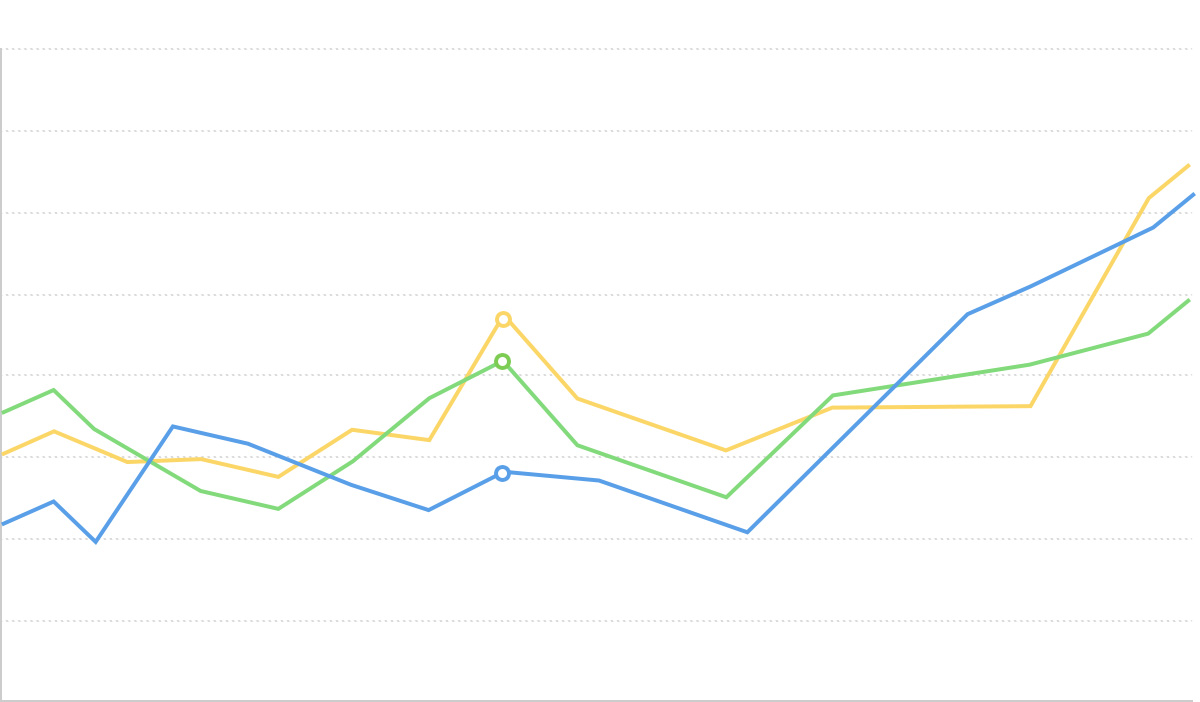
A line chart is a statistical chart that connects data points in chronological or categorical order to form a line, used to display data trends over time or ordered categories. Through the rise or fall of the line, it can intuitively show the speed, amplitude, range, and periodicity of data changes.
Line charts are particularly suitable for displaying continuous time series data changes and can effectively reflect data trends, fluctuations, periodicity, and anomalies. When comparing multiple data series, line charts use lines of different colors or styles to clearly show the comparison and relationships between different data series.
Compared to area charts, line charts focus more on showing trends and trajectories of data changes rather than total quantities. Compared to bar charts, line charts are more suitable for showing continuous trends rather than discrete numerical comparisons.
**Other Names**: Line Chart
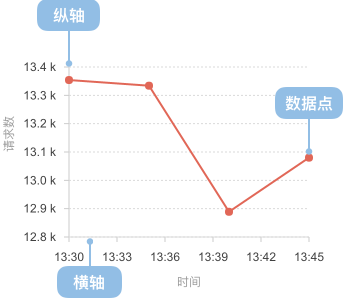
## Components of a Line Chart
### Basic Line Chart
## Introduction to Line Charts
A line chart is a statistical chart that connects data points in chronological or categorical order to form a line, used to display data trends over time or ordered categories. Through the rise or fall of the line, it can intuitively show the speed, amplitude, range, and periodicity of data changes.
Line charts are particularly suitable for displaying continuous time series data changes and can effectively reflect data trends, fluctuations, periodicity, and anomalies. When comparing multiple data series, line charts use lines of different colors or styles to clearly show the comparison and relationships between different data series.
Compared to area charts, line charts focus more on showing trends and trajectories of data changes rather than total quantities. Compared to bar charts, line charts are more suitable for showing continuous trends rather than discrete numerical comparisons.
**Other Names**: Line Chart
## Components of a Line Chart
### Basic Line Chart
 | Chart Type | Basic Line Chart |
| ------------------------ | --------------------------------------------------------------------------------------------------------------------------------------- |
| Suitable Data | Time series data: one ordered/continuous data field (usually time), one continuous data field |
| Function | Display data trends over time or ordered dimensions |
| Data-to-Graphics Mapping | Time field maps to x-axis position
| Chart Type | Basic Line Chart |
| ------------------------ | --------------------------------------------------------------------------------------------------------------------------------------- |
| Suitable Data | Time series data: one ordered/continuous data field (usually time), one continuous data field |
| Function | Display data trends over time or ordered dimensions |
| Data-to-Graphics Mapping | Time field maps to x-axis position
Value field maps to y-axis height
Data points are connected by lines to show change trajectory |
| Suitable Scenarios | Single data series change trends over time |
---
### Multi-Series Line Chart
| Chart Type | Multi-Series Line Chart |
| ------------------------ | ------------------------------------------------------------------------------------------------------------------------------- |
| Suitable Data | Multi-series time data: one ordered/continuous data field (usually time), one continuous data field, one categorical data field |
| Function | Display trends of multiple data series over time, facilitating comparison of relationships between different series |
| Data-to-Graphics Mapping | Time field maps to x-axis position
Value field maps to y-axis height
Category field maps to different colored lines |
| Suitable Scenarios | Comparison of multiple data series trends over time |
## Use Cases of Line Charts
### Suitable Use Cases
Example 1: **Suitable for displaying continuous time series trends**
The following chart is a line chart of stock price trends, showing the change trend of a company's stock price over time.
| date | close |
| -------- | ------ |
| 2015/1/5 | 121.73 |
| 2015/1/6 | 115.07 |
| 2015/1/7 | 116.75 |
| ... | ... |
```ts
import { Chart } from '@antv/g2';
const chart = new Chart({
container: 'container',
theme: 'classic',
});
chart.options({
type: 'line',
autoFit: true,
data: {
type: 'fetch',
value: 'https://assets.antv.antgroup.com/g2/aapl.json',
transform: [
{
type: 'map',
callback: (d) => ({
...d,
date: new Date(d.date),
}),
},
],
},
encode: { x: 'date', y: 'close' },
axis: {
x: {
title: null,
},
y: {
title: null,
},
},
style: {
lineWidth: 2,
stroke: '#1890ff',
},
});
chart.render();
```
**Explanation**:
- The `date` field maps to the x-axis position, representing chronological order
- The `close` field maps to the y-axis height, showing price trends over time
- Data points are connected by lines, clearly displaying the trajectory of data changes
Example 2: **Suitable for displaying comparative trends of multiple data series**
Multi-series line charts can simultaneously display changes of multiple data series over time, facilitating comparative analysis. The following chart shows unemployment rate trends in different regions.
```ts
import { Chart } from '@antv/g2';
const chart = new Chart({
container: 'container',
theme: 'classic',
});
chart.options({
type: 'line',
autoFit: true,
data: {
type: 'fetch',
value:
'https://gw.alipayobjects.com/os/bmw-prod/728a4bdc-9d0b-49e0-a92f-6320a6cddeed.csv',
},
encode: {
x: 'date',
y: 'unemployment',
color: 'division',
},
axis: {
x: {
title: null,
},
y: {
title: null,
},
},
});
chart.render();
```
**Explanation**:
- The `date` field maps to the x-axis, representing the time dimension
- The `unemployment` field maps to the y-axis, representing unemployment rate
- The `division` field maps to color, distinguishing different regions
- Multiple lines facilitate intuitive comparison of unemployment rate trends and differences across regions
Example 3: **Displaying subtle data changes and fluctuations**
Line charts can clearly display subtle data changes and fluctuations, especially when there are many data points with frequent changes.
```ts
import { Chart } from '@antv/g2';
const chart = new Chart({
container: 'container',
theme: 'classic',
});
chart.options({
type: 'line',
autoFit: true,
data: [
{ month: 'Jan', city: 'Tokyo', temperature: 7 },
{ month: 'Jan', city: 'London', temperature: 3.9 },
{ month: 'Feb', city: 'Tokyo', temperature: 6.9 },
{ month: 'Feb', city: 'London', temperature: 4.2 },
{ month: 'Mar', city: 'Tokyo', temperature: 9.5 },
{ month: 'Mar', city: 'London', temperature: 5.7 },
{ month: 'Apr', city: 'Tokyo', temperature: 14.5 },
{ month: 'Apr', city: 'London', temperature: 8.5 },
{ month: 'May', city: 'Tokyo', temperature: 18.4 },
{ month: 'May', city: 'London', temperature: 11.9 },
{ month: 'Jun', city: 'Tokyo', temperature: 21.5 },
{ month: 'Jun', city: 'London', temperature: 15.2 },
{ month: 'Jul', city: 'Tokyo', temperature: 25.2 },
{ month: 'Jul', city: 'London', temperature: 17 },
{ month: 'Aug', city: 'Tokyo', temperature: 26.5 },
{ month: 'Aug', city: 'London', temperature: 16.6 },
{ month: 'Sep', city: 'Tokyo', temperature: 23.3 },
{ month: 'Sep', city: 'London', temperature: 14.2 },
{ month: 'Oct', city: 'Tokyo', temperature: 18.3 },
{ month: 'Oct', city: 'London', temperature: 10.3 },
{ month: 'Nov', city: 'Tokyo', temperature: 13.9 },
{ month: 'Nov', city: 'London', temperature: 6.6 },
{ month: 'Dec', city: 'Tokyo', temperature: 9.6 },
{ month: 'Dec', city: 'London', temperature: 4.8 },
],
encode: { x: 'month', y: 'temperature', color: 'city' },
axis: {
y: {
title: null,
labelFormatter: (d) => d + '°C',
},
x: {
title: null,
},
},
style: {
lineWidth: 2,
},
});
chart.render();
```
**Explanation**:
- The line chart clearly displays annual temperature change curves for Tokyo and London
- Through different colored lines, temperature differences and change patterns between the two cities can be intuitively compared
### Unsuitable Use Cases
Example 1: **Not suitable for displaying discrete category comparisons**
When the horizontal axis data type is unordered categories or the vertical axis data type is continuous time, line charts are not suitable.
We take a scenario comparing sales of different game types as an example. For data representing categorical comparisons, we should use [bar charts](/en/charts/bar/) instead of line charts.
**Wrong approach (using line chart):**
```ts
import { Chart } from '@antv/g2';
const chart = new Chart({
container: 'container',
theme: 'classic',
height: 250,
});
chart.options({
type: 'line',
autoFit: true,
data: [
{ genre: 'Sports', sold: 27500 },
{ genre: 'Strategy', sold: 11500 },
{ genre: 'Action', sold: 6000 },
{ genre: 'Shooter', sold: 3500 },
{ genre: 'Other', sold: 1500 },
],
encode: { x: 'genre', y: 'sold' },
axis: {
x: {
title: 'Game Type',
},
y: {
title: 'Sales',
labelFormatter: (val) => val / 1000 + 'k',
},
},
style: {
lineWidth: 3,
stroke: '#1890ff',
},
});
chart.render();
```
**Correct approach (using bar chart):**
```ts
import { Chart } from '@antv/g2';
const chart = new Chart({
container: 'container',
theme: 'classic',
height: 250,
});
chart.options({
type: 'interval',
autoFit: true,
data: [
{ genre: 'Sports', sold: 27500 },
{ genre: 'Strategy', sold: 11500 },
{ genre: 'Action', sold: 6000 },
{ genre: 'Shooter', sold: 3500 },
{ genre: 'Other', sold: 1500 },
],
encode: { x: 'genre', y: 'sold', color: 'genre' },
axis: {
x: {
title: 'Game Type',
},
y: {
title: 'Sales',
labelFormatter: (val) => val / 1000 + 'k',
},
},
});
chart.render();
```
**Problem description**:
- Game types have no natural order or continuous relationship
- The connecting line implies a trend relationship between categories, but this relationship doesn't actually exist
- The line may mislead readers into thinking there's a trend from "Sports" to "Strategy"
- Bar charts can more accurately represent independent sales comparisons between game types
Example 2: **Poor effectiveness when data points are few or changes are insignificant**
When there are few data points or changes are insignificant, line charts may not fully leverage their advantage of showing trend changes. In such cases, consider using bar charts or dot plots to emphasize comparisons between individual data points.
```ts
import { Chart } from '@antv/g2';
const chart = new Chart({
container: 'container',
theme: 'classic',
});
chart.options({
type: 'line',
autoFit: true,
data: [
{ quarter: 'Q1', value: 100 },
{ quarter: 'Q2', value: 101 },
{ quarter: 'Q3', value: 99 },
{ quarter: 'Q4', value: 102 },
],
encode: { x: 'quarter', y: 'value' },
axis: {
x: { title: null },
y: { title: null },
},
style: {
lineWidth: 2,
stroke: '#1890ff',
},
});
chart.render();
```
**Problem description**:
- Too few data points (only 4), unable to form a clear trend line
- Very small value changes (99-102), the line appears almost flat
- Difficult to extract meaningful trend information
- Bar charts or dot plots would better emphasize comparisons between individual values
## Extensions of Line Charts
### Step Line Chart
Step line charts use horizontal and vertical line segments to connect data points, creating a step-like effect, suitable for displaying data that changes abruptly at specific time points.
```ts
import { Chart } from '@antv/g2';
const chart = new Chart({
container: 'container',
theme: 'classic',
});
chart.options({
type: 'line',
autoFit: true,
data: [
{ month: 'Jan', value: 51 },
{ month: 'Feb', value: 91 },
{ month: 'Mar', value: 34 },
{ month: 'Apr', value: 47 },
{ month: 'May', value: 63 },
{ month: 'June', value: 58 },
{ month: 'July', value: 56 },
{ month: 'Aug', value: 77 },
{ month: 'Sep', value: 99 },
{ month: 'Oct', value: 106 },
{ month: 'Nov', value: 88 },
{ month: 'Dec', value: 56 },
],
encode: { x: 'month', y: 'value', shape: 'hv' },
axis: {
x: {
title: null,
},
y: {
title: null,
},
},
style: {
lineWidth: 2,
stroke: '#1890ff',
},
});
chart.render();
```
**Explanation**:
- Use `encode: { shape: 'hv' }` to specify step-like line shape
- Suitable for displaying data that changes at specific time points and remains stable until the next change point, such as tiered electricity prices, inventory level changes, etc.
### Dashed Line Chart
Dashed line charts use different line styles to distinguish different data series or represent specific meanings, such as predicted values, reference lines, etc.
```ts
import { Chart } from '@antv/g2';
const chart = new Chart({
container: 'container',
theme: 'classic',
});
chart.options({
type: 'view',
autoFit: true,
data: [
{ year: '1991', value: 3, type: 'Actual' },
{ year: '1992', value: 4, type: 'Actual' },
{ year: '1993', value: 3.5, type: 'Actual' },
{ year: '1994', value: 5, type: 'Actual' },
{ year: '1995', value: 4.9, type: 'Actual' },
{ year: '1996', value: 6, type: 'Actual' },
{ year: '1997', value: 7, type: 'Actual' },
{ year: '1998', value: 9, type: 'Actual' },
{ year: '1999', value: 13, type: 'Actual' },
{ year: '1999', value: 13, type: 'Predicted' },
{ year: '2000', value: 16, type: 'Predicted' },
{ year: '2001', value: 21, type: 'Predicted' },
{ year: '2002', value: 25, type: 'Predicted' },
{ year: '2003', value: 30, type: 'Predicted' },
],
children: [
{
type: 'line',
encode: { x: 'year', y: 'value', color: 'type' },
style: {
lineWidth: 2,
lineDash: (d) => (d[0].type === 'Predicted' ? [4, 4] : null),
},
},
{
type: 'point',
encode: { x: 'year', y: 'value', color: 'type', shape: 'circle' },
},
],
scale: {
color: {
range: ['#1890FF', '#FF6B3B'],
},
},
axis: {
x: { title: null },
y: { title: null },
},
});
chart.render();
```
**Explanation**:
- Use `lineDash: (d) => (d[0].type === 'Predicted' ? [4, 4] : null)` to set dashed line style for predicted values
- Solid lines represent existing historical data, dashed lines represent predicted or estimated data, enhancing data readability
## Comparing Line Charts to Other Charts
### Line Charts and [Area Charts](/en/charts/area/)
- Line charts focus on displaying trends and trajectories of data changes, emphasizing direction and speed of change
- Area charts emphasize visual effects of quantities through filled areas, more suitable for displaying total quantity changes
- Choose line charts when highlighting change trends, choose area charts when emphasizing magnitude changes
### Line Charts and [Stacked Area Charts](/en/charts/stacked-area/)
- Line charts are suitable for displaying trends of multiple independent data series, allowing direct comparison between series
- Stacked area charts show the contribution of each part to the total, emphasizing cumulative effects and part-to-whole relationships
- Choose line charts when comparing multiple independent trends, choose stacked area charts when showing how parts contribute to total changes
### Line Charts and [Bar Charts](/en/charts/bar/)
- Line charts are more suitable for displaying continuous time series change trends, emphasizing data fluidity and continuity
- Bar charts are more suitable for displaying numerical comparisons between discrete categories, emphasizing size comparisons of individual independent values
- Choose line charts when data points are numerous and trend changes are the focus, choose bar charts when data points are fewer and specific value comparisons are the focus
### Line Charts and [Scatter Plots](/en/charts/scatter-plot/)
- Line charts show data change trends and continuity through connecting lines, emphasizing relationships between data points
- Scatter plots display distribution of individual independent data points, without emphasizing continuous relationships between data points
- Choose line charts when displaying data trends, choose scatter plots when displaying data distribution or correlation
## Similar Charts
[Interactive content]()
## Categories
[Interactive content]()