---
title: "Histogram Chart"
description: "Group continuous data into bins and count observations. Learn how histograms differ from bar charts, choose bins, and explore G2 examples."
language: "en"
canonical: "https://g2.antv.antgroup.com/en/charts/histogram/"
version: "5.4.8"
---
[Resource index](/llms.txt)
 ## Introduction to Histogram Charts
A histogram is a chart that, while similar in shape to [bar charts](/en/charts/bar/), has a completely different meaning. Histograms involve statistical concepts, first grouping data, then counting the number of data elements in each group. In a Cartesian coordinate system, the horizontal axis marks the endpoints of each group, the vertical axis represents frequency, and the height of each rectangle represents the corresponding frequency, called a frequency distribution histogram. Standard frequency distribution histograms require calculating frequency times class width to get the count for each group. Since the class width is fixed for the same histogram, using the vertical axis to directly represent counts, with each rectangle's height representing the corresponding number of data elements, preserves the distribution shape while intuitively showing the count for each group. All examples in this document use non-standard histograms with the vertical axis representing counts.
**Related Concepts**:
- Number of classes: When organizing statistical data, we divide data into several groups by different ranges, and the number of groups is called the number of classes
- Class width: The difference between the two endpoints of each group
- Frequency: The number of data elements in a group divided by the class width
**Functions of Histograms**:
- Can display the frequency or count distribution of each group
- Easy to show differences in frequency or count between groups
Through histograms, you can also observe and estimate which data is more concentrated and where abnormal or isolated data is distributed.
**Other Names**: Frequency Distribution Chart
## How to Create a Histogram
Creating a histogram in G2 requires the following core elements:
### 1. Use rect Mark
Histograms need to use the **rect mark** rather than the interval mark. This is because:
- The rect mark supports both `x` and `x1` channels, which can precisely represent the start and end positions of data intervals
- Each rectangle spans from `x` to `x1`, conforming to the mathematical definition of a histogram
- The interval mark only supports a single `x` value, with bars aligned at tick points, which is not suitable for representing continuous intervals
### 2. Use binX Transform
The **binX transform** is the key to creating histograms. Its functions are:
- Automatically divide continuous numerical data into multiple intervals (binning)
- Count the number of data points or other aggregate values in each interval
- Output the start position (`x`) and end position (`x1`) of each interval
**Basic Usage**:
```javascript
.transform({
type: 'binX',
y: 'count', // Count the number in each interval
thresholds: 20, // Optional: specify the number of bins
})
```
### 3. Complete Example
```javascript
import { Chart } from '@antv/g2';
const chart = new Chart({
container: 'container',
autoFit: true,
});
chart.options({
type: 'rect', // Use rect mark
data: {
type: 'fetch',
value: 'data.json',
},
encode: {
x: 'value', // Continuous numerical field
y: 'count', // Frequency
},
transform: [
{ type: 'binX', y: 'count' } // binX transform
],
});
chart.render();
```
## Components of a Histogram Chart
### Frequency Distribution Histogram
## Introduction to Histogram Charts
A histogram is a chart that, while similar in shape to [bar charts](/en/charts/bar/), has a completely different meaning. Histograms involve statistical concepts, first grouping data, then counting the number of data elements in each group. In a Cartesian coordinate system, the horizontal axis marks the endpoints of each group, the vertical axis represents frequency, and the height of each rectangle represents the corresponding frequency, called a frequency distribution histogram. Standard frequency distribution histograms require calculating frequency times class width to get the count for each group. Since the class width is fixed for the same histogram, using the vertical axis to directly represent counts, with each rectangle's height representing the corresponding number of data elements, preserves the distribution shape while intuitively showing the count for each group. All examples in this document use non-standard histograms with the vertical axis representing counts.
**Related Concepts**:
- Number of classes: When organizing statistical data, we divide data into several groups by different ranges, and the number of groups is called the number of classes
- Class width: The difference between the two endpoints of each group
- Frequency: The number of data elements in a group divided by the class width
**Functions of Histograms**:
- Can display the frequency or count distribution of each group
- Easy to show differences in frequency or count between groups
Through histograms, you can also observe and estimate which data is more concentrated and where abnormal or isolated data is distributed.
**Other Names**: Frequency Distribution Chart
## How to Create a Histogram
Creating a histogram in G2 requires the following core elements:
### 1. Use rect Mark
Histograms need to use the **rect mark** rather than the interval mark. This is because:
- The rect mark supports both `x` and `x1` channels, which can precisely represent the start and end positions of data intervals
- Each rectangle spans from `x` to `x1`, conforming to the mathematical definition of a histogram
- The interval mark only supports a single `x` value, with bars aligned at tick points, which is not suitable for representing continuous intervals
### 2. Use binX Transform
The **binX transform** is the key to creating histograms. Its functions are:
- Automatically divide continuous numerical data into multiple intervals (binning)
- Count the number of data points or other aggregate values in each interval
- Output the start position (`x`) and end position (`x1`) of each interval
**Basic Usage**:
```javascript
.transform({
type: 'binX',
y: 'count', // Count the number in each interval
thresholds: 20, // Optional: specify the number of bins
})
```
### 3. Complete Example
```javascript
import { Chart } from '@antv/g2';
const chart = new Chart({
container: 'container',
autoFit: true,
});
chart.options({
type: 'rect', // Use rect mark
data: {
type: 'fetch',
value: 'data.json',
},
encode: {
x: 'value', // Continuous numerical field
y: 'count', // Frequency
},
transform: [
{ type: 'binX', y: 'count' } // binX transform
],
});
chart.render();
```
## Components of a Histogram Chart
### Frequency Distribution Histogram
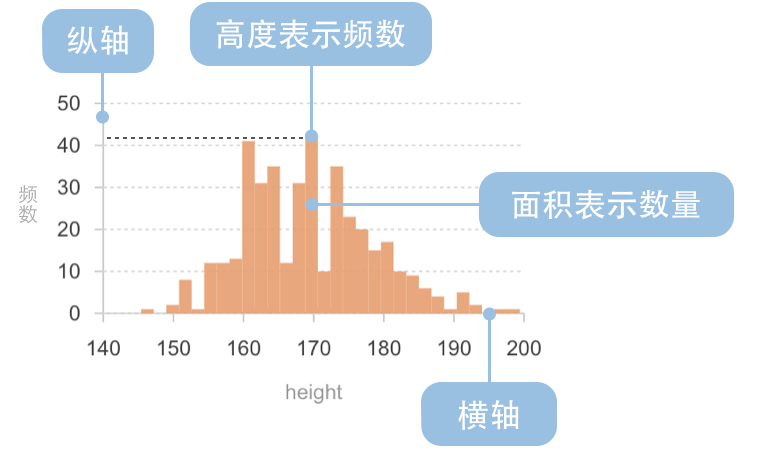 | Chart Type | Frequency Distribution Histogram |
| ---------------------- | --------------------------------------------------------------------------------------------------------------------------------------------------------------------------------------------------------------- |
| Suitable Data | List: one continuous data field, one categorical field (optional) |
| Function | Show data distribution across different intervals |
| Data-to-Visual Mapping | Grouped data field (statistical result) mapped to horizontal axis position
| Chart Type | Frequency Distribution Histogram |
| ---------------------- | --------------------------------------------------------------------------------------------------------------------------------------------------------------------------------------------------------------- |
| Suitable Data | List: one continuous data field, one categorical field (optional) |
| Function | Show data distribution across different intervals |
| Data-to-Visual Mapping | Grouped data field (statistical result) mapped to horizontal axis position
Frequency field (statistical result) mapped to rectangle height
Categorical data can use color to enhance category distinction |
| Suitable Data Volume | No less than 50 data points |
---
### Non-standard Histogram
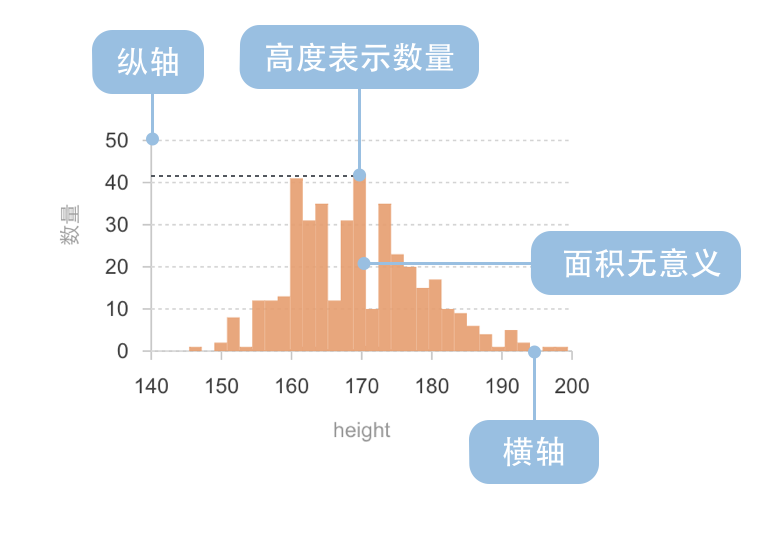 | Chart Type | Non-standard Histogram |
| ---------------------- | ----------------------------------------------------------------------------------------------------------------------------------------------------------------------------------------------------------- |
| Suitable Data | List: one continuous data field, one categorical field (optional) |
| Function | Show data distribution across different intervals |
| Data-to-Visual Mapping | Grouped data field (statistical result) mapped to horizontal axis position
| Chart Type | Non-standard Histogram |
| ---------------------- | ----------------------------------------------------------------------------------------------------------------------------------------------------------------------------------------------------------- |
| Suitable Data | List: one continuous data field, one categorical field (optional) |
| Function | Show data distribution across different intervals |
| Data-to-Visual Mapping | Grouped data field (statistical result) mapped to horizontal axis position
Count field (statistical result) mapped to rectangle height
Categorical data can use color to enhance category distinction |
| Suitable Data Volume | No less than 50 data points |
## Use Cases of Histogram Charts
### Suitable Use Cases
Example 1: **Statistical Analysis of Data Distribution**
The following chart shows a histogram of diamond weight distribution, displaying how diamond weights are distributed across different intervals.
```ts
import { Chart } from '@antv/g2';
const chart = new Chart({
container: 'container',
theme: 'classic',
autoFit: true,
});
chart.options({
type: 'rect',
data: {
type: 'fetch',
value: 'https://gw.alipayobjects.com/os/antvdemo/assets/data/diamond.json',
},
encode: {
x: 'carat',
y: 'count',
},
transform: [
{ type: 'binX', y: 'count' },
],
scale: {
y: { nice: true },
},
axis: {
x: { title: 'Diamond Weight (Carat)' },
y: { title: 'Frequency' },
},
style: {
fill: '#1890FF',
fillOpacity: 0.9,
},
});
chart.render();
```
**Notes**:
- Using `rect` mark combined with `binX` transform to create the histogram
- `binX` transform automatically bins the `carat` field and counts the frequency of each interval
- Each rectangle spans a numerical interval (e.g., 0.2-0.3, 0.3-0.4), indicating that the data is continuously distributed
Example 2: **Using Different Binning Methods**
The key to histograms is how to divide data intervals (i.e., "binning"). Different binning methods affect the understanding of data distribution. The chart below uses a custom number of bins.
```ts
import { Chart } from '@antv/g2';
const chart = new Chart({
container: 'container',
theme: 'classic',
autoFit: true,
});
chart.options({
type: 'rect',
data: {
type: 'fetch',
value: 'https://gw.alipayobjects.com/os/antvdemo/assets/data/diamond.json',
},
encode: {
x: 'carat',
y: 'count',
},
transform: [
{ type: 'binX', y: 'count', thresholds: 30 }, // Specify number of bins
],
scale: {
y: { nice: true },
},
axis: {
x: { title: 'Diamond Weight (Carat)' },
y: { title: 'Frequency' },
},
style: {
fill: '#1890FF',
fillOpacity: 0.9,
},
});
chart.render();
```
**Notes**:
- Using `transform: { type: 'binX', thresholds: 30 }` to specify 30 bins
- The choice of bin number affects the display of distribution details; more bins can show more detailed distribution patterns
- Fewer bins can highlight the main distribution trends
### Unsuitable Use Cases
Example 1: **Not Suitable for Comparing Categorical Data**
Histograms are designed for continuous numerical data distribution and are not suitable for comparing non-numerical categorical data. For counting statistics of categorical data, regular bar charts should be used instead.
Example 2: **Not Suitable for Showing Time Series Trends**
Histograms focus on showing data distribution characteristics rather than trends over time. If you need to display how data changes over time, line charts or area charts should be used instead.
## Extensions of Histogram Charts
### Multi-distribution Histogram
A multi-distribution histogram can display the distribution of multiple datasets in the same coordinate system, facilitating comparison of distribution characteristics between different datasets.
```ts
import { Chart } from '@antv/g2';
const chart = new Chart({
container: 'container',
theme: 'classic',
autoFit: true,
});
chart.options({
type: 'rect',
data: {
type: 'fetch',
value: 'https://gw.alipayobjects.com/os/antvdemo/assets/data/diamond.json',
transform: [
{
type: 'map',
callback: (d) => ({
...d,
group: d.cut === 'Ideal' ? 'Ideal' : 'Others',
}),
},
],
},
encode: {
x: 'price',
y: 'count',
color: 'group',
},
transform: [
{ type: 'binX', y: 'count', thresholds: 30, groupBy: ['group'] },
],
scale: {
y: { nice: true },
color: { range: ['#1890FF', '#FF6B3B'] },
},
axis: {
x: { title: 'Price (USD)' },
y: { title: 'Frequency' },
},
style: {
fillOpacity: 0.7,
},
legend: true,
});
chart.render();
```
**Notes**:
- Using `color: 'group'` and `groupBy: ['group']` to achieve multi-distribution comparison
- Using different colors and transparencies to facilitate observation of distribution differences between groups
## Comparing Histogram Charts to Other Charts
### Histograms and [Bar Charts](/en/charts/bar/)
- Histograms are used to show the distribution of continuous numerical data, emphasizing the shape of data distribution
- Bar charts are used to compare numerical values across different categories or time points, emphasizing comparison
- Histograms have no gaps between bars, while bar charts have gaps between bars
### Histograms and [Box Plots](/en/charts/boxplot/)
- Histograms show data concentration and dispersion through frequency distribution
- Box plots show data concentration and dispersion through quartiles, making it easier to identify outliers
- Histograms provide more detailed distribution patterns, while box plots provide more concise statistical summaries
### Histograms, [Line Charts](/en/charts/line/), and [Area Charts](/en/charts/area/)
- Histograms focus on showing data distribution characteristics
- Line and area charts focus on showing data trends over time
- Histograms are suitable for single time-point data analysis, while line and area charts are suitable for continuous multi-time-point data analysis
## Similar Charts
[Interactive content]()
## Categories
[Interactive content]()