---
title: "Chord Diagram"
description: "Show relationships and their magnitude with groups around a circle and connecting ribbons. Explore chord diagram use cases and G2 examples."
language: "en"
canonical: "https://g2.antv.antgroup.com/en/charts/chord/"
version: "5.4.8"
---
[Resource index](/llms.txt)
 ## Introduction to Chord Diagrams
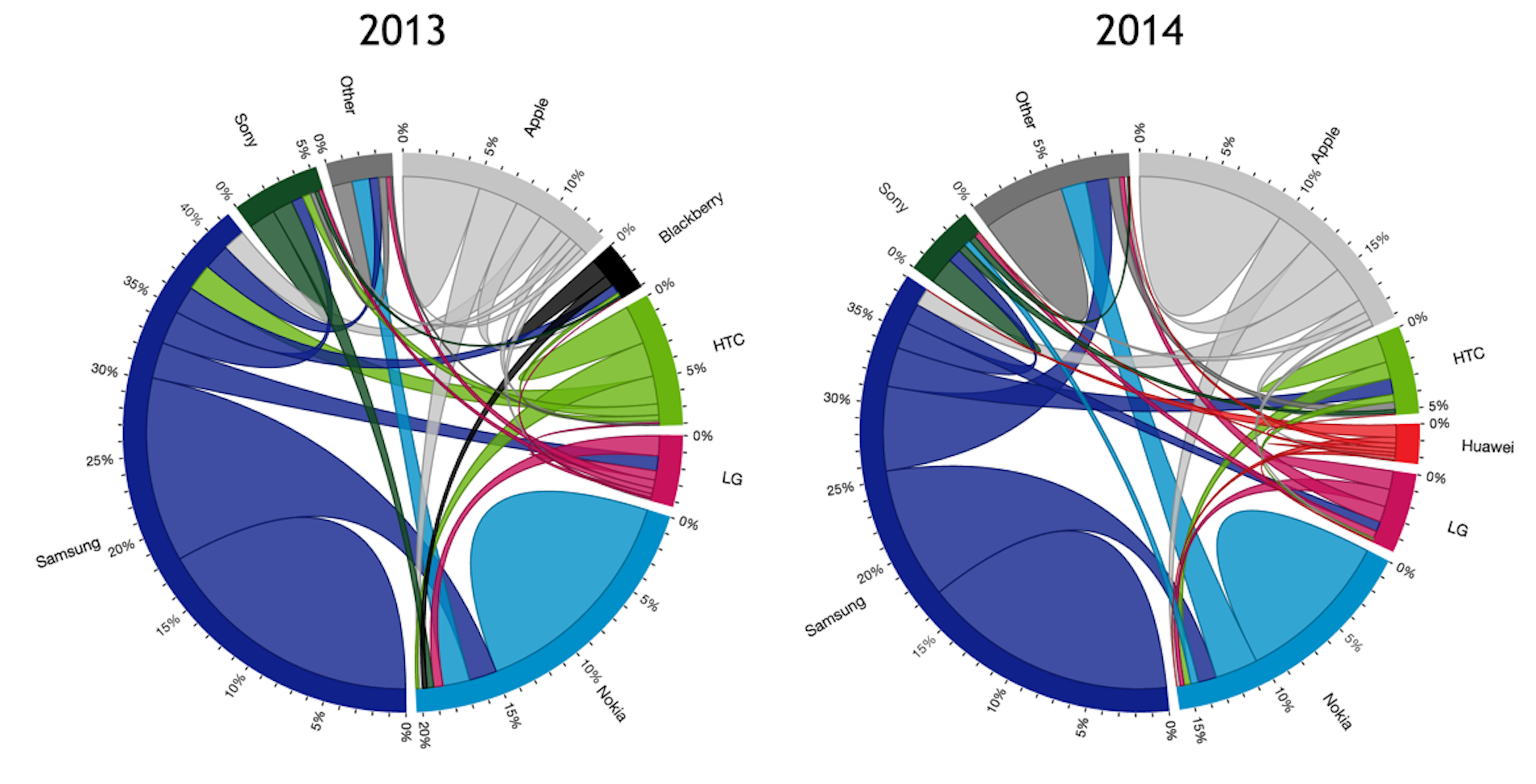
A Chord Diagram is a visualization method that displays the relationships between data in a matrix. Nodes are arranged radially around a circle, connected by weighted arcs that represent the relationships and flow between different entities. It's particularly effective for showing mutual relationships and flows between multiple entities.
Chord diagrams can intuitively display complex relationship networks between multiple nodes, especially suitable for visualizing bidirectional flow data such as population migration, trade flows, fund transfers, software dependencies, and other scenarios.
**Other Names**: Chord Chart, Chord Graph
## Components of a Chord Diagram
## Introduction to Chord Diagrams
A Chord Diagram is a visualization method that displays the relationships between data in a matrix. Nodes are arranged radially around a circle, connected by weighted arcs that represent the relationships and flow between different entities. It's particularly effective for showing mutual relationships and flows between multiple entities.
Chord diagrams can intuitively display complex relationship networks between multiple nodes, especially suitable for visualizing bidirectional flow data such as population migration, trade flows, fund transfers, software dependencies, and other scenarios.
**Other Names**: Chord Chart, Chord Graph
## Components of a Chord Diagram
 | Chart Type | Chord Diagram |
| ---------------------- | ---------------------------------------------------------------------------------------------------------------------------------------- |
| Suitable Data | Node dataset (optional), edge dataset: source node, target node, flow value |
| Function | Observe node relationships, display bidirectional flow relationships between multiple entities |
| Data-to-Visual Mapping | Weight mapped to node and edge width
| Chart Type | Chord Diagram |
| ---------------------- | ---------------------------------------------------------------------------------------------------------------------------------------- |
| Suitable Data | Node dataset (optional), edge dataset: source node, target node, flow value |
| Function | Observe node relationships, display bidirectional flow relationships between multiple entities |
| Data-to-Visual Mapping | Weight mapped to node and edge width
Source and target nodes mapped to arc positions on circle
Nodes can be distinguished by color |
| Suitable Data Volume | Two or more node groups, optimal with 5-15 nodes |
### Components of a Chord Diagram
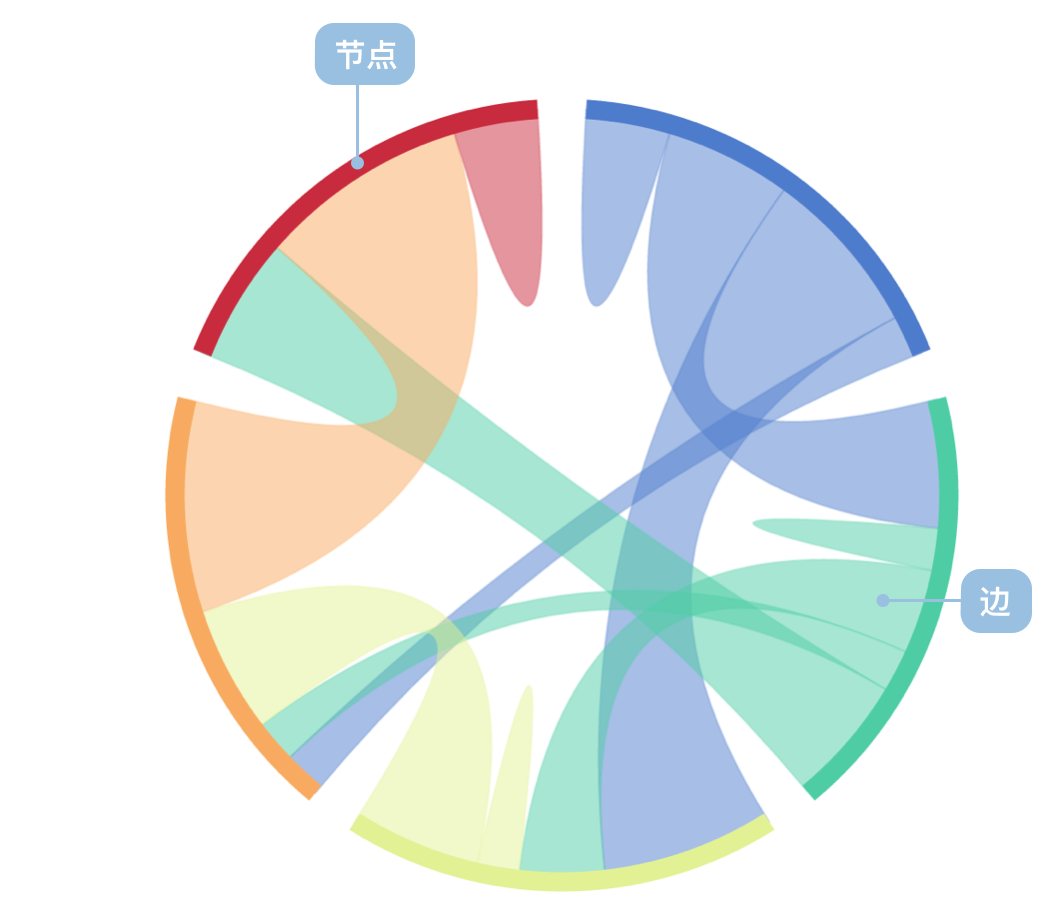
- **Outer Arcs**: Arc segments on the circle representing different categories or nodes, with arc length reflecting total flow of the node
- **Chords**: Curves connecting different outer arcs, representing relationships between nodes, with curve thickness indicating flow magnitude
- **Labels**: Text descriptions identifying each node
- **Colors**: Used to distinguish different nodes or flow directions
## Use Cases of Chord Diagrams
### Suitable Use Cases
Example 1: **Suitable for displaying flow relationships**
The following chart shows population flow between different cities, clearly displaying bidirectional flow relationships between cities through a chord diagram.
| source (Source City) | target (Target City) | value (Population Flow) |
| -------------------- | -------------------- | ----------------------- |
| Beijing | Shanghai | 100,000 |
| Beijing | Guangzhou | 80,000 |
| Shanghai | Beijing | 70,000 |
| Shanghai | Guangzhou | 90,000 |
| Guangzhou | Shenzhen | 120,000 |
```ts
import { Chart } from '@antv/g2';
const chart = new Chart({
container: 'container',
theme: 'classic',
});
chart.options({
type: 'chord',
autoFit: true,
data: {
value: {
links: [
{ source: 'Beijing', target: 'Shanghai', value: 100 },
{ source: 'Beijing', target: 'Guangzhou', value: 80 },
{ source: 'Beijing', target: 'Shenzhen', value: 60 },
{ source: 'Shanghai', target: 'Beijing', value: 70 },
{ source: 'Shanghai', target: 'Guangzhou', value: 90 },
{ source: 'Shanghai', target: 'Shenzhen', value: 50 },
{ source: 'Guangzhou', target: 'Beijing', value: 40 },
{ source: 'Guangzhou', target: 'Shanghai', value: 85 },
{ source: 'Guangzhou', target: 'Shenzhen', value: 120 },
{ source: 'Shenzhen', target: 'Beijing', value: 35 },
{ source: 'Shenzhen', target: 'Shanghai', value: 45 },
{ source: 'Shenzhen', target: 'Guangzhou', value: 110 },
],
},
},
layout: { nodeWidthRatio: 0.05 },
scale: {
color: {
type: 'ordinal',
range: ['#5B8FF9', '#5AD8A6', '#F6BD16', '#E86452'],
},
},
style: {
labelFontSize: 12,
labelFill: '#333',
linkFillOpacity: 0.6,
},
tooltip: {
items: [
{ field: 'source', name: 'Source City' },
{ field: 'target', name: 'Target City' },
{ field: 'value', name: 'Population Flow' },
],
},
interaction: [
{
type: 'elementHighlight',
background: true,
},
],
});
chart.render();
```
Example 2: **Displaying software dependencies**
The following chart shows dependency relationships between software packages. Each node represents an independent package, and each edge shows the dependency relationship between packages. The thickness of edges indicates the strength of dependencies.
```ts
import { Chart } from '@antv/g2';
const chart = new Chart({
container: 'container',
theme: 'classic',
});
chart.options({
type: 'chord',
autoFit: true,
data: {
value: {
links: [
{ source: 'vis.core', target: 'vis.data', value: 85 },
{ source: 'vis.core', target: 'vis.event', value: 45 },
{ source: 'vis.core', target: 'vis.util', value: 120 },
{ source: 'vis.data', target: 'vis.core', value: 30 },
{ source: 'vis.data', target: 'vis.util', value: 60 },
{ source: 'vis.event', target: 'vis.core', value: 25 },
{ source: 'vis.event', target: 'vis.data', value: 40 },
{ source: 'vis.util', target: 'vis.core', value: 15 },
{ source: 'vis.render', target: 'vis.core', value: 95 },
{ source: 'vis.render', target: 'vis.util', value: 55 },
{ source: 'vis.layout', target: 'vis.core', value: 75 },
{ source: 'vis.layout', target: 'vis.util', value: 35 },
],
},
},
layout: { nodeWidthRatio: 0.05 },
scale: {
color: {
type: 'ordinal',
range: ['#1f77b4', '#ff7f0e', '#2ca02c', '#d62728', '#9467bd'],
},
},
style: {
labelFontSize: 11,
labelFill: '#333',
linkFillOpacity: 0.6,
},
tooltip: {
items: [
{ field: 'source', name: 'Source Package' },
{ field: 'target', name: 'Target Package' },
{ field: 'value', name: 'Dependency Strength' },
],
},
interaction: [
{
type: 'elementHighlight',
background: true,
},
],
});
chart.render();
```
**Description**:
- Nodes represent different software package modules
- Edge thickness indicates the strength of dependency relationships
- Colors distinguish different packages, making it easier to identify circular dependencies
### Unsuitable Use Cases
Example 1: **Too many nodes leading to poor readability**
When the number of nodes exceeds 15, chord diagrams become crowded and difficult to read, with severely overlapping connection lines.
```ts
import { Chart } from '@antv/g2';
const chart = new Chart({
container: 'container',
theme: 'classic',
});
// Simulate data for 20 provinces, too many nodes leading to poor readability
const provinces = [
'Beijing',
'Shanghai',
'Guangzhou',
'Shenzhen',
'Hangzhou',
'Nanjing',
'Wuhan',
'Chengdu',
'Xian',
'Chongqing',
'Tianjin',
'Suzhou',
'Qingdao',
'Dalian',
'Xiamen',
'Ningbo',
'Changsha',
'Zhengzhou',
'Jinan',
'Fuzhou',
];
const data = [];
provinces.forEach((source, i) => {
provinces.forEach((target, j) => {
if (i !== j && Math.random() > 0.7) {
data.push({
source,
target,
value: Math.floor(Math.random() * 50) + 10,
});
}
});
});
chart.options({
type: 'chord',
autoFit: true,
data: {
value: {
links: data.slice(0, 40), // Only take first 40 data points for demo
},
},
layout: { nodeWidthRatio: 0.05 },
style: {
labelFontSize: 8, // Smaller font to accommodate more labels
labelFill: '#666',
linkFillOpacity: 0.5,
},
});
chart.render();
```
Example 2: **Not suitable for displaying hierarchical relationships**
Chord diagrams are mainly used to show relationships between equal nodes and are not suitable for displaying data with obvious hierarchical structures.
## Comparing Chord Diagrams to Other Charts
### Chord Diagrams and Radar Charts
- Chord diagrams are mainly used to display bidirectional flow relationships between nodes, emphasizing connections and flows
- Radar charts are mainly used for multi-dimensional data comparison, displaying values across dimensions through polygons
### Chord Diagrams and Area Charts
- Chord diagrams display relationship networks through circular layout and connecting arcs, suitable for flow data
- Area charts display numerical trends through filled areas, suitable for time series data
## Similar Charts
[Interactive content]()
## Categories
[Interactive content]()