---
title: "Bullet Chart"
description: "Compare actual values, targets, and performance ranges in a compact chart. Learn the structure of bullet charts and explore G2 examples."
language: "en"
canonical: "https://g2.antv.antgroup.com/en/charts/bullet/"
version: "5.4.8"
---
[Resource index](/llms.txt)
 ## Introduction to Bullet Charts
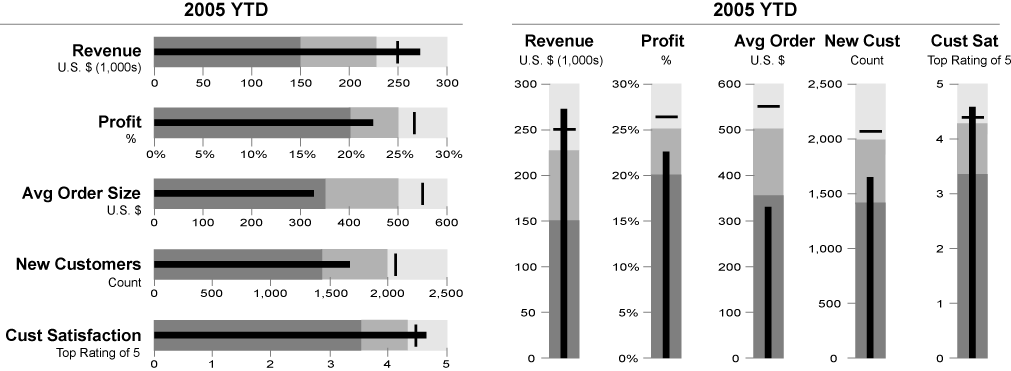
A Bullet Chart is a linear chart type originally designed by data visualization expert Stephen Few as a more compact and information-rich alternative to traditional dashboard gauges. Bullet charts can simultaneously display actual values, target values, and performance ranges within a limited space, clearly showing the completion rate and performance status through comparison.
The design philosophy of bullet charts is to maximize the data-ink ratio, displaying the most useful information in the smallest space, making them particularly suitable for dashboard and performance monitoring scenarios.
**English Names**: Bullet Chart
**Other Names**: Progress Bar Chart, Target Comparison Chart, Bullet Graph
## Components of a Bullet Chart
### Basic Bullet Chart
## Introduction to Bullet Charts
A Bullet Chart is a linear chart type originally designed by data visualization expert Stephen Few as a more compact and information-rich alternative to traditional dashboard gauges. Bullet charts can simultaneously display actual values, target values, and performance ranges within a limited space, clearly showing the completion rate and performance status through comparison.
The design philosophy of bullet charts is to maximize the data-ink ratio, displaying the most useful information in the smallest space, making them particularly suitable for dashboard and performance monitoring scenarios.
**English Names**: Bullet Chart
**Other Names**: Progress Bar Chart, Target Comparison Chart, Bullet Graph
## Components of a Bullet Chart
### Basic Bullet Chart
 | Chart Type | Bullet Chart |
| --------------- | ----------------------------------------------------------------------------------------------------------------------------------------------------------------------------------------- |
| Suitable Data | One categorical data field, one continuous data field (actual value), one target value, optional performance ranges |
| Functionality | Display comparison between actual and target values, evaluate performance levels |
| Data Mapping | Categorical data field maps to vertical axis position
| Chart Type | Bullet Chart |
| --------------- | ----------------------------------------------------------------------------------------------------------------------------------------------------------------------------------------- |
| Suitable Data | One categorical data field, one continuous data field (actual value), one target value, optional performance ranges |
| Functionality | Display comparison between actual and target values, evaluate performance levels |
| Data Mapping | Categorical data field maps to vertical axis position
Continuous data field maps to bar length
Target value maps to marker line
Performance ranges map to background color bands |
| Data Size Limit | Single or multiple indicators, recommended not to exceed 10 |
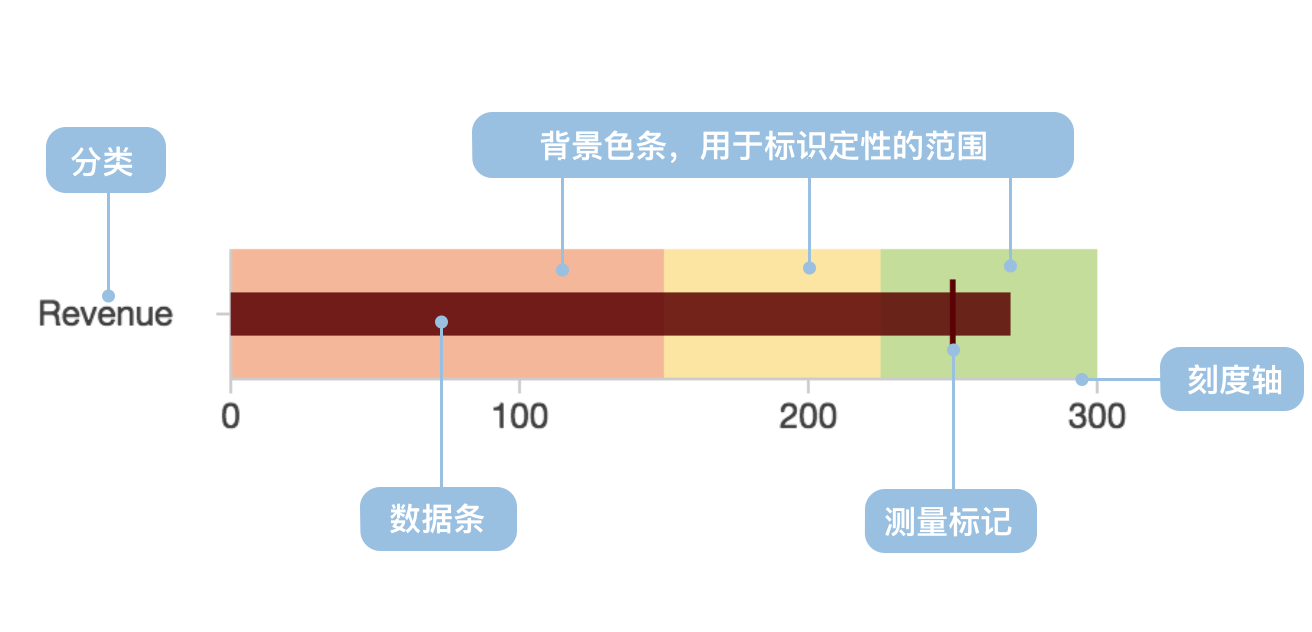
The main components of a bullet chart include:
- **Actual Value Bar**: Represented by a thick, dark-colored bar showing the current actual achieved value
- **Target Value Marker**: Represented by a vertical line or other marker, indicating the target to be achieved
- **Performance Ranges**: Background uses color bands of different shades, typically divided into poor, good, and excellent ranges
- **Scale Axis**: Provides numerical reference to help readers understand specific numerical values
```ts
import { Chart } from '@antv/g2';
const chart = new Chart({
container: 'container',
theme: 'classic',
});
const data = [
{
title: 'Sales Completion Rate',
ranges: 100,
measures: 80,
target: 85,
},
];
chart.options({
type: 'view',
coordinate: { transform: [{ type: 'transpose' }] },
children: [
{
type: 'interval',
data,
encode: { x: 'title', y: 'ranges', color: '#f0efff' },
style: { maxWidth: 30 },
axis: {
y: {
grid: true,
gridLineWidth: 2,
title: 'Completion Rate (%)',
},
x: {
title: false,
},
},
},
{
type: 'interval',
data,
encode: { x: 'title', y: 'measures', color: '#5B8FF9' },
style: { maxWidth: 20 },
label: {
text: 'measures',
position: 'right',
textAlign: 'left',
dx: 5,
formatter: (d) => `${d}%`,
},
},
{
type: 'point',
data,
encode: {
x: 'title',
y: 'target',
shape: 'line',
color: '#3D76DD',
size: 8,
},
tooltip: {
title: false,
items: [
{
channel: 'y',
name: 'Target Value',
valueFormatter: (d) => `${d}%`,
},
],
},
},
],
});
chart.render();
```
---
## Use Cases for Bullet Charts
### Appropriate Use Cases
**Scenario 1: Performance Indicator Monitoring**
Bullet charts are ideal tools for displaying performance indicator completion status, clearly comparing actual performance with target requirements.
```ts
import { Chart } from '@antv/g2';
const chart = new Chart({
container: 'container',
theme: 'classic',
});
const colors = {
ranges: ['#ffebee', '#fff3e0', '#e8f5e8'],
measures: '#1890ff',
target: '#ff4d4f',
};
// Transform data structure
const transformedData = [
{ title: 'Project Progress', value: 40, level: 'Poor' },
{ title: 'Project Progress', value: 30, level: 'Good' },
{ title: 'Project Progress', value: 30, level: 'Excellent' },
];
const data = [
{ title: 'Project Progress', value: 60, type: 'Actual Progress' },
{ title: 'Project Progress', value: 80, type: 'Target Progress' },
];
chart.options({
type: 'view',
coordinate: { transform: [{ type: 'transpose' }] },
children: [
{
type: 'interval',
data: transformedData,
encode: { x: 'title', y: 'value', color: 'level' },
transform: [{ type: 'stackY' }],
scale: {
color: {
domain: ['Poor', 'Good', 'Excellent'],
range: colors.ranges,
},
},
style: { maxWidth: 30 },
},
{
type: 'interval',
data: {
value: data,
transform: [
{ type: 'filter', callback: (d) => d.type === 'Actual Progress' },
],
},
encode: { x: 'title', y: 'value', color: colors.measures },
style: { maxWidth: 16 },
},
{
type: 'point',
data: {
value: data,
transform: [
{ type: 'filter', callback: (d) => d.type === 'Target Progress' },
],
},
encode: {
x: 'title',
y: 'value',
shape: 'line',
color: colors.target,
size: 8,
},
axis: { y: { grid: true, title: 'Progress (%)' }, x: { title: false } },
},
],
});
chart.render();
```
**Scenario 2: Budget Execution Tracking**
Bullet charts can effectively display budget execution status, including actual expenditure, budget targets, and warning ranges.
**Scenario 3: Resource Utilization Monitoring**
Through bullet charts, you can intuitively understand the usage of various resources and identify overused or underutilized resources.
```ts
import { Chart } from '@antv/g2';
const chart = new Chart({
container: 'container',
theme: 'classic',
});
const resourceData = [
{
resource: 'CPU Usage',
ranges: 100,
measures: 65,
target: 80,
},
{
resource: 'Memory Usage',
ranges: 100,
measures: 45,
target: 70,
},
{
resource: 'Disk Usage',
ranges: 100,
measures: 88,
target: 85,
},
{
resource: 'Network Bandwidth',
ranges: 100,
measures: 72,
target: 75,
},
];
chart.options({
type: 'view',
coordinate: { transform: [{ type: 'transpose' }] },
children: [
{
type: 'interval',
data: resourceData,
encode: { x: 'resource', y: 'ranges', color: '#f5f5f5' },
style: { maxWidth: 30 },
},
{
type: 'interval',
data: resourceData,
encode: {
x: 'resource',
y: 'measures',
color: (d) => (d.measures > d.target ? '#ff7875' : '#52c41a'),
},
style: { maxWidth: 20 },
label: {
text: 'measures',
position: 'right',
textAlign: 'left',
dx: 5,
formatter: (d) => `${d}%`,
},
},
{
type: 'point',
data: resourceData,
encode: {
x: 'resource',
y: 'target',
shape: 'line',
color: '#1890ff',
size: 6,
},
axis: {
y: {
grid: true,
title: 'Usage Rate (%)',
},
x: {
title: 'System Resources',
},
},
},
],
});
chart.render();
```
### Inappropriate Use Cases
**Scenario 1: Time Trend Analysis**
Bullet charts primarily display status comparisons at a specific point in time and are not suitable for showing trends over time. Line charts should be used in such cases.
**Scenario 2: Part-to-Whole Relationships**
If you need to show the proportional relationship of parts to the whole, pie charts or donut charts are more appropriate.
**Scenario 3: Large Data Volume**
When displaying a large number of indicators, bullet charts can cause visual confusion. It's recommended to use grouped displays or other chart types.
## Extensions of Bullet Charts
### Multi-dimensional Bullet Charts
Display the performance of multiple related indicators through grouping, facilitating horizontal comparison.
```ts
import { Chart } from '@antv/g2';
const chart = new Chart({
container: 'container',
theme: 'classic',
});
const multiData = [
{
department: 'Sales',
indicator: 'Sales Revenue',
ranges: 100,
measures: 85,
target: 90,
},
{
department: 'Sales',
indicator: 'Customer Count',
ranges: 100,
measures: 92,
target: 85,
},
{
department: 'Marketing',
indicator: 'Brand Awareness',
ranges: 100,
measures: 78,
target: 80,
},
{
department: 'Marketing',
indicator: 'Marketing ROI',
ranges: 100,
measures: 88,
target: 85,
},
];
chart.options({
type: 'view',
coordinate: { transform: [{ type: 'transpose' }] },
children: [
{
type: 'interval',
data: multiData,
encode: { x: 'indicator', y: 'ranges', color: '#f0f0f0' },
style: { maxWidth: 30 },
},
{
type: 'interval',
data: multiData,
encode: { x: 'indicator', y: 'measures', color: 'department' },
style: { maxWidth: 20 },
label: {
text: 'measures',
position: 'right',
textAlign: 'left',
dx: 5,
},
},
{
type: 'point',
data: multiData,
encode: {
x: 'indicator',
y: 'target',
shape: 'line',
color: '#666',
size: 6,
},
axis: {
y: {
grid: true,
title: 'Completion Rate',
},
x: {
title: 'Key Indicators',
},
},
},
],
});
chart.render();
```
### Layered Performance Ranges
Provide more detailed performance evaluation criteria through background ranges of different color shades.
```ts
import { Chart } from '@antv/g2';
const chart = new Chart({
container: 'container',
theme: 'classic',
});
const colors = {
ranges: ['#ffebee', '#fff3e0', '#e8f5e8'],
measures: '#1890ff',
target: '#ff4d4f',
};
// Transform data structure
const transformedData = [
{ title: 'Project Progress', value: 40, level: 'Poor' },
{ title: 'Project Progress', value: 30, level: 'Good' },
{ title: 'Project Progress', value: 30, level: 'Excellent' },
];
const data = [
{ title: 'Project Progress', value: 60, type: 'Actual Progress' },
{ title: 'Project Progress', value: 80, type: 'Target Progress' },
];
chart.options({
type: 'view',
coordinate: { transform: [{ type: 'transpose' }] },
children: [
{
type: 'interval',
data: transformedData,
encode: { x: 'title', y: 'value', color: 'level' },
transform: [{ type: 'stackY' }],
scale: {
color: {
domain: ['Poor', 'Good', 'Excellent'],
range: colors.ranges,
},
},
style: { maxWidth: 30 },
},
{
type: 'interval',
data: {
value: data,
transform: [
{ type: 'filter', callback: (d) => d.type === 'Actual Progress' },
],
},
encode: { x: 'title', y: 'value', color: colors.measures },
style: { maxWidth: 16 },
},
{
type: 'point',
data: {
value: data,
transform: [
{ type: 'filter', callback: (d) => d.type === 'Target Progress' },
],
},
encode: {
x: 'title',
y: 'value',
shape: 'line',
color: colors.target,
size: 8,
},
axis: { y: { grid: true, title: 'Progress (%)' }, x: { title: false } },
},
],
});
chart.render();
```
### Vertical Bullet Charts
When space is limited or special layouts are needed, vertical bullet charts can be used.
```ts
import { Chart } from '@antv/g2';
const chart = new Chart({
container: 'container',
theme: 'classic',
});
const verticalData = [
{
metric: 'Q1 Sales',
ranges: 100,
measures: 80,
target: 85,
},
{
metric: 'Q2 Sales',
ranges: 100,
measures: 92,
target: 88,
},
{
metric: 'Q3 Sales',
ranges: 100,
measures: 76,
target: 90,
},
];
chart.options({
type: 'view',
children: [
{
type: 'interval',
data: verticalData,
encode: { x: 'metric', y: 'ranges', color: '#f0f0f0' },
style: { maxWidth: 30 },
},
{
type: 'interval',
data: verticalData,
encode: { x: 'metric', y: 'measures', color: '#52c41a' },
style: { maxWidth: 20 },
label: {
text: 'measures',
position: 'top',
textAlign: 'center',
dy: -5,
},
},
{
type: 'point',
data: verticalData,
encode: {
x: 'metric',
y: 'target',
shape: 'line',
color: '#ff4d4f',
size: 6,
},
axis: {
y: {
grid: true,
title: 'Sales (10k CNY)',
},
x: {
title: 'Quarter',
},
},
},
],
});
chart.render();
```
## Comparison with Other Charts
### Bullet Chart vs [Bar Chart](/en/charts/bar/)
- Bullet charts add target values and performance ranges to bar charts, providing richer comparison dimensions
- Bar charts are mainly used to compare numerical values across different categories, while bullet charts focus on comparing actual values with target values
### Bullet Chart vs [Gauge Chart](/en/charts/gauge/)
- Bullet charts save more space than gauge charts and can display more information in the same space
- Gauge charts more intuitively display the status of a single indicator, while bullet charts are more suitable for multi-indicator comparison
### Bullet Chart vs [Progress Chart](/en/charts/gauge/)
- Bullet charts provide more contextual information, including target values and performance ranges
- Progress charts mainly show completion progress, while bullet charts can show the quality of performance
## Similar Charts
[Interactive content]()
## Category
[Interactive content]()