---
title: "Bubble Map"
description: "Use bubble positions and sizes on a map to show geographic distributions and differences in magnitude. Explore use cases and G2 examples."
language: "en"
canonical: "https://g2.antv.antgroup.com/en/charts/bubble-map/"
version: "5.4.8"
---
[Resource index](/llms.txt)
 > Note: G2 5.0 does not directly support complete map background functionality. This page primarily provides concept introduction. For actual applications, additional map components and data need to be imported.
## Introduction to Bubble Maps
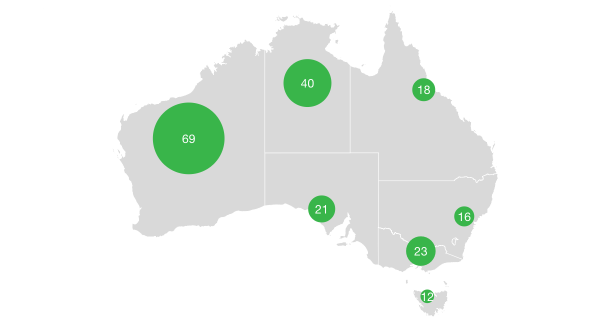
A Bubble Map is a visualization chart that uses bubbles (circles) on a geographic map to represent data size at different geographic locations. The size of the bubble typically represents the magnitude of a value, the position represents geographic coordinates, and colors can be used to distinguish different categories or represent another dimension of values.
Bubble Maps are more suitable for comparing geographically related data than [Choropleth Maps](/en/charts/choropleth-map/). The main disadvantage is that when there are too many large bubbles on the map, they may overlap and affect data display, so this needs to be considered when creating the chart.
**Other Names**: Bubble Chart Map, Geographic Bubble Chart
## Components of a Bubble Map
### Basic Bubble Map
> Note: G2 5.0 does not directly support complete map background functionality. This page primarily provides concept introduction. For actual applications, additional map components and data need to be imported.
## Introduction to Bubble Maps
A Bubble Map is a visualization chart that uses bubbles (circles) on a geographic map to represent data size at different geographic locations. The size of the bubble typically represents the magnitude of a value, the position represents geographic coordinates, and colors can be used to distinguish different categories or represent another dimension of values.
Bubble Maps are more suitable for comparing geographically related data than [Choropleth Maps](/en/charts/choropleth-map/). The main disadvantage is that when there are too many large bubbles on the map, they may overlap and affect data display, so this needs to be considered when creating the chart.
**Other Names**: Bubble Chart Map, Geographic Bubble Chart
## Components of a Bubble Map
### Basic Bubble Map
 | Chart Type | Bubble Map |
| ------------- | --------------------------------------------------------------------------------------------------------------------------------------------------------------------------------- |
| Suitable Data | Data containing geographic coordinates (longitude and latitude) and one or more numeric fields |
| Function | Display geographic distribution and value relationships on a geographic background |
| Data Mapping | Longitude/latitude fields mapped to map position
| Chart Type | Bubble Map |
| ------------- | --------------------------------------------------------------------------------------------------------------------------------------------------------------------------------- |
| Suitable Data | Data containing geographic coordinates (longitude and latitude) and one or more numeric fields |
| Function | Display geographic distribution and value relationships on a geographic background |
| Data Mapping | Longitude/latitude fields mapped to map position
Numeric field mapped to bubble size
Category field can be mapped to color
Other values can be mapped to color intensity |
| Data Volume | Recommended not to exceed 100 data points to avoid bubble overlap affecting readability |
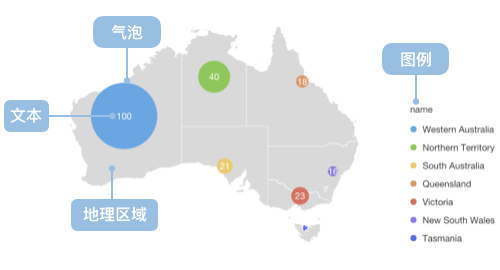
The main components of a Bubble Map include:
- **Geographic Background**: Provides a map background with geographic coordinate system, such as world map, country map, etc.
- **Bubbles**: Circular markers where position represents geographic coordinates and size represents the magnitude of values
- **Color Encoding**: Uses different colors to distinguish categories or represent value ranges
- **Legend**: Explains the meaning of bubble size and color
---
## Use Cases of Bubble Maps
### Suitable Use Cases
**Case 1: Geographic Data Distribution Analysis**
Bubble Maps are ideal tools for analyzing data with geographic attributes, clearly showing the distribution pattern of data across geographic space.
**Case 2: Regional Comparison Analysis**
Through comparison of bubble size and color, different regions' data differences can be effectively compared.
**Case 3: Multi-dimensional Geographic Data Display**
Bubble Maps can simultaneously display multiple dimensions of information including location, value size, and category.
### Unsuitable Use Cases
**Case 1: Too Many Data Points Causing Overlap**
When there are too many data points on the map, bubbles may overlap and affect clear data display. In such cases, heat maps or dot density maps should be considered.
**Case 2: Lack of Geographic Coordinate Information**
For data without latitude and longitude information, geocoding conversion is needed first, or other chart types should be considered.
**Case 3: Precise Value Display**
Bubble Maps focus on showing geographic distribution trends of data and are not suitable for scenarios requiring precise values. Tables or other precise display methods should be used in such cases.
## Extensions of Bubble Maps
### Multi-layer Bubble Maps
By setting different layers and transparency levels, multiple data series can be displayed on the same map.
### Bubble Maps with Map Backgrounds
Combining geographic boundary data provides richer geographic background information.
### Time Series Bubble Maps
Showing changes in bubbles over time through animation.
## Comparing Bubble Maps to Other Charts
### Bubble Maps and [Scatter Charts](/en/charts/scatter-plot/)
- Bubble Maps use geographic coordinate systems, suitable for displaying geospatial data
- Scatter Charts use Cartesian coordinate systems, suitable for displaying correlations between two continuous variables
### Bubble Maps and [Choropleth Maps](/en/charts/choropleth-map/)
- Bubble Maps use bubble size to represent values, allowing precise comparison of values across different regions
- Choropleth Maps use color intensity to represent value ranges, suitable for displaying overall distribution patterns of data
### Bubble Maps and [Dot Charts](/en/charts/scatter-plot/)
- Bubble Maps incorporate geographic information, where position has geographic significance
- Regular dot charts' positions only represent data dimensions without geographic attributes
## Implementing Bubble Maps in G2 5.0
In G2 5.0, we can implement bubble maps by drawing `point` on `geoView`. Here are two practical examples:
### Example 1: London Population Distribution Bubble Map
Based on London map data, showing the population distribution across different areas:
```ts
import { Chart } from '@antv/g2';
import { feature } from 'topojson-client';
Promise.all([
fetch('https://assets.antv.antgroup.com/g2/londonBoroughs.json').then((res) =>
res.json(),
),
fetch('https://assets.antv.antgroup.com/g2/londonCentroids.json').then(
(res) => res.json(),
),
]).then((values) => {
const [londonBoroughs, londonCentroids] = values;
const london = feature(
londonBoroughs,
londonBoroughs.objects.boroughs,
).features;
// Add simulated population and GDP data to centroid data
const bubbleData = londonCentroids.map((d, index) => ({
...d,
name: d.name || `Area ${index + 1}`, // Ensure each data point has a name
population: Math.floor(Math.random() * 500000) + 100000, // 100K-600K population
gdp: Math.floor(Math.random() * 50000) + 20000, // 20K-70K GDP
category: ['Business', 'Residential', 'Industrial', 'Mixed'][
Math.floor(Math.random() * 4)
],
}));
const chart = new Chart({
container: 'container',
autoFit: true,
});
chart.options({
type: 'geoView',
children: [
{
type: 'geoPath',
data: london,
style: {
fill: 'lightgray',
stroke: 'white',
lineWidth: 1,
},
},
{
type: 'point',
data: bubbleData,
encode: {
x: 'cx',
y: 'cy',
size: 'population',
color: 'category',
shape: 'point',
},
style: {
opacity: 0.7,
stroke: 'white',
lineWidth: 1,
},
scale: {
size: {
range: [4, 30],
},
color: {
range: ['#1f77b4', '#ff7f0e', '#2ca02c', '#d62728'],
},
},
tooltip: {
title: 'name',
items: [
{
name: 'Population',
channel: 'size',
valueFormatter: (value) =>
`${value ? value.toLocaleString() : 'N/A'} people`,
},
{
name: 'GDP',
field: 'gdp',
valueFormatter: (value) =>
`${value ? value.toLocaleString() : 'N/A'} million`,
},
{ name: 'Type', field: 'category' },
],
},
},
],
});
chart.render();
});
```
### Example 2: Global Major Cities GDP Bubble Map
Displaying GDP distribution of major cities worldwide:
```ts
import { Chart } from '@antv/g2';
// Global major cities data - ensuring data completeness
const worldCities = [
{
name: 'Beijing',
lng: 116.4074,
lat: 39.9042,
gdp: 4027,
population: 2154,
region: 'Asia',
},
{
name: 'Shanghai',
lng: 121.4737,
lat: 31.2304,
gdp: 4321,
population: 2424,
region: 'Asia',
},
{
name: 'New York',
lng: -74.0059,
lat: 40.7128,
gdp: 1700,
population: 851,
region: 'North America',
},
{
name: 'Los Angeles',
lng: -118.2437,
lat: 34.0522,
gdp: 710,
population: 397,
region: 'North America',
},
{
name: 'London',
lng: -0.1276,
lat: 51.5074,
gdp: 653,
population: 898,
region: 'Europe',
},
{
name: 'Tokyo',
lng: 139.6917,
lat: 35.6895,
gdp: 1617,
population: 1396,
region: 'Asia',
},
{
name: 'Paris',
lng: 2.3522,
lat: 48.8566,
gdp: 709,
population: 1068,
region: 'Europe',
},
{
name: 'Berlin',
lng: 13.405,
lat: 52.52,
gdp: 147,
population: 367,
region: 'Europe',
},
{
name: 'Sydney',
lng: 151.2093,
lat: -33.8688,
gdp: 337,
population: 518,
region: 'Oceania',
},
{
name: 'Toronto',
lng: -79.3832,
lat: 43.6532,
gdp: 324,
population: 294,
region: 'North America',
},
{
name: 'Seoul',
lng: 126.978,
lat: 37.5665,
gdp: 779,
population: 969,
region: 'Asia',
},
{
name: 'Singapore',
lng: 103.8198,
lat: 1.3521,
gdp: 340,
population: 584,
region: 'Asia',
},
{
name: 'Chicago',
lng: -87.6298,
lat: 41.8781,
gdp: 689,
population: 271,
region: 'North America',
},
{
name: 'Frankfurt',
lng: 8.6821,
lat: 50.1109,
gdp: 731,
population: 75,
region: 'Europe',
},
{
name: 'Hong Kong',
lng: 114.1694,
lat: 22.3193,
gdp: 365,
population: 745,
region: 'Asia',
},
{
name: 'Mumbai',
lng: 72.8777,
lat: 19.076,
gdp: 310,
population: 1284,
region: 'Asia',
},
{
name: 'São Paulo',
lng: -46.6333,
lat: -23.5505,
gdp: 430,
population: 1252,
region: 'South America',
},
{
name: 'Mexico City',
lng: -99.1332,
lat: 19.4326,
gdp: 411,
population: 912,
region: 'North America',
},
].map((city) => ({
...city,
// Data validation and formatting
name: city.name || 'Unknown City',
lng: typeof city.lng === 'number' ? city.lng : 0,
lat: typeof city.lat === 'number' ? city.lat : 0,
gdp: typeof city.gdp === 'number' ? city.gdp : 0,
population: typeof city.population === 'number' ? city.population : 0,
region: city.region || 'Unknown Region',
}));
// Simplified global map outline data
const worldOutline = [
{
type: 'Feature',
geometry: {
type: 'Polygon',
coordinates: [
[
[-180, -60],
[180, -60],
[180, 75],
[-180, 75],
[-180, -60],
],
],
},
},
];
const chart = new Chart({
container: 'container',
autoFit: true,
});
chart.options({
type: 'geoView',
children: [
{
type: 'geoPath',
data: worldOutline,
style: {
fill: '#f0f0f0',
stroke: '#d0d0d0',
lineWidth: 1,
},
},
{
type: 'point',
data: worldCities,
encode: {
x: 'lng',
y: 'lat',
size: 'gdp',
color: 'region',
shape: 'point',
},
style: {
opacity: 0.8,
stroke: 'white',
lineWidth: 2,
},
scale: {
size: {
range: [8, 40],
},
color: {
range: [
'#1f77b4',
'#ff7f0e',
'#2ca02c',
'#d62728',
'#9467bd',
'#8c564b',
],
},
},
tooltip: {
title: 'name',
items: [
{
name: 'GDP',
channel: 'size',
valueFormatter: (value) => `${value || 0} billion USD`,
},
{
name: 'Population',
field: 'population',
valueFormatter: (value) => `${value || 0} million`,
},
{ name: 'Region', field: 'region' },
],
},
},
],
});
chart.render();
```
### Key Points
Essential elements for creating bubble maps with G2 5.0:
1. **Use geoView**: Create a geographic coordinate system view with `type: 'geoView'`
2. **Point marks**: Use `type: 'point'` in children to draw bubbles
3. **Encoding mapping**:
- Map `x`, `y` to longitude and latitude coordinates in the `encode` object
- Map `size` to numeric values
- Map `color` to categories or values
4. **Style settings**: Set opacity, stroke, etc. through the `style` object
5. **Scale configuration**: Control bubble size and color ranges through the `scale` object
6. **Interactive features**: Add `tooltip` and `labels` to enhance user experience
7. **Multi-layer structure**: Use the `children` array to simultaneously draw map background and bubble layers
## Similar Charts
[Interactive content]()
## Categories
[Interactive content]()
## Notes
### About Map Background Display
For actual applications, to properly display map backgrounds, you need to:
1. Import map projection components
2. Load complete GeoJSON map data
3. Use correct transform configuration