---
title: "Arc Diagram"
description: "Show relationships with nodes arranged on a line or circle and connected by arcs. Explore node ordering, connection patterns, and G2 arc diagram examples."
language: "en"
canonical: "https://g2.antv.antgroup.com/en/charts/arcdiagram/"
version: "5.4.8"
---
[Resource index](/llms.txt)
 ## Introduction to Arc Diagrams
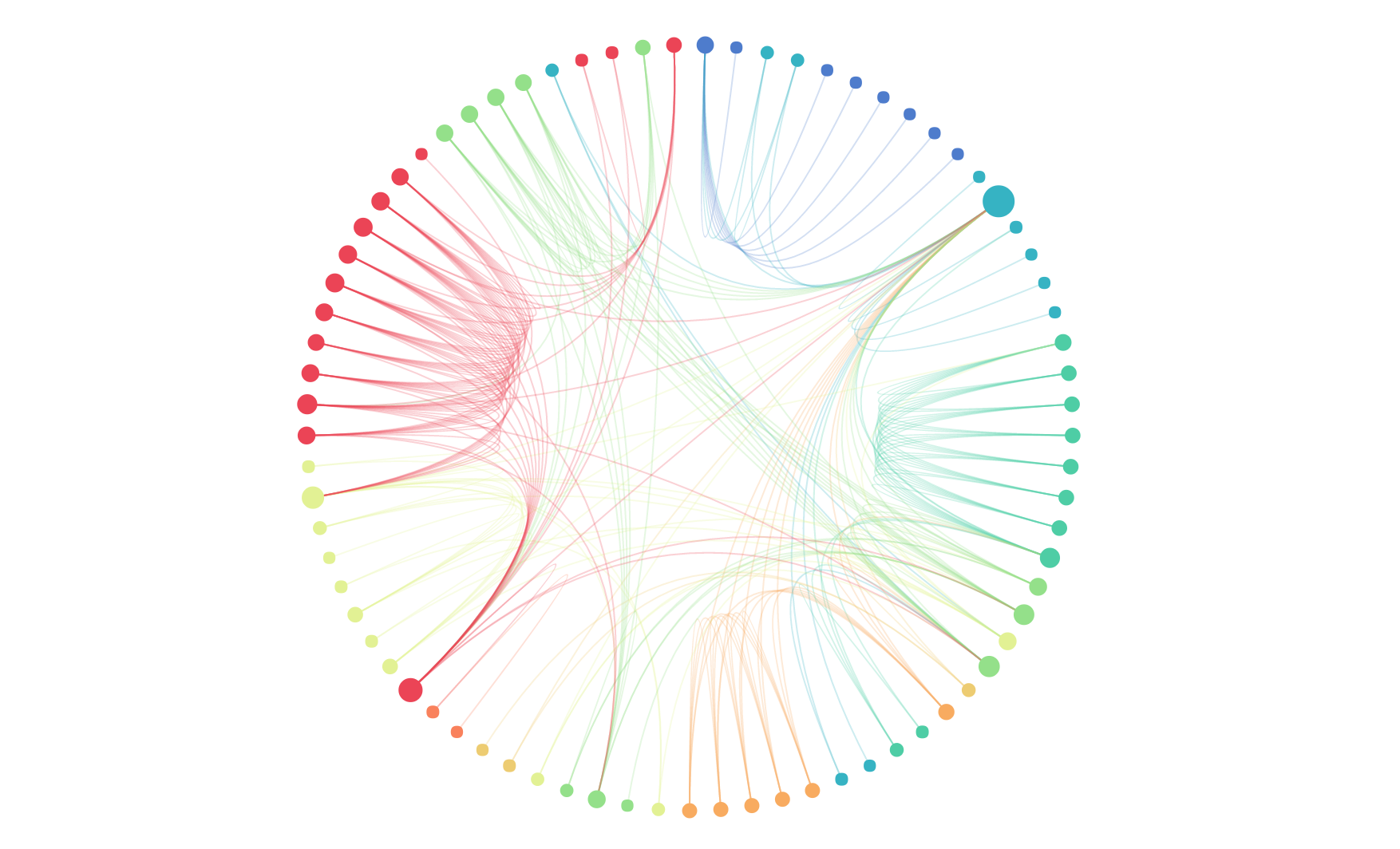
An arc diagram is a variation of the node-link method, which refers to a visual layout representation of node-link layouts that use nodes to represent objects and lines (or edges) to represent relationships. Based on this concept, arc diagrams adopt a one-dimensional layout approach, where nodes are arranged along a linear axis or in a circular pattern, and arcs are used to express the linking relationships between nodes. While this method cannot express the global structure of a graph like two-dimensional layouts can, it can clearly present ring and bridge structures when nodes are well-ordered.
**Other Names**: Arc diagram
## Components of an Arc Diagram
### Linear Arc Diagram
## Introduction to Arc Diagrams
An arc diagram is a variation of the node-link method, which refers to a visual layout representation of node-link layouts that use nodes to represent objects and lines (or edges) to represent relationships. Based on this concept, arc diagrams adopt a one-dimensional layout approach, where nodes are arranged along a linear axis or in a circular pattern, and arcs are used to express the linking relationships between nodes. While this method cannot express the global structure of a graph like two-dimensional layouts can, it can clearly present ring and bridge structures when nodes are well-ordered.
**Other Names**: Arc diagram
## Components of an Arc Diagram
### Linear Arc Diagram
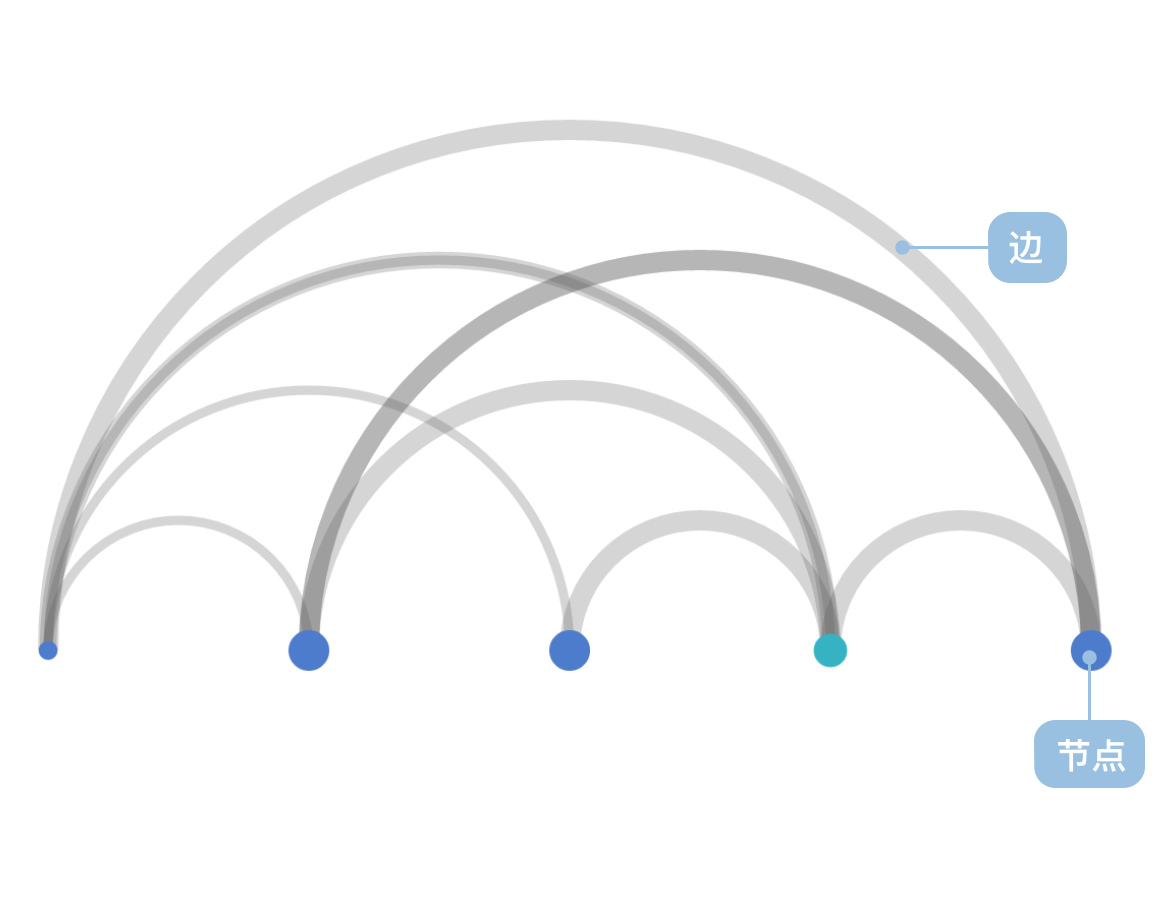 | Chart Type | Linear Arc Diagram |
| ---------------------- | ---------------------------------------------------------------------------------------------------------------------------------------------------------------------------------------------------------------------------------------------------------------------------------- |
| Suitable Data | List: A set of node data (containing node id field), a set of link data (containing source node field and target node field) |
| Function | Represents linking relationships between data |
| Data-to-Visual Mapping | Node coordinates (automatically calculated) field mapped to node position on coordinate axis
| Chart Type | Linear Arc Diagram |
| ---------------------- | ---------------------------------------------------------------------------------------------------------------------------------------------------------------------------------------------------------------------------------------------------------------------------------- |
| Suitable Data | List: A set of node data (containing node id field), a set of link data (containing source node field and target node field) |
| Function | Represents linking relationships between data |
| Data-to-Visual Mapping | Node coordinates (automatically calculated) field mapped to node position on coordinate axis
Link coordinates (automatically calculated) mapped to semicircle arc vertex coordinate axis position
Categorical data in nodes can also be color-coded for enhanced distinction |
| Suitable Data Volume | No less than 2 data entries |
---
### Circular Arc Diagram
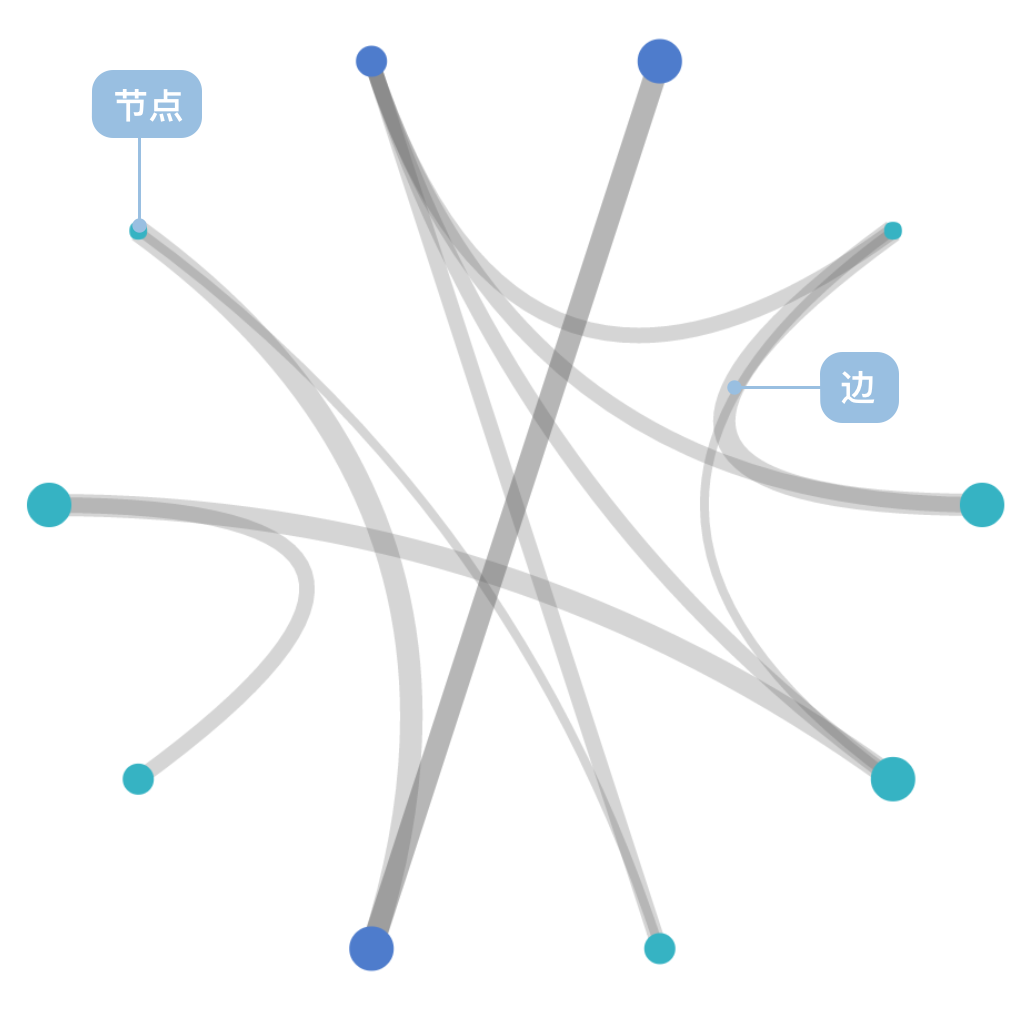 | Chart Type | Circular Arc Diagram |
| ---------------------- | -------------------------------------------------------------------------------------------------------------------------------------------------------------------------------------------------------------------------------------------------------------------------------------------------------------------- |
| Suitable Data | List: A set of node data (containing node id field), a set of link data (containing source node field and target node field) |
| Function | Represents linking relationships between data |
| Data-to-Visual Mapping | Node coordinates (automatically calculated) field mapped to node position on coordinate axis
| Chart Type | Circular Arc Diagram |
| ---------------------- | -------------------------------------------------------------------------------------------------------------------------------------------------------------------------------------------------------------------------------------------------------------------------------------------------------------------- |
| Suitable Data | List: A set of node data (containing node id field), a set of link data (containing source node field and target node field) |
| Function | Represents linking relationships between data |
| Data-to-Visual Mapping | Node coordinates (automatically calculated) field mapped to node position on coordinate axis
Link coordinates (automatically calculated) mapped to Bézier curve vertex coordinate axis position with circle center as control point
Categorical data in nodes can also be color-coded for enhanced distinction |
| Suitable Data Volume | No less than 5 node data entries |
## Use Cases of Arc Diagrams
### Suitable Use Cases
Example 1: **Expressing relationships between data and the importance of relationships**
The network shown below represents character relationships in Victor Hugo's classic novel "Les Misérables".
**Node Data**:
| name | group | id |
| ------ | ----- | --- |
| Myriel | 1 | 0 |
| ... | ... | ... |
**Link Data**:
| source | target | value |
| ------ | ------ | ----- |
| 1 | 0 | 1 |
| ... | ... | ... |
```ts
import { Chart } from '@antv/g2';
const colors = [
'#ff7875',
'#ffa940',
'#fadb14',
'#73d13d',
'#40a9ff',
'#b37feb',
'#ff85c0',
'#ffc069',
'#95de64',
];
const chart = new Chart({
container: 'container',
theme: 'classic',
});
chart.options({
type: 'view',
autoFit: true,
data: {
type: 'fetch',
value:
'https://gw.alipayobjects.com/os/antvdemo/assets/data/relationship.json',
transform: [
{
type: 'custom',
callback: (data) => {
const { nodes, links } = data;
const arcData = [];
links.forEach((link) => {
const sourceId = parseInt(link.source);
const targetId = parseInt(link.target);
const sourceIndex = nodes.findIndex((n) => n.id === sourceId);
const targetIndex = nodes.findIndex((n) => n.id === targetId);
if (sourceIndex !== -1 && targetIndex !== -1) {
const sourceX = sourceIndex * 15 + 50;
const targetX = targetIndex * 15 + 50;
const distance = Math.abs(targetX - sourceX);
const arcHeight = Math.min(150, distance * 0.1);
for (let i = 0; i <= 15; i++) {
const t = i / 15;
const x = sourceX + (targetX - sourceX) * t;
const y = 600 - arcHeight * Math.sin(Math.PI * t);
arcData.push({
x: x,
y: y,
linkId: `${sourceId}-${targetId}`,
sourceName: nodes[sourceIndex].label,
targetName: nodes[targetIndex].label,
type: 'link',
});
}
}
});
const nodeData = nodes.map((node, i) => ({
name: node.label,
group: node.modularity_class,
size: node.size,
displaySize: Math.sqrt(node.size) * 4,
x: i * 15 + 50,
y: 600,
type: 'node',
}));
return [...arcData, ...nodeData];
},
},
],
},
children: [
{
type: 'line',
data: {
transform: [{ type: 'filter', callback: (d) => d.type === 'link' }],
},
encode: { x: 'x', y: 'y', series: 'linkId' },
style: { stroke: '#1890ff', strokeWidth: 0.8, strokeOpacity: 0.4 },
},
{
type: 'point',
data: {
transform: [{ type: 'filter', callback: (d) => d.type === 'node' }],
},
encode: { x: 'x', y: 'y', color: 'group' },
scale: {
color: {
type: 'ordinal',
range: colors,
},
},
style: {
r: 4,
fill: (d) => colors[parseInt(d.group)] || '#40a9ff',
stroke: 'none',
fillOpacity: 0.8,
},
},
],
});
chart.render();
```
**Description**:
- The `group` field uses `color` to distinguish different node types
- The `value` field uses `arc thickness` to represent relationship strength
Example 2: **Circular layout for displaying complex relationship networks**
Using a polar coordinate system, the data from Example 1 can be rendered as a circular arc diagram, which is more suitable for displaying network data with large numbers of nodes and complex relationships.
```ts
import { Chart } from '@antv/g2';
const colors = [
'#ff7875',
'#ffa940',
'#fadb14',
'#73d13d',
'#40a9ff',
'#b37feb',
'#ff85c0',
'#ffc069',
'#95de64',
];
const chart = new Chart({
container: 'container',
theme: 'classic',
width: 600,
height: 600,
});
const nodeFilter = {
transform: [{ type: 'filter', callback: (d) => d.type === 'node' }],
};
chart.options({
type: 'view',
autoFit: true,
data: {
type: 'fetch',
value:
'https://gw.alipayobjects.com/os/antvdemo/assets/data/relationship.json',
transform: [
{
type: 'custom',
callback: (data) => {
const { nodes, links } = data;
const centerX = 300;
const centerY = 300;
const radius = 200;
const nodeCount = nodes.length;
const nodePositions = nodes.map((node, i) => {
const angle = (i / nodeCount) * 2 * Math.PI - Math.PI / 2;
const x = centerX + radius * Math.cos(angle);
const y = centerY + radius * Math.sin(angle);
return {
...node,
x,
y,
angle,
index: i,
};
});
const arcData = [];
links.forEach((link) => {
const sourceId = parseInt(link.source);
const targetId = parseInt(link.target);
const sourceNode = nodePositions.find((n) => n.id === sourceId);
const targetNode = nodePositions.find((n) => n.id === targetId);
if (sourceNode && targetNode) {
const steps = 20;
for (let i = 0; i <= steps; i++) {
const t = i / steps;
const x =
Math.pow(1 - t, 2) * sourceNode.x +
2 * (1 - t) * t * centerX +
Math.pow(t, 2) * targetNode.x;
const y =
Math.pow(1 - t, 2) * sourceNode.y +
2 * (1 - t) * t * centerY +
Math.pow(t, 2) * targetNode.y;
arcData.push({
x,
y,
linkId: `${sourceId}-${targetId}`,
sourceName: sourceNode.label,
targetName: targetNode.label,
type: 'link',
});
}
}
});
const nodeData = nodePositions.map((node) => ({
name: node.label,
group: node.modularity_class,
size: node.size,
displaySize: Math.sqrt(node.size) * 4,
x: node.x,
y: node.y,
type: 'node',
}));
return [...arcData, ...nodeData];
},
},
],
},
children: [
{
type: 'line',
data: {
transform: [{ type: 'filter', callback: (d) => d.type === 'link' }],
},
encode: { x: 'x', y: 'y', series: 'linkId' },
style: {
stroke: '#1890ff',
strokeWidth: 1.2,
strokeOpacity: 0.3,
lineCap: 'round',
},
},
{
type: 'point',
data: nodeFilter,
encode: { x: 'x', y: 'y', color: 'group' },
scale: {
color: {
type: 'ordinal',
range: colors,
},
},
style: {
r: 6,
fill: (d) => colors[parseInt(d.group)] || '#40a9ff',
stroke: '#fff',
strokeWidth: 2,
fillOpacity: 0.9,
},
},
{
type: 'text',
data: nodeFilter,
encode: { x: 'x', y: 'y', text: 'name' },
style: {
textAlign: 'center',
textBaseline: 'middle',
fontSize: 10,
fill: '#333',
fontWeight: 'bold',
dy: -15,
},
},
],
});
chart.render();
```
### Unsuitable Use Cases
Example 1: **Not suitable for representing hierarchical structures**
Arc diagrams use linear or circular one-dimensional layouts and cannot effectively express hierarchical relationships in data. For data with obvious hierarchical structures, tree diagrams or organizational charts are more appropriate.
Example 2: **Not suitable for handling too many nodes**
When there are too many nodes, arc diagrams become crowded and difficult to read, with serious line overlap affecting readability. In such cases, force-directed graphs or other network graph layouts should be considered.
## Comparing Arc Diagrams to Other Charts
### Arc Diagrams and [Chord Charts](/en/charts/chord/)
- Arc diagrams use standard linear layout for nodes, where node weights determine node size but do not affect position
- Arc diagram connections can use weights to control line width, with uniform thickness
- Arc diagram connections are drawn overlapping on top of nodes
- Chord charts use weight-based linear layout for nodes, where node weights determine both node size and position
- Chord chart connections use source and target weights to control line width, with non-uniform thickness
- In chord charts, node width equals the sum of connection widths, with connections laid out flat at nodes without overlap
### Arc Diagrams and [Sankey Diagrams](/en/charts/sankey/)
- Arc diagrams are primarily used to represent relational connections between nodes, without expressing flow or data direction
- Sankey diagrams are specifically used to represent data flow, where connection width represents flow volume with clear directionality
- Arc diagrams use curved connections that are visually more elegant
- Sankey diagrams use straight or curved connections that more intuitively express directional relationships
## Similar Charts
- [Chord Charts](/en/charts/chord/) - Used to represent relationships and flows between multiple entities
- [Sankey Diagrams](/en/charts/sankey/) - Used to represent data flows and energy transfers
- [Network Graphs](/en/manual/extra-topics/graph/force-graph/) - Used to represent complex network relationship structures
## Similar Charts
[Interactive content]()
## Categories
[Interactive content]()